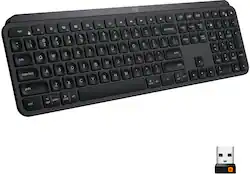
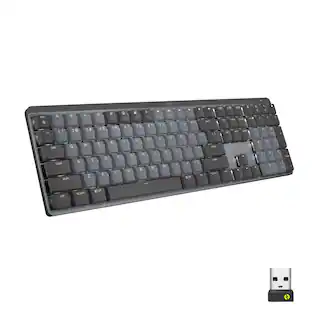
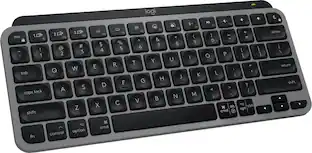
Logitech - MX Keys Advanced Full-size Wireless Scissor Keyboard for PC and Mac with Backlit keys - Black
- Key Specs
- Lighting Type: Single color
- Form Factor: Full-size (The size, arrangement, and physical configuration of the product.)
- Keyboard Technology: Scissor (Type of technology that detects a key press.)
- Connection Type: Wireless
- General
- Brand: Logitech
- Model Number: 920-009295
- Product Name: MX Keys Advanced Full-size Wireless Scissor Keyboard for PC and Mac with Backlit keys
- Color: Black
- Features
- Lighting Type: Single color
- Customizable Lighting: false
- Numeric Keypad: true
- Touchpad: false
- Palm Rest: false
- Spill Resistant: false (Designed to resist some degree of accidental liquid spill. The level of spill-resistance is indicated by the product manufacturer, but the degree of protection may not be guaranteed after normal wear of the product.)
- Keyboard Features: Spherically-dished keys, Smart illumination, Advanced key customization
- Foldable: false
- Keycap Material: ABS
- Functions
- Form Factor: Full-size (The size, arrangement, and physical configuration of the product.)
- Keyboard Technology: Scissor (Type of technology that detects a key press.)
- Dedicated Macro Keys: false (Perform shortcuts of key sequences to carry out commands with a single key. Key sequences may include key strokes, mouse actions, and/or menu actions.)
- Adjustable Tilt Function: false
- Multimedia Keys: true
- Internet Keys: false
- Number Of Programmable Keys: 0
- Connectivity
- Connection Type: Wireless
- Wireless Connectivity: Radio Frequency (RF), Bluetooth (The manner in which a device sends data to another device over a short distance without the use of wires or cables.)
- Maximum Wireless Range: 33 feet
- Number Of USB Port(s): 1 (The total number of USB ports including all generations and versions.)
- Number of Devices Connectable Simultaneously: 3
- Compatibility
- Operating System Compatibility: Android, Apple iOS, Linux, Mac, Windows
- Plug and Play Operation: true
- System Requirements: Windows 10, 11 or later, Linux, Chrome OS, macOS, iPadOS, Android (The software that a product must have for it to be able to integrate with another product.)
- Power
- Rechargeable Battery: true
- Battery Chemistry: Lithium
- Batteries Included: true (Indicates whether the product comes with the required batteries for its operation.)
- On/Off Switch: true
- Dimensions
- Product Height: 0.81 inches (The out of box height of the item. Height is measured as the vertical distance from the bottom of the item to the top as it would be primarily used or placed.)
- Product Width: 16.94 inches (The out of box width of the item. Width is measured as the horizontal distance from one side of the item to the other as it would be primarily used or placed.)
- Product Depth: 5.18 inches (The out of box depth of the item. Depth is measured as the distance from the front of the item to the back as it would be primarily used or placed.)
- Product Weight: 28.57 ounces (The out of box weight of the item.)
- Mouse
- Mouse Included: false
- Warranty
- Warranty - Parts: 1 year
- Warranty - Labor: None
- Other
- UPC: 097855152732
Introducing MX Keys, an advanced wireless illuminated keyboard crafted for efficiency, stability, and precision. Perfect Stroke keys are shaped for your fingertips and increased key stability reduces noise while optimizing responsiveness. Tactile reference for hand positioning makes it easy to stay oriented and in your flow. The backlit keys light up the moment your hands approach, and automatically adjust to suit changing lighting conditions. With MX Keys you can truly master what you make.
- Perfect stroke keys: Spherically-dished keys match the shape of your fingertips, offering satisfying feedback with every tap.
- Smart illumination: Features hand proximity detection and automatic backlighting.
- Wireless technology: Enables reliable connection via the included USB wireless receiver or Bluetooth Low Energy technology.
- Comfort and stability: Type with confidence on a keyboard crafted for comfort, stability, and precision.
- Multidevice and multi-OS compatibility: Compatible with Windows, macOS, Linux, iOS, and Android systems - pair it with up to three devices.
- Flow cross-computer control: Type on multiple computers in one fluid workflow.
- USB-C rechargeable: Full charge lasts up to 10 days - or up to 5 months with backlighting off.
- More sustainable: Uses FSC-certified paper for responsible packaging. Certified carbon neutral: the carbon impact of the product and packaging has been reduced to zero.
Whats Included
- Logitech MX Keys Advanced Wireless Illuminated Keyboard
- USB-C charging cable (USB-A to USB-C)
- Unifying receiver
- User documentation
A: There is a numbers lock key, it is located above the number 7 on the number keypad and is labeled Clear / lock symbol. In addition I discovered that the opt/ start button located below the Z on the main keyboard serves as the Windows button. Hope this helps,
A: I have never turned mine off. It goes into a sleep mode, and I haven't noticed any battery life hits. I charge mine every two weeks as a matter of habit.
Q: Are the rechargeable batteries removable?
A: no, they are built in and not replaceable. It charges really fast, I think a 15min charge will give you a few hours of use. but you can also use it while charging from USB-C so no downtime from work.
A: That's the power level indicator. Green is regular level, red means it needs to be charged, the rest of the time during use, it shouldn't illuminate at all. If you're using the Logitech Options software, it should tell you the power level as well.
A: No it does not require a USB connector. I have mine connected via Bluetooth.
A: The connection with the USB cable is for charging. The first connection uses the Logitech Unifying USB plug and is wireless. Connections 2 & 3 are for Bluetooth and will need a computer with Bluetooth or a Bluetooth adapter to connect.
A: No. It comes with a decent charge right out of the box.
A: no the angle of the keyboard isn't adjustable at all - that top piece isn't removable
People also viewed
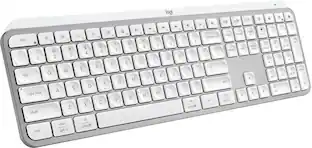 $119.99The price was $129.99
 Top Deal$39.99The price was $59.99
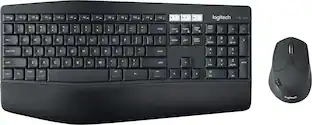 Top Deal$89.99The price was $99.99
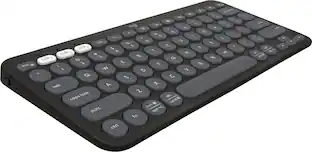 $33.99The price was $39.99
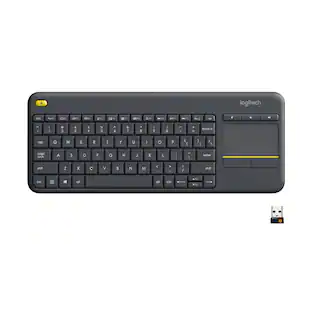 $27.99The price was $34.99

Today's top picks
 $299.99The price was $499.99
 $699.99The price was $999.99
 $1,099.99The price was $1,599.99
 $529.99The price was $749.99
 $999.99The price was $1,599.99
 $1,099.99The price was $1,299.99
 $1,199.99The price was $1,299.99
 $1,099.99The price was $1,649.99