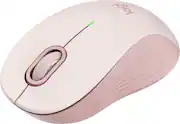
Logitech - Signature M550 Wireless Bluetooth Optical Ambidextrous Mouse with Silent Clicks - Wireless - Rose
Customers are saying
Customers are positive about the overall performance, ease of setup, and ergonomic design of this mouse, which many users find perfectly sized for their hands. They also appreciate the reliable connectivity, long battery life, and the quiet nature of the primary clicks. While most feedback is favorable, some users expressed minor concerns regarding the noise level of the scroll wheel and side buttons, as well as the lightweight feel and price point of the device.
Color
RoseScroll smarter
With Logitech Signature M550 Wireless Mouse you get line-by-line precision for documents and super-fast scrolling for long web pages; simply switch modes with a flick of the SmartWheel.
The optimal fit for your hand
This comfortable mouse is designed for small-to-medium sized hands, for the optimal fit.
Upgrade your comfort
Upgrade your comfort: This work mouse provides long hours of comfort thanks to a contoured shape, soft thumb area, and rubber side grips that keep your hand snug and in place.
Connect the way you like
Connect the way you like: Connect this cordless computer mouse in an instant via Bluetooth Low Energy or Logi Bolt USB receiver.
Less noise, more focus
Whether working at the office or at home, Logitech Signature M550 is a quiet mouse, allowing you to enjoy 90 percent less click noise with SilentTouch technology. ¹
24 month battery life
Work for up to 2 years on the single AA battery that comes with your multi-device mouse. ³
Works on multiple platforms
Experience seamless compatibility with Windows, macOS, Linux, Chrome OS, ipadOS, and Android operating systems with Logitech Signature 550 wireless Bluetooth mouse.
Made with recycled plastic
Plastic parts in Signature M550 include certified post-consumer recycled plastic (Graphite: 65% Off-White/Rose plastics: 26%). ³
- Lighting TypeNoneMaximum Sensitivity4000 dots per inchNumber of Buttons (Total)3Connection TypeWireless
Reviews
Rating 4.8 out of 5 stars with 2483 reviews
- Overall Performance (473)
- Ease of use (379)
- Size (266)
- Ergonomics (206)
- Connectivity (178)
- Side Buttons (20)
- Scroll Wheel (10)
- Price (7)
- Weight (6)
Customer Images
The vast majority of our reviews come from verified purchases. Reviews from customers may include My Best Buy members, employees, and Tech Insider Network members (as tagged). Select reviewers may receive discounted products, promotional considerations or entries into drawings for honest, helpful reviews.
Compare similar products

Upgrade to smarter scrolling and more productivity with a mouse comfort-fit for your hand size and preference. You’ll work faster than ever before thanks to SmartWheel scrolling, silent clicks, and a contoured comfort design. Smartwheel Scrolling provides line-by-line precision for documents – and super fast scrolling for long web pages. Choose the right design for you – whether you have smaller or larger hands – and work long hours in comfort thanks to the computer and laptop mouse's contoured shape and soft-to-the-touch thumb area. Connect instantly via Bluetooth or Logi Bolt USB receiver. Work in peace and quiet thanks to 90% less click noise and Logitech SilentTouch technology. Plus, work for up to 2 years on the included AA battery so you never have to worry about recharging your mouse.

Upgrade to smarter scrolling, better comfort, and more productivity with the Signature M650 L wireless computer mouse. The versatile Logitech bluetooth mouse features an adaptive scroll SmartWheel that delivers line-by-line precision and auto-switches to super fast free spin mode with the flick of a finger. A choice of sizes for smaller, larger and left hands means there's a cordless mouse for anyone. With seamless wireless connectivity, Bluetooth options, customizable side buttons, and a comfortable shape, this wireless mouse keeps you productive and comfortable hour after hour. Logitech’s SilentTouch technology delivers silent clicks to keep you focused – while 24-month battery life and universal operating system compatibility ensure hassle-free performance. Battery life may vary based on user and computing conditions.

Upgrade to smarter scrolling, better comfort, and more productivity with the Signature M650. The versatile mouse features an adaptive scroll SmartWheel that delivers line-by-line precision, and auto-switches to super-fast free spin mode with the flick of a finger. A choice of sizes for smaller, larger and left hands means there's a perfect fit for anyone. Seamless wireless connectivity, customizable side buttons, and a comfort shape keep you comfortably and productive hour after hour. Logitech’s SilentTouch technology delivers silent clicks to keep you focused – while the up to 24-month battery life and universal operating system compatibility ensure hassle-free performance.

With the same click feel and 90% noise reduction compared to Logitech M170 classic mice, M220 SILENT offers a quiet experience for yourself and those around you. It has a long-lasting up to 18-month battery life with auto-sleep and a powerful 33 ft wireless range with 128-bit encryption between the mouse and the receiver. Plus, its small size is perfect to toss in a bag and go. Just plug the tiny USB receiver and it works with Windows, Mac, Chrome OS or Linux. Finally, the Logitech Advanced Optical Tracking is designed for smooth and precise moves on almost any surface.
| Pros for Logitech - Signature M550 Wireless Bluetooth Optical Ambidextrous Mouse with Silent Clicks - Wireless - Rose | |||
|---|---|---|---|
| Overall Performance, Ease of use, Size, Ergonomics, Connectivity | There were no pros for this product— | Ease of use, Overall Performance, Size, Ergonomics, Silent Clicks | Ease of use, Overall Performance, Size, Noise Level, Color |
| Cons for Logitech - Signature M550 Wireless Bluetooth Optical Ambidextrous Mouse with Silent Clicks - Wireless - Rose | |||
| Side Buttons, Scroll Wheel, Price, Weight | There were no cons for this product— | Price, Side Buttons, Scroll Wheel, Click Noise | There were no cons for this product— |


![F1, esc, !, -, 1, tab, caps lock, shift, F2, @, 2, Q, A, F3, Q, #, 3, W, S, Z, F4, $4, E, D, X, F5, %, 5, R, F, C, F6, 44, A, 6, T, G, V, F7, HI &, 7, Y, H, logi, F8, FO, 4, *, (, 8, 9, U, I, J, K, M, N, FI0, 0, O, L, <, -, alt, page up, page down, end, down, delete, home, 1, P, [, ] 5, 5, 4, ., -, enter, :, 1, 3, enter, I, 2, 1, Pg up, [, ] 5, 5, 4, ., -, enter, ?, >, /, 0, del, a, 4, ins, e, ctrl, *, fn, ctrl, fn, alt, logi.](https://pisces.bbystatic.com/image2/BestBuy_US/images/products/6536/6536551_sd.jpg;maxHeight=232;maxWidth=233?format=webp)
![Sure, here is the corrected and grouped text from the image:
---
**Top Row:**
- Esc
- F1 F2 F3 F4 F5 F6 F7 F8 F9 F10 F11 F12
**Second Row:**
- 1 ! 2 @ 3 # 4 $ 5 % 6 ^ 7 & 8 * 9 ( 0 ) - _ + =
**Third Row:**
- Tab Q W E R T Y U I O P [ { ] } \
**Fourth Row:**
- Caps Lock A S D F G H J K L ; ' Enter
**Fifth Row:**
- Shift Z X C V B N M , . / Shift
**Function Keys:**
- F1 F2 F3 F4 F5 F6 F7 F8 F9 F10 F11 F12
**Right Side:**
- Insert Home Page Up Delete End Page Down
**Bottom Row:**
- Ctrl Alt Spacebar Alt Ctrl
**Additional Keys:**
- Logi
- Scroll Lock
- Pause Break
---
This should match the layout of the keyboard in the image.](https://pisces.bbystatic.com/image2/BestBuy_US/images/products/0ce0f170-380c-41e4-8d6a-fa0aadbd534c.jpg;maxHeight=232;maxWidth=233?format=webp)
![esc ! - 1 tab caps lock shift ctrl F2 F3 # 2 3 Q W E R T Y U I O P A S D F G H J K L Z X C V B N M start opt alt cmd logi 44 HI . F10 F8 F7 F6 * ( ) - - & 0 8 9 7 O P U I Y K L H J > < N M B F + = { [ : I : ? I alt cmd 2 30 3 1 FQ page insert home up backspace page 1 delete end down ) ] / I I & shift ctrl fn opt 6 / + / clear 8 9 + 7 & P9 up home 5 6 4 a 4 2 3 enter 1 dn pg end = 0 del ins](https://pisces.bbystatic.com/image2/BestBuy_US/images/products/6539/6539508_sd.jpg;maxHeight=232;maxWidth=233?format=webp)
![esc 1 ! 2 @ 3 # 4 $ 5 % 6 ^ 7 & 8 * 9 ( 0 ) - = + tab Q W E R T Y U I O P [ { ] } | caps A S D F G H J K L ; : " enter shift Z X C V B N M , < > ? shift ctrl alt fn ctrl](https://pisces.bbystatic.com/image2/BestBuy_US/images/products/f4530ec5-6fbf-4ff0-a67d-1967e6381b1c.jpg;maxHeight=232;maxWidth=233?format=webp)


![logi esc 1 F1 2 F2 3 F3 F4 F5 F6 F7 F8 x F9 NI F10 x F11 F12 ins del ~ ! 1 2 # 3 $ 4 % 5 ^ 6 & 7 8 ( 9 ) 0 e - + = backspace tab Q W E R T Y U I O P { [ } ] I / caps lock A S D F G H J - K L : ; " enter shift Z X C V B N M < > ? / shift ctrl fn L start opt H alt cmd alt cmd ctrl opt](https://pisces.bbystatic.com/image2/BestBuy_US/images/products/6478/6478163_sd.jpg;maxHeight=232;maxWidth=233?format=webp)


