I am a member of Best Buy’s Technical Insider Network, TIN for short. Reviewers in this invitation-only program are provided products for the purpose of writing honest, unbiased reviews.
Lyric’s phone app and full user’s manual was not available at time of this review.
Initial Impressions:
This is a powerful massager. I have owned multiple massagers over the years that were one trick ponies. In short, they were all vibrating objects of various shapes and sizes whose goal was to magically relax sore muscles. At most, they made my voice all cool sounding when applied to my chest. Otherwise, they were all worthless. The Lyric is something different. The head oscillates like in a steady back and forth pattern instead of the random omni-directional vibrating heads of other motorized massagers. The oscillating head is very powerful. It comes with tips that will allow you to customize how best to target your sore spots and muscle groups. There is a handle that attaches to and extends the reach of the Lyric. The LCD touch screen is large, easy to read, and is easy to navigate. There are not lot of screens so it should not take long to try out all the features.
My first use of the Lyric was a bit of an adventure. Eh, it did not work out so well. I was not expecting the oscillations to be so powerful. In the end failed to respect how powerful of the massager this is and ended up bruising my shoulder. It took a few attempts to figure out how best to hold it, where to place the massager tip, which tick to use, and how much pressure to apply to my body part so the massager would massage and not punch me at high speed. My recommendation is that you practice this on the setting “Level” at level 1 speed using the soft tip until you have a good idea how to handle your Lyric. My outcomes became much better after a little experience with how to hold the unit, placement, and working with the pre-programmed therapies.
Setup:
Setup is straight forward. Turn on your phone, turn on the Lyric, follow the Lyric’s onscreen instructions. If you reset the Lyric, then you will be walked through the Wi-Fi setup again and again and again. Why is it so easy to reset the Lyric. The UI developers at Lyric decided to include the Rest button as one of the four guided massage options. In my opinion, the rest button should have been one of the last screens you can swipe to on the top-level menu screens.
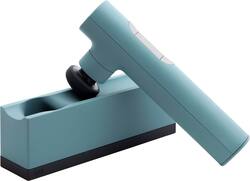
The Lyric has two charging options. You can plug the USB cable directly into the handle or you can charge the Lyric via the included charging base. Both methods use the same USB A/B to USB C cable. The base also houses three of the of four massager heads. The default Dome head is designed to be stored attached to the Lyric. In my opinion, this is a compact and efficient design.
The extension handle has a smooth rubberized like coating. The extension handle slides into bottom of the Lyric and is held in place by a rubberized compression seal. The connection has a slight wobble which may lead you to believe the Lyric will just fall off the extension handle. It won’t. The fit is very tight. I had the lyric upside down massaging my back while I held the extension handle over my shoulder. It also took a good tug using both hands to separate the handle from the massager.
Power:
As mentioned earlier, this is a powerful massager. You will hurt yourself if you do not treat the Lyric, or your body, with respect. There are three guided massage settings: Pain Relief, Calm, and Energy. These are pre-programmed therapies that target specific pressure points on your body. The massage head vibrates for about 20 seconds at each pressure point. The power to the massage head may start slow, ramp up to fast, and then slow again but with more powerful hits than when the session began. For example, one of the pressure points is the back of my hand just under my thumb. It took a few practices tries to find the correct position for my hand so that the Lyric would not simply punch me in the back of the hand. Placing my hand on a table caused the Lyric to punch the palm of hand on the table. For me, the best position was to hold my hand in the air and apply pressure to the massager heard with the back of my hand.
Attachments:
From Lyric’s website. The four attachments are as follows:
Cone: Intended for more sensitive areas and for acupressure treatments.
Dome: Recommended for larger areas of the body.
Thumb: Can be applied to trigger points or used for deeper tissue penetration.
Double: This two-pronged design enables a “double tap” to target both muscle and tissue.
I need specific directions on how and when to use the Double.
The Cone and Dome are the two I use the most. The Cone comes to a point but is softer than the other attachments. I use this mostly for targeting specific sore spots or areas where I feel the other attachments are too hard.
The Dome is broad and covers a wide area. This is the default attachment. This is good when moving the Lyric over a large muscle or area of your body. However, you still need to be careful because if you use this incorrectly it turns into a giant battering ram for a muscle or joint.
I used the Thumb a few times. Mostly on some stubborn knots in the arch of my foot. As much as I wanted to punish the nasty little knot, I found that the Cone was a better fit. Otherwise, I did not find a good use for the Thumb.
Guided therapy:
There are three guided therapies: Pain Relief, Calm, and Energy. Maybe there will be more when Lyric launches its app. There is little introduction or instruction for these therapies. The touch screen LCD will walk you through the placements of the massager head for each one of these therapies. I recommend that you start with the default Dome massager head until you get more comfortable with each therapy. If you find the Dome still too hard then go with the Cone. The Cone is the most forgiving of the four heads.
For example, the Pain Relief Therapy is a three-minute therapy consisting of eight twenty second sessions: massage of right/left inside thumb, right/left inside pinky, traps (top of shoulder), and right/left inside ankle. The LCD will give you an image of your right hand, palm side down, with a dot where the massage head should rest. The guide will show a graphic of the next massage point when it finishes with the previous one. Text on the screen will also state what the point is. You have three seconds to place the massage head between massage points. This will take some practice to get right. It took me a few tries to figure out exactly how to massage the inside of my thumbs before I got it right. First time the Lyric punched my hand. The second time I had better results. The third time I rested my hand palm down on a table. That was a very bad idea because the Lyric simply punched the palm of my hand into the table. This is an area where better instruction would be very helpful. As mentioned earlier, the best position for me was holding my hand in the air.
The LCD is very sensitive. If you touch the LCD screen with any part of your hand while transitioning to another part of your body the massager pauses. This is not a big deal with the guided therapy. It could be a very big deal when engaging in a mode called Level. This is essentially free hand mode. Using the trigger button, you can set the intensity level from 1 to 4. Four being the most powerful, fastest oscillation. This is not an issue if I am using the extension to reach hard to reach places. However, if I am targeting an easy to reach muscle group, such as my hip, then it is very likely I will brush the LCD screen and pause my massage session. In these instances, I had to put fabric between the LCD touch screen and my hand to prevent any interruption in the massage session. I am not sure if there is a software solution here. At least I can solve the problem using other methods.
Final thoughts:
If you are ready to give up on the vibrating massagers and ready for something a little more targeted, then you might like the Lyric. It has a very powerful motor, multiple tips, and an extension arm that allows you to massage those hard-to-reach places. The batter lasts a good long time. Charging is easy. And the multiple tips cover a variety of applications. I cannot stress enough how much this can hurt you if you do not respect it. Be smart and you will get a lot of great use out of the Lyric.