Deals Worth GiftingShop now

Main Content

Mesh WiFi System (1 eero + 1 eero Beacon), 2nd Generation - White

Model: M010201
SKU: 10891767
$139.97
Save $159.00
Comp. Value: $299.00
or
Finance OptionsView your offers
Availability
Fulfillment Options

FREE shipping to

Sold & shipped by
Tech For Less
(22)

Highlights

  • Key Specs
    • Wi-Fi Mesh System: true (A single wireless network consisting of a main router (connected directly to a modem) that connects to a series of satellite modules or nodes placed around the home. Routers with this capability promote stronger, faster wireless signals as well as increase Wi-Fi coverage by reducing interference and eliminating dead zones.)
    • Number of Wi-Fi Satellites Included: 3 (Quantity of Wi-Fi satellite modules/nodes for a Wi-Fi Mesh System that come with the product.)
    • Number Of LAN Ports: 2 (Number of devices able to be connected to the Local Area Network (LAN). LAN ports allow wired connections to other networking devices (wireless access points, range extenders, etc.) in order to share the internet connection received through a WAN port.)
    • Wi-Fi Speed: 2200 gigabits per second (The maximum rate at which data is transferred between a network device and wireless router.)
  • General
    • Brand: eero
    • Model Number: M010201
    • Product Name: Mesh WiFi System (1 eero + 1 eero Beacon), 2nd Generation
    • Color: White
  • Security
    • Data Encryption: true
    • Encryption Type: WPA2 (The security protocols or certification programs that protect the Wi-Fi network.)
    • Firewall Type: NAT (The method the firewall uses to filter and process data to increase network security, primarily by blocking malicious traffic requests while allowing legitimate traffic through.)
    • Security Features: WPA2 encryption, Family Profiles
    • Parental Controls: true (Allows user to block unwanted content, signals, channels, networks, etc. from being received or accessed.)
  • Network
    • Band Technology: Tri (Refers to the number of frequency bands used to wirelessly transmit an internet signal. For example, dual-band devices may use one 2.4 and one 5 GHz band, while tri-band devices may use one 2.4 and two 5 GHz bands. Multiple bands also provide more flexibility for designating connected devices to specific band use.)
    • Ethernet Standard: 10/100/1000 (Each standard is a variation of the IEEE 802.3 set of computer networking technologies known as Ethernet. New versions evolved to include higher bandwidth, different physical media, and other new and improved features. Standards are often denoted by speeds (in Megabits per second). For example, a 10/100/1000 Ethernet port transmits at 10 Mbps, 100 Mbps, and 1000 Mbps (1 Gbps).)
    • Frequency Band: 2.4 GHz, 5.0 GHz (Bands may be grouped into categories such as low- and high-band VHF (Very High Frequency), low- and high-band UHF (Ultra High Frequency), or certain frequency channels (measured in MHz or GHz). Generally, higher frequencies transmit information faster but have shorter range than lower frequencies.)
    • Wireless Networking Standard: Wi-Fi 5 (The wireless networking standard used by the device. Each iteration of the standard developed by the Wi-Fi Alliance corresponds to an existing IEEE 802.11 protocol; for example, standard 802.11ac (or AC) is termed Wi-Fi 5. Refers specifically to the standard the device is designed to use, but ultimately determines product interoperability and backward compatibility including previous versions.)
    • Wireless Standard: AC, N (The wireless networking protocol used by the device. Each iteration of the protocol is based on the 802.11 standard developed by the Institute of Electrical and Electronics Engineers (IEEE) Standards Association. Denoted by letters following 802.11 (802.11a, 802.11ac, etc.), each version, published in alphabetical order, encompasses all previous versions.)
    • Number of 2.4Ghz Streams: 1 (A router's streams are like lanes on a highway. The more streams a router has, the less traffic congestion. Because the 2.4 GHz band is used to transmit wireless signals to a wide variety of devices, there is often high amounts of traffic on that stream. But with multiple streams, each can be designated to a specific device for optimal performance. For example, if one 2.4 GHz stream is assigned to one device, such as a desktop computer, it leaves the remaining streams open for guest users, devices that use more data, or devices with specific band compatibility.)
    • Number of 5.0Ghz Streams: 1 (A router's streams are like lanes on a highway. The more streams a router has, the less traffic congestion. The 5.0 GHz band provides high speed, short-range data transmission and typically has less traffic than the 2.4 GHz band. With multiple streams, each can be designated to a specific device for optimal performance. For example, if one 5.0 GHz stream is assigned to one device, such as a streaming media player, it leaves the remaining streams open for guest users, devices that need less data, or devices with specific band compatibility.)
    • Wi-Fi Mesh System: true (A single wireless network consisting of a main router (connected directly to a modem) that connects to a series of satellite modules or nodes placed around the home. Routers with this capability promote stronger, faster wireless signals as well as increase Wi-Fi coverage by reducing interference and eliminating dead zones.)
    • Number of Wi-Fi Satellites Included: 3 (Quantity of Wi-Fi satellite modules/nodes for a Wi-Fi Mesh System that come with the product.)
    • Number of Wi-Fi Satellites Supported: 3 (Maximum quantity of Wi-Fi satellite modules/nodes that are able to be connected to the main router in a Wi-Fi Mesh System.)
    • Wired Backhaul: false (Also known as Ethernet backhaul or backbone, this capability can be enabled to directly wire a secondary router or satellite to the main router via Ethernet cable. This connection allows for faster and more stable data upload.)
  • Certifications Listings & Approvals
    • ENERGY STAR Certified: false (Devices carrying the ENERGY STAR service mark, such as computer products and peripherals, kitchen appliances, and other products, generally use 20% to 30% less energy than required by federal standards.)
  • Features
    • Integrated Modem: false
    • Auto Detecting: true
    • Wireless: true
  • Ports
    • Port Type(s): RJ-45, USB (USB 2.0 connects external drives, gaming controllers, smartphones, MP3 players and other accessories.USB 3.0 transfers data faster than USB 2.0, but only when used with USB 3.0 devices.USB Type-C provides fast speeds and versatile power, featuring connectors with identical ends that plug in upside down or right side up. Adapters allow for video as well as backward compatibility.Thunderbolt provides ultra-high bandwidth for fast data transfer between devices featuring a Thunderbolt or MiniDisplayPort connection.HDMI allows you to connect a projector or display HD media on your HDTV or monitor.Media card slots allow you to transfer photos from your digital camera or camcorder.)
    • Number Of LAN Ports: 2 (Number of devices able to be connected to the Local Area Network (LAN). LAN ports allow wired connections to other networking devices (wireless access points, range extenders, etc.) in order to share the internet connection received through a WAN port.)
  • Speed
    • Wi-Fi Speed: 2200 gigabits per second (The maximum rate at which data is transferred between a network device and wireless router.)
    • Gigabit Ethernet Speed: true (Supports the gigabit Ethernet networking standard, which has a data rate of at least one gigabit per second, or 1,000 Mbps.)
    • Auto Speed Sensing: true
  • Compatibility
    • System Requirements: Supported iOS or Android device, Internet service (with cable or DSL modem, if required) (The software that a product must have for it to be able to integrate with another product.)
    • Bluetooth Enabled: true (The device is capable of communicating with another device via Bluetooth, provided they are within the required range of each other. A Bluetooth-enabled device must also be the same Bluetooth version or higher than the accessory it is intended to pair with.)
  • Dimensions
    • Product Height: 1.5 inches (The out of box height of the item. Height is measured as the vertical distance from the bottom of the item to the top as it would be primarily used or placed.)
    • Product Length: 4.75 inches (The out of box length of the item. Length is measured as the longest dimension of the item.)
    • Product Width: 4.75 inches (The out of box width of the item. Width is measured as the horizontal distance from one side of the item to the other as it would be primarily used or placed.)
    • Product Weight: 1.5 pounds (The out of box weight of the item.)
  • Warranty
    • Warranty - Parts: 1 year
    • Warranty - Labor: 1 year
  • Other
    • UPC: 852582006242

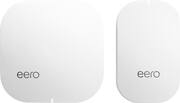
The eero Home WiFi System (1 eero + 1 eero Beacon) is perfect for 1-2 bedroom homes. eero works as the hub of your WiFi system, and with two Ethernet ports and tri-band technology, eero connects wired or wirelessly so you can do more in every corner of your home. eero Beacons plug directly into any outlet to expand coverage in your home on a single network - perfect for hallways, kitchens, and basements. They even come with a nightlight. And with eero's app, you can set up your system in under 10 minutes, share your network with guests, and manage family screen time from anywhere.

Find the perfect Wi-Fi solution

  • Replace your router in under 10 minutes: The app guides you through setup and placement. eeros automatically connect to create a wireless mesh network.
  • World-class security: eero utilizes automatic software updates to keep customer networks protected against today's latest threats. You can rest assured knowing your system is always kept safe and secure without having to even lift a finger.
  • Entertainment-grade WiFi for the entire family: With its incredibly low latency and coverage, you can stream, game, work, and play from every corner of your home - and from the backyard, too. eero won't break a sweat.
  • Intelligent software: eero's TrueMesh consistently finds the best route for your network traffic, quickly switching paths to avoid any interference.
  • Stays new, gets better: Get regular and automatic software updates with new features, improved performance, and advanced security enhancements without doing a thing. eero can cover any home, no matter the size or layout.
  • Covers any home: Customize or expand your WiFi by adding as many eeros and eero Beacons as you need. eero can also use Ethernet wiring in any combination. That means eero can cover any home, no matter the size or layout.
  • Easy-to-use app: With the eero app you can check network status, connected devices, and run speed tests from the app dashboard.
  • Parental controls: Easily create profiles to set schedules and pause the internet on your kids devices. You can even pause the Internet with an Alexa command.
  • Replace your router in under 10 minutes: The app guides you through setup and placement. eeros automatically connect to create a wireless mesh network.
  • World-class security: eero utilizes automatic software updates to keep customer networks protected against today's latest threats. You can rest assured knowing your system is always kept safe and secure without having to even lift a finger.
  • Entertainment-grade WiFi for the entire family: With its incredibly low latency and coverage, you can stream, game, work, and play from every corner of your home - and from the backyard, too. eero won't break a sweat.
  • Intelligent software: eero's TrueMesh consistently finds the best route for your network traffic, quickly switching paths to avoid any interference.
  • Stays new, gets better: Get regular and automatic software updates with new features, improved performance, and advanced security enhancements without doing a thing. eero can cover any home, no matter the size or layout.
  • Covers any home: Customize or expand your WiFi by adding as many eeros and eero Beacons as you need. eero can also use Ethernet wiring in any combination. That means eero can cover any home, no matter the size or layout.
  • Easy-to-use app: With the eero app you can check network status, connected devices, and run speed tests from the app dashboard.
  • Parental controls: Easily create profiles to set schedules and pause the internet on your kids devices. You can even pause the Internet with an Alexa command.
Whats Included
  • eero Home WiFi System (1 eero + 1 eero Beacon), 2nd Generation
  • eero Home WiFi System (1 eero + 1 eero Beacon), 2nd Generation

Q: do I need a beacon at site of router? and if so how much for a 3rd beacon?

A: The eero and eero Beacons are all essentially "routers". You will need one eero close to your modem (it will plug directly into your modem), and then you can spread the beacons out through your home. I think maybe you were asking if you also need a beacon next to your modem, as well? If so, the answer is no...just the full sized eero needs to be there. And to you answer your second question, they sell individual beacons for $149. Sorry if I misunderstood your question, but I hope I helped!

Q: Will the eero transmit the wireless signal to a erro Beacon plugged into another building on my property? It is roughly 75 feet from the internet connection.

A: If your phone can make a connection--even if it is one bar of WiFi, then the Eero can make a connection. With that said, not everything is always 100% reliable and the farther you go the slower the WiFi gets.

Q: My cable provider gives me 120Mbs to the house, but when using wifi that speed diminishes to about 30 - 50 Mbs for the various devices, so what speed to the devices can I expect from Eero? What is impact on the other systems that use separate wifi?

A: I get from my provider 150/150. Before I bought the Eero system I would get sometimes 70/60 or 50/30 through wifi. With the Eero system I have yet to get under 155/158 through wifi. That's right I get more than my provider supplies me. I would highly recommend Eero and in fact my father is buying a new house and will purchasing an Eero system the day he moves in. I will also be recommending to all my friends as well.

Q: will this help the reception on my cell phone

A: Prior to installing eero I could not reveivr texts in my basement and phone service was sketchy. Noe O have no problems.

Q: do I still need to get internet from my cable company

A: Yes you will need to get that from your Internet Service Provider. The EERO is the router and does not provide internet by just plugging in.

Q: Will every work in a house with plaster walls

A: I have an older home (almost 100 years old) with some plaster walls. The performance of wifi with Eero over the old wifi router is amazing. I have a 1600 sq ft home and I went with two beacons because of the walls - just to ensure good coverage. Placement might be key for you. If the signals can't go through the walls, you should try to get a little more "line of sight" type of placement between the Eero components if you can.

Q: Do I change my network to the eero Network on my smart devices or leave them on my Xfinity Network?

A: Definitely move to eero. I don't mind, but it's much slower than what you'll get by plugging eero or any other wireless router into the ethernet port. Then there is a "bridge" setting on xfinity to turn off their wifi. It's a good idea to do that so the signals don't interfere with each other. The eero can distribute wifi to your entier home, and the wifi router built into the xfinity modem is good, but not nearly as good as the eero system. BTW there are two ways to access wifi with an xfinity system. First, there's an open xfinity wifi login that is available with almost any xfinity modem in any home or restaurant. It's purposely kept slow, but it's free to comcast customers. The second xFinity network from your modem is a real wifi router with a separate ID and login. you can turn this one off wity a "bridge" setting. Search your comcast material help materials (online) or call comcast for helping turn this off - it's confusing and useless. And much less coverage than an eero or any other mesh system. However, the built-in wifi from xfinity is good if you have a small house or apartment. You might not need a mesh system. I compared my xFinity wifi router to my older NetGear Nighthawk AC1700 and the Netgear router seemed faster. But the coverage in my large house with AC1700 and extender is not as good as an eero and 2 beacons.

Sponsored

Compare similar products

Mesh WiFi System (1 eero + 1 eero Beacon), 2nd Generation - White

The eero Home WiFi System (1 eero + 1 eero Beacon) is perfect for 1-2 bedroom homes. eero works as the hub of your WiFi system, and with two Ethernet ports and tri-band technology, eero connects wired or wirelessly so you can do more in every corner of your home. eero Beacons plug directly into any outlet to expand coverage in your home on a single network - perfect for hallways, kitchens, and basements. They even come with a nightlight. And with eero's app, you can set up your system in under 10 minutes, share your network with guests, and manage family screen time from anywhere.

Google - Nest Wifi Pro 6e AXE5400 Mesh Router - Snow

Nest Wifi Pro gives you super fast, reliable Wi-Fi 6E coverage for your entire home.₁ It automatically adjusts your network’s performance to keep things running smoothly. It’s so smart it can monitor and diagnose common issues on its own. And it has privacy and security features to help keep you and your family safe.

eero - 6+ Dual-band Mesh Wi-Fi 6 System (3-pack) - White

eero 6+ is our most affordable gigabit system ever. Access premium wifi performance and speeds up to a gigabit, without the premium price tag. eero 6+ gives you all the connectivity, with all the reliability. So you can work from home with confidence—and say goodbye to dropped video calls. Or keep your entire smart home running, even when you’re away.*

eero - 6 Dual-band Mesh Wi-Fi 6 Router (1-pack) - White

Experience fast, reliable Wi-Fi 6 for your connected home. eero 6 uses the power of Wi-Fi 6 to support faster speeds to every corner of your space, increase your internet’s efficiency, and reduce network congestion compared to prior Wi-Fi standards. eero makes it easy to expand your system as your needs change. With cross-compatible hardware, you can easily add eero products in minutes. Best of all, you can say goodbye to dead spots and buffering. eero’s mesh wifi technology optimizes for your space—so you can confidently stream 4K video, game, and video conference across your home.

Pros for Mesh WiFi System (1 eero + 1 eero Beacon), 2nd Generation - White
There were no pros for this productSpeed, Ease of use, Setup, Coverage, PerformanceEase of use, Overall Performance, Speed, Wi-Fi Coverage, SetupEase of use, Speed, Overall Performance, Wi-Fi Coverage, Setup
Cons for Mesh WiFi System (1 eero + 1 eero Beacon), 2nd Generation - White
There were no cons for this productPrice, Compatibility, ConnectivityCompatibility, Price, Buffering, Lag, Dead SpotsThere were no cons for this product

Specs

Reviews

Customer Images

The vast majority of our reviews come from verified purchases. Reviews from customers may include My Best Buy members, employees, and Tech Insider Network members (as tagged). Select reviewers may receive discounted products, promotional considerations or entries into drawings for honest, helpful reviews.

  • Rated 5 out of 5 stars

    Outstanding.

    So I’ve had the Eero system for aver a month now. Setup was very easy. The beacons are a nice touch of style for the home if you can spare the wall outlet. Speeds are consistent and the range is astounding considering their size. I literally can wait for my daughter at the bus stop access from my house and still stream content to my phone. I pay for 200 mb from xfinity and my results usually end up daily over 250 with the occasional one just below 200. Their customer service is great. I signed up for their Eero Plus and have been enjoying those benefits as well. I can from an Orbi setup consisting of 1 router and 2 sattalites. Orbis customer service is a joke and the devices and software had so many reaccuring problems. I’m completely satisfied with my Eero system. It’s not without its flaws but in my experience the few flaws that it has are overshadowed by its incredible reliability. Good job Eero. Keep the updates rolling and improving your ecosystem.

    This review is from Mesh WiFi System (1 eero + 1 eero Beacon), 2nd Generation - White

    Posted by HeREIGNS82

  • Rated 5 out of 5 stars

    Exactly what we needed in our house

    This system has saved our life! Our WiFi would not reach our spare room, and the signal was weak in the rooms you pass on your way into the spare room. After installing this system, our WiFi now reaches our entire house! In fact, that spare room is now my remote classroom where I run Zoom for 8 hours a day, plus a dozen other tabs and apps. My two teens are each at a table also on Zoom for 7 hours a day, while my husband streams television in our bedroom. It was also super easy to install. Up and running in just a few minutes. Thanks, Eero!

    This review is from Mesh Wi-Fi 5 System (1 eero + 2 eero Beacons), 2nd Generation - White

    Posted by CardiacKid

  • Rated 5 out of 5 stars

    TBOY WIFI

    Great Mesh WiFi that's easy to setup and strong signal blanketing your entire house. The best features of the product are the 2 eero Beacons which require 0% technical skills to setup. You will plug each one in an outlet of a room that you want strong coverage and you're done, no additional setup is needed beyond plugging the Beacons into a wall outlet. They also provide a little night light below the Beacon when dark. The price is tough to swallow but the results will wash away any remorse of your purchase. Think of how often you upgrade your phone, now think of the last time you've upgraded your WiFi? The Best One Yet!

    This review is from Mesh Wi-Fi 5 System (1 eero + 2 eero Beacons), 2nd Generation - White

    Posted by KennyLove

No content
Sponsored

Similar products from outside of Best Buy

sponsored

Finance Options

My Best Buy® Credit Card
10% back in rewardson your first day of purchases when approved for the My Best Buy® Credit Card.
Buy Now, Pay Later
4 payments starting at $34.99
Lease to own
Apply today with no credit needed and enjoy flexible payment options.