Outlet EventEnds Oct. 26. Limited quantities. No rainchecks.Shop now

Main Content
product image

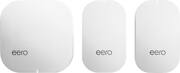
Mesh Wi-Fi 5 System (1 eero + 2 eero Beacons), 2nd Generation - White

Model: M010301
SKU: 5873516
This item is no longer available in new condition. See similar items below
  • Key Specs
    • Wi-Fi Mesh System: true (A single wireless network consisting of a main router (connected directly to a modem) that connects to a series of satellite modules or nodes placed around the home. Routers with this capability promote stronger, faster wireless signals as well as increase Wi-Fi coverage by reducing interference and eliminating dead zones.)
    • Number of Wi-Fi Satellites Included: 3 (Quantity of Wi-Fi satellite modules/nodes for a Wi-Fi Mesh System that come with the product.)
    • Number Of LAN Ports: 2 (Number of devices able to be connected to the Local Area Network (LAN). LAN ports allow wired connections to other networking devices (wireless access points, range extenders, etc.) in order to share the internet connection received through a WAN port.)
    • Wi-Fi Speed: 2.2 gigabits per second (The maximum rate at which data is transferred between a network device and wireless router.)
  • General
    • Brand: eero
    • Model Number: M010301
    • Product Name: Mesh Wi-Fi 5 System (1 eero + 2 eero Beacons), 2nd Generation
    • Color: White
  • Security
    • Data Encryption: true
    • Encryption Type: WPA3 (The security protocols or certification programs that protect the Wi-Fi network.)
    • Firewall Type: NAT (The method the firewall uses to filter and process data to increase network security, primarily by blocking malicious traffic requests while allowing legitimate traffic through.)
    • Security Features: WPA3 encryption, Family Profiles
    • Parental Controls: true (Allows user to block unwanted content, signals, channels, networks, etc. from being received or accessed.)
  • Network
    • Band Technology: Tri (Refers to the number of frequency bands used to wirelessly transmit an internet signal. For example, dual-band devices may use one 2.4 and one 5 GHz band, while tri-band devices may use one 2.4 and two 5 GHz bands. Multiple bands also provide more flexibility for designating connected devices to specific band use.)
    • Ethernet Standard: 10/100/1000 (Each standard is a variation of the IEEE 802.3 set of computer networking technologies known as Ethernet. New versions evolved to include higher bandwidth, different physical media, and other new and improved features. Standards are often denoted by speeds (in Megabits per second). For example, a 10/100/1000 Ethernet port transmits at 10 Mbps, 100 Mbps, and 1000 Mbps (1 Gbps).)
    • Frequency Band: 2.4 GHz, 5.0 GHz (Bands may be grouped into categories such as low- and high-band VHF (Very High Frequency), low- and high-band UHF (Ultra High Frequency), or certain frequency channels (measured in MHz or GHz). Generally, higher frequencies transmit information faster but have shorter range than lower frequencies.)
    • Wireless Networking Standard: Wi-Fi 5 (The wireless networking standard used by the device. Each iteration of the standard developed by the Wi-Fi Alliance corresponds to an existing IEEE 802.11 protocol; for example, standard 802.11ac (or AC) is termed Wi-Fi 5. Refers specifically to the standard the device is designed to use, but ultimately determines product interoperability and backward compatibility including previous versions.)
    • Wireless Standard: AC, N (The wireless networking protocol used by the device. Each iteration of the protocol is based on the 802.11 standard developed by the Institute of Electrical and Electronics Engineers (IEEE) Standards Association. Denoted by letters following 802.11 (802.11a, 802.11ac, etc.), each version, published in alphabetical order, encompasses all previous versions.)
    • Number of 2.4Ghz Streams: 1 (A router's streams are like lanes on a highway. The more streams a router has, the less traffic congestion. Because the 2.4 GHz band is used to transmit wireless signals to a wide variety of devices, there is often high amounts of traffic on that stream. But with multiple streams, each can be designated to a specific device for optimal performance. For example, if one 2.4 GHz stream is assigned to one device, such as a desktop computer, it leaves the remaining streams open for guest users, devices that use more data, or devices with specific band compatibility.)
    • Number of 5.0Ghz Streams: 1 (A router's streams are like lanes on a highway. The more streams a router has, the less traffic congestion. The 5.0 GHz band provides high speed, short-range data transmission and typically has less traffic than the 2.4 GHz band. With multiple streams, each can be designated to a specific device for optimal performance. For example, if one 5.0 GHz stream is assigned to one device, such as a streaming media player, it leaves the remaining streams open for guest users, devices that need less data, or devices with specific band compatibility.)
    • Wi-Fi Mesh System: true (A single wireless network consisting of a main router (connected directly to a modem) that connects to a series of satellite modules or nodes placed around the home. Routers with this capability promote stronger, faster wireless signals as well as increase Wi-Fi coverage by reducing interference and eliminating dead zones.)
    • Number of Wi-Fi Satellites Included: 3 (Quantity of Wi-Fi satellite modules/nodes for a Wi-Fi Mesh System that come with the product.)
    • Number of Wi-Fi Satellites Supported: 32 (Maximum quantity of Wi-Fi satellite modules/nodes that are able to be connected to the main router in a Wi-Fi Mesh System.)
    • Wired Backhaul: false (Also known as Ethernet backhaul or backbone, this capability can be enabled to directly wire a secondary router or satellite to the main router via Ethernet cable. This connection allows for faster and more stable data upload.)
  • Certifications Listings & Approvals
    • ENERGY STAR Certified: false (Devices carrying the ENERGY STAR service mark, such as computer products and peripherals, kitchen appliances, and other products, generally use 20% to 30% less energy than required by federal standards.)
  • Features
    • App Compatible: true (The product can be connected to a program or software application on a mobile device, which then receives collected data from the product.)
    • App Name: eero
    • Beamforming: true (A signal processing technique that enables a router to focus a Wi-Fi signal in a specific direction. The router determines where a connected device in the network is located and projects a stronger signal in that specific direction. This can result in faster and higher quality data transfer as well as reduced signal interference.)
    • Integrated Modem: false
    • Auto Detecting: true
    • Wireless: true
  • Ports
    • Number Of WAN Ports: 1 (Number of devices able to be connected to the Wide Area Network (WAN). This type of port may simply be labeled "Internet," and it allows the device to share its internet connection with all devices connected to it via LAN ports.)
    • Port Type(s): RJ-45, USB (USB 2.0 connects external drives, gaming controllers, smartphones, MP3 players and other accessories.USB 3.0 transfers data faster than USB 2.0, but only when used with USB 3.0 devices.USB Type-C provides fast speeds and versatile power, featuring connectors with identical ends that plug in upside down or right side up. Adapters allow for video as well as backward compatibility.Thunderbolt provides ultra-high bandwidth for fast data transfer between devices featuring a Thunderbolt or MiniDisplayPort connection.HDMI allows you to connect a projector or display HD media on your HDTV or monitor.Media card slots allow you to transfer photos from your digital camera or camcorder.)
    • Number Of LAN Ports: 2 (Number of devices able to be connected to the Local Area Network (LAN). LAN ports allow wired connections to other networking devices (wireless access points, range extenders, etc.) in order to share the internet connection received through a WAN port.)
  • Speed
    • Wi-Fi Speed: 2.2 gigabits per second (The maximum rate at which data is transferred between a network device and wireless router.)
    • Gigabit Ethernet Speed: true (Supports the gigabit Ethernet networking standard, which has a data rate of at least one gigabit per second, or 1,000 Mbps.)
    • Auto Speed Sensing: true
  • Compatibility
    • System Requirements: Supported iOS or Android device, Internet service (with cable or DSL modem, if required) (The software that a product must have for it to be able to integrate with another product.)
    • Bluetooth Enabled: true (The device is capable of communicating with another device via Bluetooth, provided they are within the required range of each other. A Bluetooth-enabled device must also be the same Bluetooth version or higher than the accessory it is intended to pair with.)
  • Dimensions
    • Product Height: 1.5 inches (The out of box height of the item. Height is measured as the vertical distance from the bottom of the item to the top as it would be primarily used or placed.)
    • Product Length: 4.5 inches (The out of box length of the item. Length is measured as the longest dimension of the item.)
    • Product Width: 13.4 inches (The out of box width of the item. Width is measured as the horizontal distance from one side of the item to the other as it would be primarily used or placed.)
    • Product Weight: 2.5 pounds (The out of box weight of the item.)
  • Warranty
    • Warranty - Parts: 1 Year
    • Warranty - Labor: 1 Year
  • Other
    • UPC: 852582006181

Extend your internet access with this handy eero TrueMesh Wi-Fi system. Distributed throughout your home, the base units included with this system make it easier to get a clear wireless signal no matter where you are. Built around a quad-core processor and a set of powerful radios, each unit in this eero TrueMesh Wi-Fi system has a maximum 40-foot range

Find the perfect Wi-Fi solution

  • Replace your router in under 10 minutes: The app guides you through setup and placement. eeros automatically connect to create a wireless mesh network.
  • World-class security: eero utilizes automatic software updates to keep customer networks protected against today's latest threats. You can rest assured knowing your system is always kept safe and secure without having to even lift a finger.
  • Entertainment-grade WiFi for the entire family: With its incredibly low latency and coverage, you can stream, game, work, and play from every corner of your home - and from the backyard, too. eero won't break a sweat.
  • Intelligent software: eero's TrueMesh consistently finds the best route for your network traffic, quickly switching paths to avoid any interference.
  • Stays news, gets better: Get regular and automatic software updates with new features, improved performance, and advanced security enhancements without doing a thing. eero can cover any home, no matter the size or layout.
  • Easy-to-use app: With the eero app you can check network status, connected devices, and run speed tests from the app dashboard.
  • Parental controls: Easily create profiles to set schedules and pause the internet on your kids devices. You can even pause the Internet with an Alexa command.
  • Designed for the home: eeros are compact and elegant, making them a perfect fit for your home. On the inside, eero is made with an uncompromising attention to detail. Every component is meticulously sourced, custom assembled and tested
Whats Included
  • eero Home WiFi System (1 eero + 2 eero Beacons), 2nd Generation

Q: do I need a beacon at site of router? and if so how much for a 3rd beacon?

A: The eero and eero Beacons are all essentially "routers". You will need one eero close to your modem (it will plug directly into your modem), and then you can spread the beacons out through your home. I think maybe you were asking if you also need a beacon next to your modem, as well? If so, the answer is no...just the full sized eero needs to be there. And to you answer your second question, they sell individual beacons for $149. Sorry if I misunderstood your question, but I hope I helped!

Q: Will the eero transmit the wireless signal to a erro Beacon plugged into another building on my property? It is roughly 75 feet from the internet connection.

A: If your phone can make a connection--even if it is one bar of WiFi, then the Eero can make a connection. With that said, not everything is always 100% reliable and the farther you go the slower the WiFi gets.

Q: My cable provider gives me 120Mbs to the house, but when using wifi that speed diminishes to about 30 - 50 Mbs for the various devices, so what speed to the devices can I expect from Eero? What is impact on the other systems that use separate wifi?

A: I get from my provider 150/150. Before I bought the Eero system I would get sometimes 70/60 or 50/30 through wifi. With the Eero system I have yet to get under 155/158 through wifi. That's right I get more than my provider supplies me. I would highly recommend Eero and in fact my father is buying a new house and will purchasing an Eero system the day he moves in. I will also be recommending to all my friends as well.

Q: will this help the reception on my cell phone

A: Prior to installing eero I could not reveivr texts in my basement and phone service was sketchy. Noe O have no problems.

Q: do I still need to get internet from my cable company

A: Yes you will need to get that from your Internet Service Provider. The EERO is the router and does not provide internet by just plugging in.

Q: Will every work in a house with plaster walls

A: I have an older home (almost 100 years old) with some plaster walls. The performance of wifi with Eero over the old wifi router is amazing. I have a 1600 sq ft home and I went with two beacons because of the walls - just to ensure good coverage. Placement might be key for you. If the signals can't go through the walls, you should try to get a little more "line of sight" type of placement between the Eero components if you can.

Q: Do I change my network to the eero Network on my smart devices or leave them on my Xfinity Network?

A: Definitely move to eero. I don't mind, but it's much slower than what you'll get by plugging eero or any other wireless router into the ethernet port. Then there is a "bridge" setting on xfinity to turn off their wifi. It's a good idea to do that so the signals don't interfere with each other. The eero can distribute wifi to your entier home, and the wifi router built into the xfinity modem is good, but not nearly as good as the eero system. BTW there are two ways to access wifi with an xfinity system. First, there's an open xfinity wifi login that is available with almost any xfinity modem in any home or restaurant. It's purposely kept slow, but it's free to comcast customers. The second xFinity network from your modem is a real wifi router with a separate ID and login. you can turn this one off wity a "bridge" setting. Search your comcast material help materials (online) or call comcast for helping turn this off - it's confusing and useless. And much less coverage than an eero or any other mesh system. However, the built-in wifi from xfinity is good if you have a small house or apartment. You might not need a mesh system. I compared my xFinity wifi router to my older NetGear Nighthawk AC1700 and the Netgear router seemed faster. But the coverage in my large house with AC1700 and extender is not as good as an eero and 2 beacons.