I use Windows 10 while at work, but never felt comfortable with it since I use my MacBook pro and iMac to write while at home. I had considered getting a windows machine to get better acquainted with Windows 10, which seemed less friendly to me. I had my eye on the Dell XPS 13 for awhile, but then I saw a surface laptop and decided to bring it home.
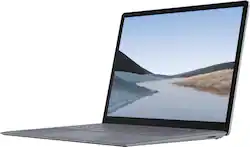
The style of this laptop is on par with apple products and in fact may be even more stylish than MacBook, which seems dated in comparison. The minimal look to the surface laptop 3 gives it a classy feel. No intel stickers on the computer, or distracting engravings detract from its style. Its all aluminum case is a pleasure to hold, while is slim design makes it seem lighter than its actual weight. It is practical to carry in my bag, but I notice the added weight when toting it around.
The laptop is powerful enough to do the things I need a laptop to do, mainly editing word documents. I bought the intel i5, 256 GB model with 8GB of RAM, normally $1299 but was on sale for $899 at the time. The laptop 3 does what I need it to do, and is snappy while doing it.
The power brick connects using a surface connector, which charges the computer. A bonus, when this port is connected to the surface dock, it powers the laptop while communicating with dual monitors and connected USB devices like hard drives and wired keyboards. It is nice to simply dock to the surface connector and begin using all my connected monitors and devices without having to sacrifice my USB A or C ports. The dock ports are not modern and probably should be updated for 2020 by adding at least one or two USB C options. But for my needs, it works perfectly as is; two mini display ports to power my old 23 inch Apple Cinema displays and two USB-A type3s that are connected to a hard drive and keyboard. The dock makes my desk less cluttered, a nice benefit.
The keyboard and trackpad are great. I would love this keyboard on my MacBook. This is the best trackpad that I have used on a windows machine, but the mac trackpads are just slightly better. The touchscreen and support for the surface pen is nice, but I rarely use them. Writing on the laptop screen is awkward, since the screen does not fold all the way over. My messy handwriting in even worse when adding notes to OneNote. There is no dedicated place on the surface 3 to attach the surface pen when not using it, but the magnets on the top of the display does a good enough job to keep it handy (see photo).
The battery life is not great. I can adjust power usage to extend battery life while sacrificing performance, but this is more of a Windows 10 thing, not really an exclusive surface 3 trait. While on best performance, my power dropped to 50% after two hours of web surfing and light document editing, which is fine for me since I am accustomed to this battery life.
The surface laptop 3 is not the most powerful that can be found, and its cost (unless on sale, like mine) is higher than other options. I enjoy the style of the surface laptop 3 which compliments the Windows 10 operating system well. Unexpectedly, it has become my main device. I still love my macbook but after using macOS for so long, working on the surface laptop seems fresh.
I like it.