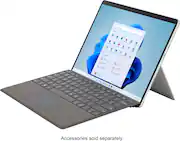
Unlock more possibilities than ever with the Pro designed for a Pro like you. The first consumer laptop-to-tablet PC designed on the Intel Evo platform⁹ and designed to light up the best of Windows 11, Surface Pro 8 combines the power of a laptop with the flexibility of a tablet, and every angle in between. Do great things with a larger 13” touchscreen, faster connections with Thunderbolt 4 ports, and extra speed when you need it.
A: Yes
Q: Do any Surface Pro come with services outside of WIFI connectivity?
A: I think they make one with cellular service built in. You could always add a usb-c dongle with ethernet.
Q: Does the Surface Pro 8 have USB A connectivity? Also, is a docking station an option?
A: Thunder bolt/ USB C only without the dock. Add the dock and get USB a
Q: Is the keyboard included or is it considered an accessory? If it is an included how much are they?
A: Accessory. $99 and up
Q: Will the Surface Pro 7 keyboard work with the Pro 8?
A: Seems to
Q: Do you have this model in stock in your East Lansing Store?
A: Hello Mary. Thank you for your question. To check on this information, please reach out to Best Buy's support team using the link below: ***https://www.bestbuy.com/site/electronics/customer-service/pcmcat87800050001.c?id=pcmcat87800050001*** You can also chat with a Best Buy agent by clicking the chat button that is located in the lower right corner of the retailer website. Thank you for choosing Intel!

Unlock more possibilities than ever with the Pro designed for a Pro like you. The first consumer laptop-to-tablet PC designed on the Intel Evo platform⁹ and designed to light up the best of Windows 11, Surface Pro 8 combines the power of a laptop with the flexibility of a tablet, and every angle in between. Do great things with a larger 13” touchscreen, faster connections with Thunderbolt 4 ports, and extra speed when you need it.

Microsoft Surface Pro 10 Tablet - 13" - vPro Technology - 32 GB - 1 TB SSD - Windows 11 Pro - Platinum - TAA Compliant - Core Ultra 7 Dodeca-core (12 Core) 165U - 600 Nit - 2880 x 1920 - PixelSense Display - 19 Hours Maximum Battery Run Time

The most flexible laptop, reimagined — Surface Pro empowers your creativity and productivity with responsive performance designed for seamless multitasking, intuitive touchscreen, and built‑in AI assistance through Copilot. Using the Windows ecosystem, it helps you work more efficiently across your apps and devices, with all‑day battery life⁵. All wrapped up in an ultra‑portable design, Pro adapts to the way you create, collaborate, and do more than you ever imagined.

Get the flexibility you want and the performance you need with Surface Pro 12”, a Copilot+ PC and the most versatile Surface—designed for creativity, efficiency, and mobility. Use it as a powerful tablet with an intuitive touchscreen, touch, voice, and Surface Slim Pen [3] to bring ideas to life, or attach the Surface Pro 12” Keyboard for a full Windows laptop experience [3]. With built‑in AI features, seamless integration across the Windows ecosystem, and an ultra‑thin, lightweight design, Surface Pro gives you the freedom to work, create, and go beyond what you thought possible.
| Pros for Microsoft - Surface Pro 8 – 13” Touch Screen – Intel Evo Platform Core i7 – 16GB Memory – 1TB SSD – Device Only - Platinum | |||
|---|---|---|---|
| There were no pros for this product— | There were no pros for this product— | There were no pros for this product— | Portability, Performance, Battery Life, Build Quality, Processor Speed |
| Cons for Microsoft - Surface Pro 8 – 13” Touch Screen – Intel Evo Platform Core i7 – 16GB Memory – 1TB SSD – Device Only - Platinum | |||
| There were no cons for this product— | There were no cons for this product— | There were no cons for this product— | Screen Brightness, Port Selection, App Compatibility |
The vast majority of our reviews come from verified purchases. Reviews from customers may include My Best Buy members, employees, and Tech Insider Network members (as tagged). Select reviewers may receive discounted products, promotional considerations or entries into drawings for honest, helpful reviews.
First off - I love my new Surface Pro 8 preloaded with Windows 11 which I have had for about 45 days so far. I prefer the 16x9 aspect ratio of the Surface Pro 2 for watching movies and such. However, the Surface Pro 8 extra screen height is nice for some applications - most notably TurboTax which always required me to scroll down on the Surface Pro 2. I do not care that the power switch is located on the side and I'm forever accidentally turning it off when I'm watching a movie or reading while holding the device. It seems like power switchon the Surface Pro 2 was in a better location! I did get the keyboard with the pen although I wish I would have got the keyboard with the fingerprint scanner - which for some reason is only available in black. I went two Best Buy to look at the Surface tablets and they were out of them and so I had them order me one to be shipped to my place. It was too late once I noticed they ordered the wrong color and since it took so long to receive I just kept it! After all, my Surface Pro 2 was on its last legs - and the battery would barely hold the charge. I typically buy a higher-end model and use it adjust daily and keep it for several years. If you are like me and coming from a Surface Pro 2 - you will see that it is a nice upgrade. All in all I wish this was a 4K resolution screen with a 16x9 aspect ratio and the power button not located on the sides where it can be easily powered off when you are using it while laying down or on your lap! Seems like I am always turning it off when I'm trying to steady the computer on my lap. I really love how thin the new computer is compared to my old! The i7 processor has plenty of speed, ram and storage to last me for years to come! Good luck with your purchase, I know you will enjoy it just as much as I do!
This review is from Microsoft - Surface Pro 8 – 13” Touch Screen – Intel Evo Platform Core i7 – 16GB Memory – 1TB SSD – Device Only - Platinum
KenR Posted
I have put my Surface Pro 4 through the wringer over the last 5+ years. I was long overdue for an upgrade and am I glad I held off until now because this new design and boost in specs is exactly what I was looking for. The most notable changes are the smaller bezel, the higher refresh rate, USB-C connections (can be used to charge it), and the proprietary Surface connection is still there. So, if you want to re-use your old charger, like me, you can! Performance wise, it handles everything I am throwing at it within reason. Lite to moderate CAD, complex excel sheets, Photoshop editing all work exceptionally well for such a compact chassis. It's performing exactly as I expected yet I'm still impressed.
This review is from Microsoft - Surface Pro 8 – 13” Touch Screen – Intel Evo Platform Core i7 – 16GB Memory – 1TB SSD – Device Only - Platinum
Caladbolg Posted
Very fast computer. Pen unity is great. Screen size is perfect. The alcantara leather is nice.
This review is from Microsoft - Surface Pro 8 – 13” Touch Screen – Intel Evo Platform Core i7 – 16GB Memory – 1TB SSD – Device Only - Platinum
Molly Posted