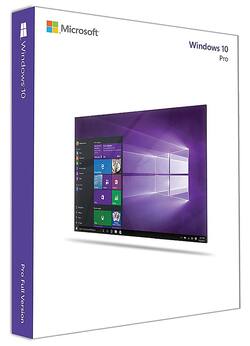
Microsoft - Windows 10 Pro - English - Physical - English
- Key Specs
- Number of Devices: 1
- Number of Licenses: 1
- Software Format: Physical (Physical software requires a disc, cartridge, etc. be inserted into the gaming console or computer to download and/or operate the software. Digital software allows for downloading and/or playing the software on the gaming console or computer without a physical disc, cartridge, etc. Physical (Download Code Only) software is purchased in physical form with a code that allows for downloading and/or playing the software on the gaming console or computer without a physical disc, cartridge, etc.)
- General
- Brand: Microsoft
- Model Number: FQC-10069
- Product Name: Windows 10 Pro - English
- Publisher: Microsoft
- Features
- Productivity and User Experience Features: Cortana
- Security Features: Windows Information Protection
- Business Features: Windows store for business
- Language(s): English
- Cloud Based Software: false
- Purchase Rights
- Number of Devices: 1
- Number of Licenses: 1
- Compatibility
- Bit Version: 32-bit, 64-bit
- Software Format: Physical (Physical software requires a disc, cartridge, etc. be inserted into the gaming console or computer to download and/or operate the software. Digital software allows for downloading and/or playing the software on the gaming console or computer without a physical disc, cartridge, etc. Physical (Download Code Only) software is purchased in physical form with a code that allows for downloading and/or playing the software on the gaming console or computer without a physical disc, cartridge, etc.)
- Number Of Discs: 1
- Upgrade: false
- Requirements
- System Requirements: 1 GHz or faster processor or SoC, 32-bit: 1 GB of RAM, 64-bit: 2 GB of RAM, 32-bit: 16 GB of free disk space, 64-bit: 20 GB of free disk space, DirectX 9 or later with WDDM 1.0 driver 800 x 600 display (The software that a product must have for it to be able to integrate with another product.)
- Download File Size: 2 gigabytes
- Hard Drive Space Required: 20 gigabytes
- Other
- UPC: 889842189438
Windows 10 Pro includes all the features of Windows 10 Home, plus business functionality for encryption, remote log-in, creating virtual machines, and more. With Windows 10 Pro, you’ll always have the latest features and security. Experience faster start-ups, a familiar yet expanded Start menu, and great new ways to get stuff done.
A: This is the current Retail version of the product. The product that is offered for $50 less is the OEM version. Full version (Retail): - Includes transfer rights to another computer. - Can change the motherboard - 90 days of technical support - Doesn't require a previous qualifying version of Windows. OEM System Builder version: OEM versions of Windows 10 are identical to Full License Retail versions except for the following: - OEM versions do not offer any free Microsoft direct support from Microsoft support personnel - OEM licenses are tied to the very first computer you install and activate it on - OEM versions allow all hardware upgrades except for an upgrade to a different model motherboard - OEM versions cannot be used to directly upgrade from an older Windows operating system
Q: Is windows 10 Pro a download or is it USB?
A: Win10 Pro can be downloaded - OR - you can purchase a physical, USB in a box at the store. If you purchase at the store, read the box contents to make sure the USB has both 32/64 bit systems.
A: Legally you will need to have a seperate keycode for each device you want to upgrade windows for. However, I have personally used multiple devices under one license. (NOTE: THIS IS NOT RECOMMENDED NOR ENCOURAGED, also issues may arise with build updates and windows locator services)
A: Yes. When you buy Windows 10, the product key is located in a side pocket of the containing box. The Product-Key will actually determine which edition of Windows 10 that will ultimately be activated for you (Home, Pro, Enterprise). Respectfully, Morpheus
A: Yes you can. To learn how to use Office 365 on your mobile devices, check out this link: https://support.office.com/en-us/article/Set-up-Mobile-Device-Management-MDM-in-Office-365-dd892318-bc44-4eb1-af00-9db5430be3cd
A: This will work well to upgrade from Windows 7 Home to Windows 10 Pro.
A: Yes, this will allow you to upgrade to Windows 10. We always recommend that you make sure you backup your files like it sounds like you have already done.
A: We recommend that you backup your data and perform a fresh installation of Windows 10 Pro.
People also viewed
Today's top picks
 $199.99The price was $249.99
 $2,449.99The price was $3,199.99
 $449.99The price was $829.99
 $999.98The price was $1,639.98
 $789.99The price was $1,049.99









