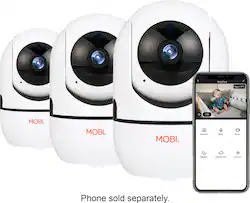
Includes 3 MobiCam HDX Cameras. The MobiCam HDX is an easy-to-use Pan & Tilt WiFi Baby Monitoring System that provides 355° coverage and digital zoom. Monitor your loved ones and effortlessly using the MOBI Smart app to remotely control, correspond, and record in every direction – with the option to zoom, all at top-notch camera quality. MobiCam HDX offers: 355° Pan, Tilt and 2X Zoom via MOBI Smart App, Monitor and stay connected remotely from any location using MOBI Smart App, View perfectly up to 40 feet in total darkness with powerful IR-Cut night vision lens, Motion alerts and notifications keep you informed, Ability to add and manage multiple users with limited access, Two-way audio allows for talk back and listening, Expandable system up to 100+ cameras allow multiple rooms and locations monitoring, View up to 4 cameras simultaneously with Quad View, 3 recording modes: Motion, Manually, or Continuously, Record up to 30 days to optional microSD memory card (No Subscription required) or optional Cloud storage. Includes Wall Mount for overhead viewing.
A: Hello Ashley, thank you for reaching out. The MobiCam doesn't require a subscription to use it. However, if you want to record the content and play it back you will need either a Micro SD card or the monthly Cloud Storage subscription ($4 basic 7-day plan). The Cloud Storage records the content of any motion detected by the MobiCam in the room it is surveilling. The App you would download to your mobile device or tablet is the MOBI Smart App. Through the App, once the device is paired to the WiFi, you will be able to view the live stream, and hear the audio of the camera in live time, or playback content captured from previous days.
A: I'm not sure if this will answer your question maybe not, but as far as I can tell you need to create an account and password with the mobi app you need Wi-Fi and you need to buy a 32 GB memory card the memory card is not needed to record if you're recording off your phone but that memory card added will save at least a couple hours playback. The application with your phone seems to already do this but it's good to have a memory card just in case. When you're applying your camera to the Wi-Fi you need to enter the Wi-Fi name and password through the app. It's reliable for the price, I myself do not like the white noise through the mic when I'm trying to listen in, when I speak people can most of the time hear me clearly. It does the job I'm just not sure if it will keep recording when the Wi-Fi is out I'm not completely sure if Wi-Fi goes off if any playback after Wi-Fi goes off will be in the memory card.
A: Hello, Thank you for reaching out. To set the motion detection on your MobiCam using the MOBI Smart App follow these instructions. . Open the MobiSmart app and go to the 'Home' page 2. Tap on the device you would like to set up for the function 3. Click on the settings option (top right-hand corner, looks like a pen drawing a line) 4. Tap on 'Detection Alarm Settings' 5. Ensure 'Motion Detection Alarm' is turned on 6. Click back to return to the camera's settings 7. under 'STORAGE' click on 'Storage Settings' 8. Ensure 'Local Recording' is on 9. Tap on 'Recording Mode' 10. Switch to 'Event Recording'
A: The application has up to a 16 channel function so if you had even more cameras than three you would easily be able to go between the three or see it all within one screen like a TV security camera. You can click on one to zoom in and then you can back out to see all the cameras again. Hopefully this answers your question
Q: Does this camera have motion alerts?
A: Yes it does . On each screen it will show you these options , touch the alarm and it will take you to the motion alerts
Q: Will this device accept 5G?
A: Absolutely NOT which I found out the hard way. I have a duel and tried to even have a dedicated 2.4 just for it…ended up messing up my entire wifi network. Returned and bought four ring stick cameras instead….don’t waste your time or energy. This was the 2nd set of pet cameras I have purchased. My original set was malfunctioning and it took 3 months before they finally successfully set up. This set, I tried for 3 days and finally said nope! Ring set up in seconds as I already have outdoor and the doorbell ring. Even if you don’t already have Ring, they set up in seconds compared to this piece of junk
A: Hello Jack, Thank you for taking the time to reach out to us! We do not have a Desktop software that supports our App. Should you have any further questions or concerns, please feel free to let us know!
A: You have to turn off tracking