Main Content
product image

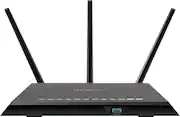
NETGEAR - Nighthawk AC2300 Dual-Band Wi-Fi 5 Router - Black

Model: R7000P-100NAS
SKU: 5712201
This item is no longer available in new condition. See similar items below
  • Key Specs
    • Wi-Fi Mesh System: false (A single wireless network consisting of a main router (connected directly to a modem) that connects to a series of satellite modules or nodes placed around the home. Routers with this capability promote stronger, faster wireless signals as well as increase Wi-Fi coverage by reducing interference and eliminating dead zones.)
    • Number Of LAN Ports: 4 (Number of devices able to be connected to the Local Area Network (LAN). LAN ports allow wired connections to other networking devices (wireless access points, range extenders, etc.) in order to share the internet connection received through a WAN port.)
    • Wi-Fi Speed: 2.3 gigabits per second (The maximum rate at which data is transferred between a network device and wireless router.)
  • General
    • Brand: NETGEAR
    • Model Number: R7000P-100NAS
    • Product Name: Nighthawk AC2300 Dual-Band Wi-Fi 5 Router
    • Color: Black
  • Security
    • Data Encryption: true
    • Encryption Type: WPA, WPA2, WPA-PSK, WPA2-PSK (The security protocols or certification programs that protect the Wi-Fi network.)
    • Firewall Type: NAT, SPI (The method the firewall uses to filter and process data to increase network security, primarily by blocking malicious traffic requests while allowing legitimate traffic through.)
    • Security Features: Wi-Fi Protected Access® (WPA/WPA2—PSK) and WEP; Guest network access—separate & secure; WiFi Protected Access® (WPA/WPA2—PSK); Double firewall protection (SPI and NAT); Denial-of-service (DoS) attack prevention
    • Parental Controls: true (Allows user to block unwanted content, signals, channels, networks, etc. from being received or accessed.)
  • Network
    • Band Technology: Dual (Refers to the number of frequency bands used to wirelessly transmit an internet signal. For example, dual-band devices may use one 2.4 and one 5 GHz band, while tri-band devices may use one 2.4 and two 5 GHz bands. Multiple bands also provide more flexibility for designating connected devices to specific band use.)
    • Ethernet Standard: 10/100/1000 (Each standard is a variation of the IEEE 802.3 set of computer networking technologies known as Ethernet. New versions evolved to include higher bandwidth, different physical media, and other new and improved features. Standards are often denoted by speeds (in Megabits per second). For example, a 10/100/1000 Ethernet port transmits at 10 Mbps, 100 Mbps, and 1000 Mbps (1 Gbps).)
    • Number of Antennas: 3
    • Frequency Band: 2.4 GHz, 5.0 GHz (Bands may be grouped into categories such as low- and high-band VHF (Very High Frequency), low- and high-band UHF (Ultra High Frequency), or certain frequency channels (measured in MHz or GHz). Generally, higher frequencies transmit information faster but have shorter range than lower frequencies.)
    • Wireless Networking Standard: Wi-Fi 5 (The wireless networking standard used by the device. Each iteration of the standard developed by the Wi-Fi Alliance corresponds to an existing IEEE 802.11 protocol; for example, standard 802.11ac (or AC) is termed Wi-Fi 5. Refers specifically to the standard the device is designed to use, but ultimately determines product interoperability and backward compatibility including previous versions.)
    • Wireless Standard: AC, N (The wireless networking protocol used by the device. Each iteration of the protocol is based on the 802.11 standard developed by the Institute of Electrical and Electronics Engineers (IEEE) Standards Association. Denoted by letters following 802.11 (802.11a, 802.11ac, etc.), each version, published in alphabetical order, encompasses all previous versions.)
    • Number of 2.4Ghz Streams: 1 (A router's streams are like lanes on a highway. The more streams a router has, the less traffic congestion. Because the 2.4 GHz band is used to transmit wireless signals to a wide variety of devices, there is often high amounts of traffic on that stream. But with multiple streams, each can be designated to a specific device for optimal performance. For example, if one 2.4 GHz stream is assigned to one device, such as a desktop computer, it leaves the remaining streams open for guest users, devices that use more data, or devices with specific band compatibility.)
    • Number of 5.0Ghz Streams: 1 (A router's streams are like lanes on a highway. The more streams a router has, the less traffic congestion. The 5.0 GHz band provides high speed, short-range data transmission and typically has less traffic than the 2.4 GHz band. With multiple streams, each can be designated to a specific device for optimal performance. For example, if one 5.0 GHz stream is assigned to one device, such as a streaming media player, it leaves the remaining streams open for guest users, devices that need less data, or devices with specific band compatibility.)
    • Wi-Fi Mesh System: false (A single wireless network consisting of a main router (connected directly to a modem) that connects to a series of satellite modules or nodes placed around the home. Routers with this capability promote stronger, faster wireless signals as well as increase Wi-Fi coverage by reducing interference and eliminating dead zones.)
    • Ethernet Switch: true (Connects multiple devices to expand the Local Area Network (LAN).)
  • Certifications Listings & Approvals
    • ENERGY STAR Certified: false (Devices carrying the ENERGY STAR service mark, such as computer products and peripherals, kitchen appliances, and other products, generally use 20% to 30% less energy than required by federal standards.)
  • Features
    • App Compatible: true (The product can be connected to a program or software application on a mobile device, which then receives collected data from the product.)
    • App Name: NETGEAR Nighthawk App
    • Beamforming: true (A signal processing technique that enables a router to focus a Wi-Fi signal in a specific direction. The router determines where a connected device in the network is located and projects a stronger signal in that specific direction. This can result in faster and higher quality data transfer as well as reduced signal interference.)
    • Integrated Modem: false
    • Auto Detecting: true
    • Wireless: true
  • Ports
    • Number Of WAN Ports: 1 (Number of devices able to be connected to the Wide Area Network (WAN). This type of port may simply be labeled "Internet," and it allows the device to share its internet connection with all devices connected to it via LAN ports.)
    • Port Type(s): RJ-45, USB (USB 2.0 connects external drives, gaming controllers, smartphones, MP3 players and other accessories.USB 3.0 transfers data faster than USB 2.0, but only when used with USB 3.0 devices.USB Type-C provides fast speeds and versatile power, featuring connectors with identical ends that plug in upside down or right side up. Adapters allow for video as well as backward compatibility.Thunderbolt provides ultra-high bandwidth for fast data transfer between devices featuring a Thunderbolt or MiniDisplayPort connection.HDMI allows you to connect a projector or display HD media on your HDTV or monitor.Media card slots allow you to transfer photos from your digital camera or camcorder.)
    • Number Of LAN Ports: 4 (Number of devices able to be connected to the Local Area Network (LAN). LAN ports allow wired connections to other networking devices (wireless access points, range extenders, etc.) in order to share the internet connection received through a WAN port.)
  • Speed
    • Wired Speed: 1000 megabits per second (The maximum rate at which data is transferred between a network device and router using an Ethernet cable.)
    • Wi-Fi Speed: 2.3 gigabits per second (The maximum rate at which data is transferred between a network device and wireless router.)
    • Gigabit Ethernet Speed: true (Supports the gigabit Ethernet networking standard, which has a data rate of at least one gigabit per second, or 1,000 Mbps.)
    • Auto Speed Sensing: true
  • Compatibility
    • System Requirements: Microsoft® Windows 7, 8, 8.1, Vista®, XP®, 2000, Mac OS®, UNIX®, or Linux®; Microsoft® Internet Explorer® 5.0, Firefox® 2.0, Safari® 1.4, or Google Chrome™ 11.0 browsers or higher (The software that a product must have for it to be able to integrate with another product.)
    • Bluetooth Enabled: false (The device is capable of communicating with another device via Bluetooth, provided they are within the required range of each other. A Bluetooth-enabled device must also be the same Bluetooth version or higher than the accessory it is intended to pair with.)
  • Dimensions
    • Product Height: 2 inches (The out of box height of the item. Height is measured as the vertical distance from the bottom of the item to the top as it would be primarily used or placed.)
    • Product Length: 7.3 inches (The out of box length of the item. Length is measured as the longest dimension of the item.)
    • Product Width: 11.2 inches (The out of box width of the item. Width is measured as the horizontal distance from one side of the item to the other as it would be primarily used or placed.)
    • Product Weight: 1.7 pounds (The out of box weight of the item.)
  • Warranty
    • Warranty - Parts: Not available
    • Warranty - Labor: Not available
  • Other
    • UPC: 606449118193

The NETGEAR Nighthawk AC2300 Smart WiFi 5 Router provides up to 1625 + 600 Mbps WiFi and MU-MIMO for lag-free gaming, better video streaming and multiple mobile devices. With Gigabit WiFi, Beamforming, and built-in high-powered amplifiers and external antennas, get ready for extreme performance! Frustration-free fast install using NETGEAR Nighthawk App to get online in matter of minutes. NETGEAR Armor - Advanced cyber threat protection for your home and all your devices. Control your home network with voice commands using Amazon Alexa and the Google Assistant.

Find the perfect Wi-Fi solution

  • Supports high definition video conferencing (Zoom, Skype, WebEx, FaceTime, and more): Whether you work from home or want to connect with your friends and family you can video conference with crystal clear audio and video from anywhere in your home.
  • Faster WiFi: Faster performance and speed with AC WiFi (1625 + 600Mbps). Ideal for Smart Home devices and large homes.
  • NETGEAR Nighthawk App: Easily setup your router. Limit online content and screen time using Circle Smart Parental Controls. Manage Internet access by pausing and resuming internet instantly. Run a speed test. Control your network security. All from your mobile device!
  • Circle Smart Parental Controls: Manage your family's internet use. Limit daily Internet time for websites, apps, and more. Set individual filter levels for family members to match their age and interests.
  • NETGEAR Armor: Built-in anti-virus and data theft protection for all of your smartphones and computers. Protects your connected home from internet threats. Free trial included. Covers unlimited devices.
  • 4 Gigabit Ethernet Ports: Directly connect all your wired devices for maximum speed and performance.
  • MU-MIMO: Capable for simultaneous streaming of data to multiple devices.
  • Smooth Streaming: Better video streaming, lag-free gaming, surfing, and more with a powerful 1GHz Dual Core Processor.
  • Dynamic QoS: Prioritizes network traffic by application & device.
  • VPN Support: Secure access to your home network and Internet when you're away from home using any of your devices.
  • Smart Connect: Intelligently selects the fastest WiFi band for every device.
  • Two USB Ports: One (1) USB 3.0 & One (1) USB 2.0 for faster streaming, backup and easy access to your stored media.
  • Supports high definition video conferencing (Zoom, Skype, WebEx, FaceTime, and more): Whether you work from home or want to connect with your friends and family you can video conference with crystal clear audio and video from anywhere in your home.
  • Faster WiFi: Faster performance and speed with AC WiFi (1625 + 600Mbps). Ideal for Smart Home devices and large homes.
  • NETGEAR Nighthawk App: Easily setup your router. Limit online content and screen time using Circle Smart Parental Controls. Manage Internet access by pausing and resuming internet instantly. Run a speed test. Control your network security. All from your mobile device!
  • Circle Smart Parental Controls: Manage your family's internet use. Limit daily Internet time for websites, apps, and more. Set individual filter levels for family members to match their age and interests.
  • NETGEAR Armor: Built-in anti-virus and data theft protection for all of your smartphones and computers. Protects your connected home from internet threats. Free trial included. Covers unlimited devices.
  • 4 Gigabit Ethernet Ports: Directly connect all your wired devices for maximum speed and performance.
  • MU-MIMO: Capable for simultaneous streaming of data to multiple devices.
  • Smooth Streaming: Better video streaming, lag-free gaming, surfing, and more with a powerful 1GHz Dual Core Processor.
  • Dynamic QoS: Prioritizes network traffic by application & device.
  • VPN Support: Secure access to your home network and Internet when you're away from home using any of your devices.
  • Smart Connect: Intelligently selects the fastest WiFi band for every device.
  • Two USB Ports: One (1) USB 3.0 & One (1) USB 2.0 for faster streaming, backup and easy access to your stored media.
Whats Included
  • 3x Detachable antenna
  • Ethernet cable
  • Nighthawk AC2300 Smart WiFi 5 Router
  • Power adapter
  • Quick install guide
  • 3x Detachable antenna
  • Ethernet cable
  • Nighthawk AC2300 Smart WiFi 5 Router
  • Power adapter
  • Quick install guide

Q: Does it work with Spectrum internet? Thanks

A: Yea have it setup on mine. Removed the spec router and have better connections throughout the house.

Q: We have a house that is 2000 square feet with a lot of indentions, can you recommend a router that can take care of that much square footage and with multiple devices? If more than one device is used, either TV freezes up or their phones or tablets.

A: The NETGEAR R7000p AC2300 Router should be able to handle a 2000 square foot home with ease. We use it in a tri-level home placed in the basement of a 3600 sqft home and it works without issue. The freezing up issue can be caused by the router, or could be a service issue. I would recommend checking directly from the modem what your internet speed is. In order to stream multiple devices you need to have sufficient bandwith as well. If you have at least 7-20 meg of download capability, then the next thing I would look at would be the router. I currently use this router with over 40 devices and 250 meg of bandwith and we have no lag at all!

Q: Will it need to be connected to a phone jack? And will you need WiFi already or is this system WiFi

A: This router must be connected to a cable modem to provide Wi-Fi connections to other devices.

Q: should all the lights be lid up Some of mine are blinking is that a problem

A: The first 4 lights from the Left edge toward center, and the first 2 lights from the Right edge toward center, should be lit up colored White with a successful connection. Two of the lights, indicating the transmission speeds, (the 3rd and 4th from the Left), flicker as a result of the ongoing speed activities. Means it is working and traffic is moving. The lights labeled with the numbers 1 through 4, correspond to additional equipment you attach that needs an online connection, just like always. This is about as much as I know. I am not a technician, but it's what little I have learned over the years. I really like this unit, glad you have one, too. I DID need to call Tech Support to have it installed, and they were really nice and efficient throughout the whole process. Netgear Tech Support's phone number is: 1-888-638-4327

Q: A senior citizen here. I have been working for over 2 hours to get my new Netgear Router model R7000P to work. It will not connect with the internet on my new Arris Modem. What is the secret?

A: No secret, make sure the the Ethernet cable from your modem is connected to the yellow Ethernet port on the router and ensure that the router has power and turn it on, that's it! You should be able to start your setup process. If you're having trouble after that, you will need to contact your internet service provider (ISP) to help with the setup due to interference on their end! Hope this helps, enjoy!

Reviews