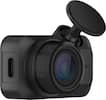
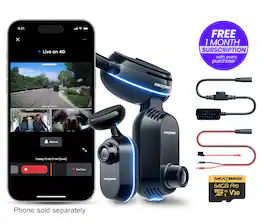
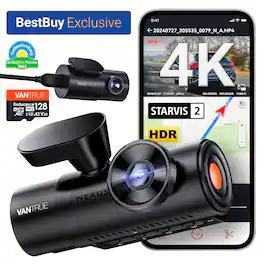
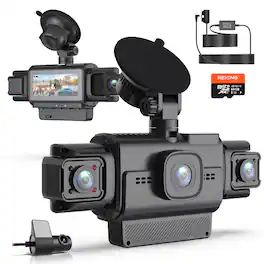
Keep your car protected at all times with the world’s first truly Smart Dash Cam. The Nextbase iQ 4K gives you eyes on your vehicle even when you're not there, using Live View and real-time alerts to help prevent theft, damage, or suspicious activity before it happens. Built-in 4G connectivity and advanced AI turn your dash cam into a connected security system for your car.
Q: Can you turn the in cabin camera off
A: undefined
Q: Is installation at Best Buy included in the purchase?
A: no it was not
Q: Is this able to tradein with nextbase GW622
A: Thank you for your question! This model isn’t eligible for trade-in with the Nextbase GW622. For trade-in options, we recommend checking directly with Best Buy, as availability may vary. If there is anything else we can help you with please let us know. -The Nextbase Reviews team
Q: How much is the monthly subscription
A: $9.99 a month for the most basic features. $19.99 for better features. The features that come with the camera are very limited and not worth buying it since you'll be paying $9.99 at least for those.
Q: For how long is cloud -stored video available? I.e., what's the rewrite time?
A: Hello, Thank you for your question! The cloud storage will store the videos for 30 days if you choose the Protect plan and 180 days if you choose the Protect Plus plan. Let us know if you have any more questions! -The Nextbase Reviews team

Keep your car protected at all times with the world’s first truly Smart Dash Cam. The Nextbase iQ 4K gives you eyes on your vehicle even when you're not there, using Live View and real-time alerts to help prevent theft, damage, or suspicious activity before it happens. Built-in 4G connectivity and advanced AI turn your dash cam into a connected security system for your car.

Unlock your car’s smart potential with the latest Nextbase iQ 4K Smart Dash Cam that’s always on duty. Predict threats and protect your car from anywhere using Live View, powered by 4G connectivity. See what your car sees and get custom alerts wherever you are. Park with confidence using Smart Sense Parking, as your iQ constantly scans the surrounding area of your vehicle, detecting potential intruders or vehicles backing up too close, allowing you to intervene using voice or an alarm.

Awarded Consumer Reports Editor’s Choice for Best Dash Cam, the Nextbase 622GW Dash Cam is a popular choice for everyday drivers who demand the very best in road safety. With ultra-detailed 4K resolution, it captures every license plate, sign, and street detail—making 4K a must-have for drivers who want total confidence behind the wheel. This premium bundle includes the 622GW Dash Cam, Rear Window Camera, 32GB U3 microSD card, and a Hardwire Kit—everything you need for full high-definition coverage of your vehicle, front and rear. The 622GW sets the standard with crystal-clear 4K video at 30fps, advanced Image Stabilization, what3words location tracking, and built-in Emergency SOS Response—all packed into a sleek, compact design. The Rear Window Camera connects directly to the 622GW and records in 1080p HD, making it ideal for capturing tailgaters and rear-end incidents. The included 32GB U3 microSD card ensures up to 1 hour of front and rear recording before looping, while the Hardwire Kit provides a clean, hidden install and powers the dash cam even when your vehicle is parked enabling Intelligent Parking Mode. Whether you’re commuting daily, driving for work, or hitting the road for a weekend trip, the 622GW Bundle offers complete protection, smart features, and industry-leading performance—every time you drive.

Experience cinematic True 4K HDR front video powered by Sony STARVIS 2 IMX678 sensor and PlatePix™ technology for unmatched license plate clarity day or night. True 3-channel recording (155°+160°+165° ultra-wide lenses) delivers 360° protection, eliminating blind spots for rideshare or family security. 24/7 Parking Guard with enhanced low-light vision keeps watch even when parked. Supercapacitor power ensures safer, longer-lasting operation in extreme heat or cold conditions. Massive storage supports up to 1TB microSD cards for extended recording. Includes 128GB MicroSD Card that features U3 speed (100MB/s read, 90MB/s write). Enjoy quick magnetic installation, hands-free voice control, and crisp anti-glare video with the optional CPL filter.
| Pros for Nextbase - 4K iQ Triple Channel Dash Cam with Cabin Cam, Rear Window Cam with 64GB SD, 4G/LTE and GPS, AI & SOS - Black | |||
|---|---|---|---|
| Video Quality, Overall Performance, Design, Features, Voice Control | Video Quality, Ease of use, GPS, Parking Mode, Installation | Video Quality, Overall Performance, Ease of Use, Included Accessories, Field of View | Video Quality, Night Vision, Setup Ease, Size, Connectivity |
| Cons for Nextbase - 4K iQ Triple Channel Dash Cam with Cabin Cam, Rear Window Cam with 64GB SD, 4G/LTE and GPS, AI & SOS - Black | |||
| Connectivity, Size, Installation Difficulty | Connectivity, Battery Life, Size, App, Price | Connectivity, Battery Life | There were no cons for this product— |
Customers are satisfied with the great video quality and sleek design of the iQ 4K Smart Dash Cam Bundle. However, some customers have expressed concerns regarding the installation process, finding it more complex than expected. Additionally, connectivity speeds and the size of the front camera have been noted as potential drawbacks. Despite these concerns, the voice control feature offers a hands-free operational experience.
The vast majority of our reviews come from verified purchases. Reviews from customers may include My Best Buy members, employees, and Tech Insider Network members (as tagged). Select reviewers may receive discounted products, promotional considerations or entries into drawings for honest, helpful reviews.

This Nextbase dashcam “system”, as I would call it, has the smarts of a modern sentry system. If only not for a big and a design that needs some work and some connectivity that needs a little more speed, it could be the perfect companion to my daily driver. INSTALLATION and DESIGN Initial software set up is not for the impatient. The LTE is pretty slow—and I live in a big Metro so the sluggish LTE connection and retrieval cannot be attributed to my location. I tried it indoors and I tried it outdoors. Besides, the LTE is supposed to be reliable and decently fast anywhere I go. The firmware update took a lot of tries before it worked. I even tried connecting it to home wifi and Bluetooth just to update the firmware. After hanging maybe 4 times (15 minutes or so per try, not including starting over time), it just worked after a reboot. Actual Installation is not simple but is not complicated either. Cables are color coded, and the connections snap in nicely. My biggest gripe: the front camera is dangling long and low for my windshield. My rearview mirror has this big console (Mercedes GLS) that stretches to the length of my rearview mirror so I cannot place the camera on the driver’s side without it being more into the drivers side (vs. under the rearview mirror) so it blocks my regular driving point-of-view. I cannot place it on the passenger side because I cannot cross the rearview mirror console or make the wire go under the headliner to crawl onto the ODB socket. So I do not have a choice but to have some driving view compromise at the front. The back camera is of decent size—not my worry as I have privacy glass at the back. Besides those nuances, it is easy to install. It comes with a kit, the pry tool some ties and prepared 3M adhesives. I neatly tucked it under the front headliner and the A pillar, into the console by the drivers door. The ODB plug wire is conveniently facing the door side so when plugged, the wire will not dangle by my feet—though it again comes with zipties for me to keep the install together. The wiring to the rear camera is pretty long which makes it easy to run the wire through the lining well onto the back. There is some creativity needed to tuck it by the tailgate hinge. PERFORMANCE Once installed, the cameras are firmly placed, thanks to the very capable adhesives, even in rough bumpy roads, the cameras stay firm—the camera hinges stay tight. The camera view and quality is clear (clear but not crisp), in front, inside the cabin, and the back of my car. Now it needs some subscription to see remote real-time activity, and the LTE is helpful if only it was a little faster. It’s just a little hard to justify paying for something that has pretty slow transmission in today’s 5G speeds. The notifications are instant (at least from what I regularly experienced). In the car, when there is activity, the cameras are responsive. Each activity is easily captured with the right amount of sensitivity. Remotely though is another story as it takes quite a while to see what is going on. I get a notification on some activity but before I can see what is happening, the person is long gone. The recordings are there though but there is a wait. Again, most important is the running quality of the recordings which makes me feel safe in the event of an accident. Covers me in front, convers me in the back. When I am away, it records activity too. And while driving, I am thinking, this could be a good idea for people who uber as it records the cabin too. Voice commands are available but I had to make sure I use them often so I remember the command. Like I want to record what’s going on and want the Witness mode, I had to make sure I get the trigger word (dashcam) then the command. But I don’t use it often in a week, so it’s something that I probably need to put a cheat sheet somewhere to remember. Overall, this is a decent system for the base functionality of a dashcam. The continuous recording is fast and clear. The added functionality of safety is the x factor in here as the alerts and remote monitoring is great. Though the real-time check needs work, I think that’s an easy fix in the future. In itself, it is a reliable security cam, not just for moving occurrences but also when my car is parked. Nextbase has a good thing going on here. It just needs some more polishing.
DarR Posted
The Nextbase iQ 4K smart front and rear dash cam is an interesting ally for my vehicle. I really like the picture clarity with 4K resolution recordings, and the ability to obtain a very full view of the vehicle. The front facing camera, rear facing camera, and cabin facing camera can help to monitor all the happenings when my vehicle is stationary or in motion. The front camera can record in 4K resolution, while the rear window camera can record the road behind me in 1440p resolution, and the cabin facing camera can record in 1080p resolution. This camera package allows for an always-on LTE signal linked directly to the camera base. The kicker is that this ability relies on a paid subscription model that will cost me either $9.99 or $19.99 per month for the different features I will want to have access to. This is something to consider when purchasing a camera like this as it makes it a pricey investment. With this ability of LTE camera, I can get instant notifications on my smartphone if the car camera notices an unusual activity to the car or in the car. I find this helpful for when I need peace of mind when traveling in uncertain locations or staying at hotels on road trips. The camera base plugs directly into the OBD port on my vehicle, which is a bit different than plugging it into a cigarette lighter like many other devices. This OBD port connection allows the camera to draw power from the vehicle battery to always be on and ready to record movement or activity. In theory it's a great way to keep your car camera in monitor and recording mode at all times. I worry over time that it may drain out my vehicle battery over extended periods. Your LTE 4G iQ camera connection will store recordings in the cloud and make them accessible to you with the Nextbase app. If you choose not to opt for a subscription this camera and app don't seem to work at all to even get into the home screen of the app for basic functions. This camera doesn't have a traditional screen for viewing, as it's solely used to house the camera lens and you'll rely on your app to view all the video and settings. I like the ability to have around the clock video monitoring of my car cameras by opening the app. I can speak to the app and the camera in the car will announce my voice to any intruder or family member. It's also a nice way to speak to a family member who may be a new driver and needs help with knowing mom or dad are watching and monitoring. The smart sense parking in the iQ features is a unique way to keep alert about what's happening around the vehicle in order to have eyes and ears on your car when you're not in it. The Guardian mode is a great tool for parents like myself, that will help me set parameters to ensure my child isn't speeding excessively or braking aggressively. I can also use this Guardian mode for monitoring my vehicle when I take it to the auto shop or valet so I know what is happening to my vehicle when it's being used by someone else. The Emergency SOS mode is a peace of mind tool that allows the dashcam to contact my specified emergency contact to let them know there may have been an accident in case I'm unable to dial them directly. It's nice to have an additional layer of safety to reach out to an emergency source on my behalf. Voice control ability also allows me to cue the camera to record a specific moment, or to turn off a specific camera for a brief duration. In conclusion the installation is a bit time consuming to adhere the camera base to your front windshield and rear windshield, but also to run the wiring from the front of the vehicle to the rear. All in all it's a good camera unit with good picture quality. There are a lot of tech savvy AI features built into the technology, but many are locked behind the subscription paywall. If you're willing to continue to invest into the camera on a monthly basis, this is a good unit to get.
JKinSYR Posted
The Nextbase IQ 4K really aims to be a true smart dash cam. It's not just about recording in 4K, it’s about bringing in 4G LTE connectivity, GPS, and a whole suite of AI-powered intelligent features. Basically, it’s designed to be a 24/7 guardian for your car that you can check in on from your smartphone anywhere. I’ll dive into all those features, how it performs in real-world use, how the install goes, and of course, what I personally like and what could use a little improvement. *Design, Build & Unboxing* The packaging on the Nextbase IQ 4K is really well done. You get two creative boxes that fit together nicely and each holds a camera. Everything is securely packed and feels premium right out of the box. Once you pull out the camera, it has a nice solid build, heavy enough to feel high-quality but not too heavy. It's a fairly large size for a front dash cam. I drive a medium sized SUV, and I had to place it to the right of my rearview mirror to avoid obstructing my view. In the box, you’ll find both front and rear cameras, and they include two trim removal tools to help you hide the cables. I won't go into installation here just yet, but it's nice that they give you those tools. They also include a 64GB microSD card that will loop record as it fills up. You’ll get a handful of zip ties, and velcro straps. There are a couple of adhesive cable management pieces, although you might want to pick up a few extra if you have a car that doesn't allow you to peel back the trim to run cables. The rear camera is a bit smaller and also comes with a couple of strong adhesive mounts. There are a couple extras in case you need to reposition either camera. Overall, the design and unboxing experience is thoughtful and user-friendly, but personally I'll have to order some extra cable management strips to tidy things up (to avoid dangling wires.) *Installation Experience* I installed the Nextbase IQ 4K using the included OBD connector, which made the overall setup fairly quick and easy. Plugging into the OBD port meant I didn’t need to hardwire anything into the fuse box. Do keep in mind that you will have to temporarily remove the connection if you need to run vehicle diagnostics. There was plenty of room to run the rear camera cable through my vehicle. The rear camera plugs directly into the front camera for both power and data, which simplifies things. I mounted the front camera to the right of the rearview mirror. This position avoided blocking my field of view while driving. However, routing the cables from the front camera was a bit of a mess. Even with the included trim tool, I couldn’t manage to tuck the wires cleanly under the headliner or trim. I’ll need to pick up some additional cable management clips, especially to keep things neat near the windshield. The included cable management pieces worked fine on the windshield itself, but their adhesive didn’t hold well on other surfaces like plastic or fabric trim. For the rear camera, I ended up mounting it directly onto the headliner in the back of my vehicle. Both the front and rear cameras use large circular adhesive pads, and so far they’ve held up well, but do much better on glass. I appreciated having a couple of extras in the box in case of repositioning. One odd thing is both cameras powered on just fine, but the system didn’t recognize the rear camera for about 10 minutes after installation. I double-checked the cables and power, and eventually it synced up. Still, I occasionally get a disconnection warning from the rear camera even though everything seems plugged in correctly. The front camera’s angle can be easily adjusted up and down after mounting, which helped me dial in the view just right. Overall, I’d say installation was very easy thanks to the OBD power option, but hiding and organizing the cables, particularly in the front, was more challenging than expected. The rear setup was cleaner, and I’ll probably use some zip ties to finish tidying up the excess cabling on the floorboard. Once installed, everything looks solid and functional, though a little more effort will be needed for a truly clean install. *Specs and Features* Cameras - The front camera is 4k (140 degree field of view), the cabin camera is 1440p (180 degree field of view), and the rear camera is 1440p (140 degree field of view). These give you an almost 360 degree view of your car. The interior camera also has infrared for traveling at night. The camera resolution is very good. I believe it previews in a lower resolution and once you download it you will get the full resolution which helps save space. CONNECTIVITY - 4G LTE Connection, It will connect to your home WiFi, and it can also be paired bluetooth to your phone. It also has a GPS for location and checking your speed (optional.) POWER - You can power it with your ODB port or connect it to your battery. There's a low power mode that will cut power if it senses a low battery. SMART SENSE PARKING monitors the area around the parked vehicle. It's designed to tell the difference between someone hanging around your car and environmental noise. WITNESS MODE allows you to say a voice command if you need recording. This is great for a traffic stop, or a road rage incident. You can give voice commands in 4 different languages: English, French, German, or Spanish. LIVE VIEW allows you to check your feed anywhere with your mobile device. GUARDIAN MODE - This allows you to GeoFence your vehicle. You can set a specific area on a map to alert you if your vehicle leaves that location. It will also alert you if your car travels faster than you expect it to be. This could come in handy if you're child is driving your car and you want to monitor his driving. ROADWATCH AI - Listed as coming soon. It supports Voice Commands and they work very well. App The app is full of features and settings but most importantly helps you monitor your vehicle. There's a live view but also an accessible library. I found the clips to be fairly easy to access but occasionally I had trouble viewing clips and would have to come back later to try again. The clips in the library seemed to be much slower to access than the Events clips. The events clips were almost instant so it seems like these are being uploaded to a server or downloaded to your phone. There's a subscription that gives you access to most of the AI features such as Live View/Remote streaming, Smart Sense Parking, Witness Mode, Guardian Mode, Cloud Storage, Emergency SOS and Remote Alarm. Performance My experience with the NextBase IQ 4K started with anticipation and excitement, and left me with a few questions and minor frustration. I had immediate connection issues with the rear camera. I checked connections and cables and I soon found out that I periodically would have the same issues with the rear camera. I noticed a few times the preview of the video in the event library would show "no rear camera", but upon downloading, it did in fact record the rear camera. I felt like there were a generous amount of events recorded but it did miss some critical moments. Even though it was supposed to be online, or in secure mode while parked, sometimes it wasn't online or it missed events happening around me. I checked the OBD connection a few times when the app stated it was not online but it was always connected, it just didn't power up, it restarted, or it was having a connection issue. There is a sensitivity setting that I will most likely increase from the default sensitivity level. Overall I felt like the idea was great, and it's feature rich, but it needs to improve connectivity and its selection of events that it records. There are a lot of settings that can be customized but I don't feel like some of them work as they should. The video resolution looked great at night with low noise. The cabin switched to infrared and was clear. During the day the resolution was good enough to read license plates. *Pros & Cons* *Pros* * Install is easy with the OBD connector, does not require complex wiring * Infrared cabin camera at night * Video Resolution is great * It does record a generous amount of material in the library * Comprehensive safety and security features * Premium build and design *Suggestions/Needs Improvement* * Software and connection quality needs improvement* * Smart Camera missed a few events it should have recorded * Needs more cable management accessories/pieces * Video downloads in 4K are not intuitive * Front camera is large * Smart Features require subscription I like where this camera and its technology are headed, but right now I think it needs improvement in some key areas. With some software updates it might get where it needs to be soon. It's very close, but right now I can't recommend this product. If you do decide to buy it, you will get some great features, Cutting Edge AI and crisp 4K video recording.
NanoEthan Posted