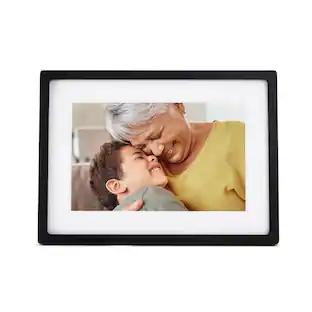
Nixplay - Smart Photo Frame 10.1-inch - Black
- General
- Brand: Nixplay
- Model Number: W10J
- Product Name: Smart Photo Frame 10.1-inch
- Color: Black
- Dimensions
- Product Width: 8.66 inches (The out of box width of the item. Width is measured as the horizontal distance from one side of the item to the other as it would be primarily used or placed.)
- Product Height: 11.85 inches (The out of box height of the item. Height is measured as the vertical distance from the bottom of the item to the top as it would be primarily used or placed.)
- Product Depth: 3.15 inches (The out of box depth of the item. Depth is measured as the distance from the front of the item to the back as it would be primarily used or placed.)
- Product Weight: 1.3 pounds (The out of box weight of the item.)
- Imaging
- Image Resolution (Display): 1280 x 800 (Refers to the number of pixels, both horizontally and vertically, used to either capture an image or display it. The higher the resolution the finer the image details.)
- Compatibility
- Memory Card Compatibility: None, None, None, None, None (The type of memory card(s) recommended for use with the product.)
- Interface(s): None (Refers to the types of connections that devices use to interact and communicate with each other.)
- Minimum System Requirements: Not Applicable, Not Applicable, Not Applicable, Not Applicable, Not Applicable
- Wireless Connectivity: Wi-Fi (The manner in which a device sends data to another device over a short distance without the use of wires or cables.)
- Operating System Compatibility: Android, Apple iOS
- Features
- Screen Size: 10.1 inches (Size of the screen, measured diagonally from corner to corner.)
- Built-in Storage: 8 gigabytes
- Warranty
- Warranty - Parts: 1 year
- Warranty - Labor: 1 year
- Other
- UPC: 5060156641859
Show off your family photos with this Nixplay 10.1 inch smart picture frame. Wi-Fi connectivity and the included app let you synchronize and display pictures from social media, and the included remote lets you switch photos easily.
- 10.1" LCD IPS display with 16:10 aspect ratio: The display auto-adjusts to portrait or landscape placement.
- 1280 x 800 display resolution: View every detail of your photos in stunning clarity and color.
- Wi-Fi connectivity: Transfer photos and videos to your Nixplay smart photo frame using your wireless network. No need for memory cards or USB sticks.
- Nixplay app: Control your photo frame from your smartphone using the Nixplay app, available for iOS and Android.
- Works with leading photo websites and apps: Instantly synchronize photos from Google Photos, Instagram, Dropbox, Facebook, Alexa, and Flickr onto your photo frame.
Whats Included
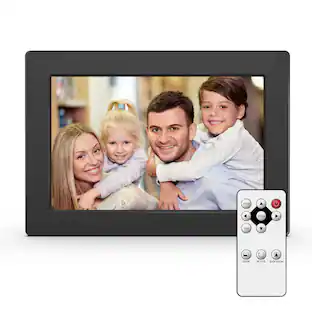
- Wall Adaptor with US plug, Infrared Remote, Wall Mounting Screws, Wall Mount Guide, Quick Start Guide
Q: How to reset this frame to factory settings?
A: How do you reset the nixplay 10.1 W10J FRAME
A: Hello. Yes, anyone from anywhere can send pictures to the frame. No, there is no limit for the number of people who can send pictures to the frame.
Q: Is there an annual fee or monthly fee?
A: Nixplay completely changed their model in the beginning of 2023. Now Nixplay requires a premium subscription in order to display more than 100 photos.
A: 1) You have a choice when you delete photos via the mobile app; you can either remove them from the Playlist (which means the original photo is still on the Nixplay Cloud, OR, you can choose to 'permanently delete' which does mean the picture will completely disappear from the frame and the Nixplay Cloud. 2) Yes. In fact, if you are in the mobile, click on 'Gift Prints'. From there, you can locate and select the photo you want to print, what you want it printed on, and then order online. We have a partnership with FujiFilm and supply competitively priced print products.
Q: How many photos does it hold
A: Hello, This frame holds 2000 pictures (pictures that are made with your cell phone). Cell phone pictures are usually about 12MP. If you add pictures from a DSLR (around 48MP) you can add only about 500 pictures (plus or minus).
A: Thanks for your question. The frame requires WIFI to receive photos but it has internal memory for offline photo viewing when there is no WIFI available.
Q: It it portrait only or can it be landscape too?
A: Hello, Since it is a picture frame, you can view pictures either way - portrait or landscape. The frame will automatically adjust the pictures to the orientation that you have set up.
Q: Does the frame have to be plugged in all the time to power?
A: Hi there, yes the frame needs to be plugged in at all times to power.
People also viewed
 $149.99The price was $199.99











Today's top picks
 $1,029.99The price was $1,199.99
 $629.99The price was $1,099.99
 $129.99The price was $219.99
 $1,399.00The price was $1,499.00
 $399.99The price was $499.99
 $549.99The price was $849.99
 $1,099.99The price was $1,649.99