Rating 4 out of 5 stars with 17 reviews
4.0- Picture Quality (8)
The vast majority of our reviews come from verified purchases. Reviews from customers may include My Best Buy members, employees, and Tech Insider Network members (as tagged). Select reviewers may receive discounted products, promotional considerations or entries into drawings for honest, helpful reviews.
- Rated 5 out of 5 stars
Excellent
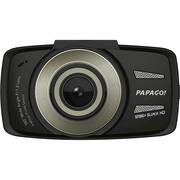
I would buy another one if I needed it. This camera is great in all looks, performance, and construction. I've had it for over two months now and I am very pleased with it. The picture is outstanding during the day and excellent during the night time. The screw is big enough to review your videos if necessary, but for the full HD enjoyment, you have to use a computer or TV. The warning features such as stop sign recognition, lane changing, and driver fatigue alert, could be annoying at times, but you can turn all that stuff off. I got one for me and one for my wife's car. If you want and unbias witness of your accident, or just want to record the scenery of your upcoming road trip, this camera is sure to do the job, and do it well.
Posted by Gil919
- Rated 5 out of 5 stars
Great Dash Cam
Been using it for a week now it’s a great product does everything i need it to and the memory card will format itself as you select which format option you like good picture clarity even has an HDMI port
Posted by iPad
- Rated 4 out of 5 stars
good little camera
Has nice clear picture, stop sign feature, is great when it works right. Does not always warn you of every stop sign. Will warn you to stop going down the highway. I am a shuttle driver and i am on the road most of the day, a 32 gb card is not enough.
Posted by kiddo
- Rated 4 out of 5 stars
No cons
It's a great dashcam. The video quality is great, it shuts off automatically when you unplug it (I wish it did when the truck turned off but I think it has to be hard wired to do that), and it's way smaller than I thought it was going to be.
Posted by Noavailablenicknames
- Rated 5 out of 5 stars
Papago
It’s a very good camera for when ever you’re driving I like it I have those kind of Camaras in my cars. I would recommend those types .
Posted by sonti9bangkok