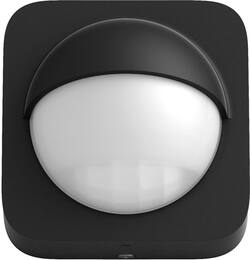
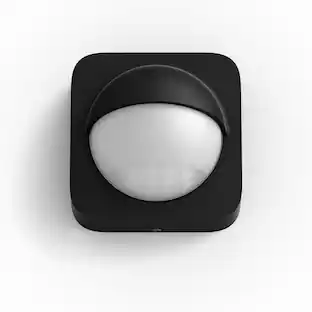
Philips - Hue Outdoor Motion Sensor - Black And White
- Key Specs
- Detector Type: Motion
- Sensor Type: Infrared
- Motion Detection Range: 39.4 feet
- Field Of View: 160 degrees (The area of a target, measured as an angle from the location of viewing, that can be observed.)
- Wireless Connectivity: Zigbee (The manner in which a device sends data to another device over a short distance without the use of wires or cables.)
- Works With: Amazon Alexa, Apple Home, Google Home, Cortana (Compatible with or able to be connected to other smart devices or applications.)
- Power Source: Battery-powered
- Number of Devices Included: 1
- General
- Brand: Philips
- Model Number: 541730
- Product Name: Hue Outdoor Motion Sensor
- Color: Black And White
- Detection
- Detector Type: Motion
- Sensor Type: Infrared
- Motion Detection Range: 39.4 feet
- Field Of View: 160 degrees (The area of a target, measured as an angle from the location of viewing, that can be observed.)
- Connectivity
- Wireless: true
- Wireless Connectivity: Zigbee (The manner in which a device sends data to another device over a short distance without the use of wires or cables.)
- Compatibility
- Works With: Amazon Alexa, Apple Home, Google Home, Cortana (Compatible with or able to be connected to other smart devices or applications.)
- Voice Assistant Built-in: No (A digital assistant built into the device that uses voice commands to answer questions and control smart devices.)
- App Compatible: true (The product can be connected to a program or software application on a mobile device, which then receives collected data from the product.)
- Operating System Compatibility: Android, Apple iOS
- Environmental
- Indoor Or Outdoor Use: Outdoor (Indicates the appropriate environment product was designed to be used in.)
- Features
- Placement: Wall
- Power
- Power Source: Battery-powered
- Dimensions
- Product Height: 2.99 inches (The out of box height of the item. Height is measured as the vertical distance from the bottom of the item to the top as it would be primarily used or placed.)
- Product Width: 2.99 inches (The out of box width of the item. Width is measured as the horizontal distance from one side of the item to the other as it would be primarily used or placed.)
- Product Depth: 2.51 inches (The out of box depth of the item. Depth is measured as the distance from the front of the item to the back as it would be primarily used or placed.)
- Product Weight: 0.5 pounds (The out of box weight of the item.)
- Included
- Number of Devices Included: 1
- Warranty
- Warranty - Parts: 2 years
- Warranty - Labor: 2 years
- Other
- UPC: 046677541736
Turn on porch or garage lights automatically with this Philips Hue outdoor sensor. It installs effortlessly on walls or posts via the included mounting components and automatically activates connected Philip Hue bulbs when incoming guests or intruders are spotted within its wide view angle and detection range. This Philip Hue outdoor sensor’s IP54 rating ensures reliable performance in all-weather conditions.
- Automatic light control: The sensor turns on the lights when somebody passes by.
- Weatherproof construction: Offers versatile placement.
- Philips Hue sensor: Features a large 160° detection area.
- Battery-powered design: Allows for simple power replenishment.
- Mounting versatility: You can mount it on a flat wall, or on the inner or outer corner of a wall or post.
Product Manuals
A: You can make motion triggers turn the lights any color or brightness. These are amazing!
A: When I first set my sensor up, it did activate from the street, which was about 100 feet from the sensor. However by easily adjusting the sensitivity in the app, I was able to limit activation to a radius of about 10 feet.
A: No, lumens, this is a motion detector.
Q: Can I turn this off from the hue app? What kind of range does it have? Thanks for any info.
A: You can use the app to control this sensor include a time frame for when it is active. Mins is sensitive over 50 feet.
A: One way to do this would be to buy a Philips-Hue Smart Plug. - Plug it into any working electrical outlet; then, - Link it automatically to your Philips-Hue Hub; then, - Link the Smart Plug to activate when your Philips-Hue Sensor near your front door senses motion; then, - Plug in any sound-making device you choose (for example a radio; a cassette tape recording of barking dogs). Your Hue Motion Sensor doesn't recognize WHAT you plug into the Hue Smart Plug. Once linked to your Hue Hub, the Hue Motion Sensor can be linked to several Hue devices in and around your home (Hue light bulbs, Hue Smart Plugs, for example). When the Hue Motion Sensor senses movement, it instantly "shares" that information with your Hue Hub, and the Hue Hub instantly turns on whatever Hue device you have chosen to be linked with the Hue Motion Sensor. The Sensor is just a tool. The Hub is the "brain" that instructs the Hue devices to carry out the simple automation that you created via your Philips-Hue App on your smart phone or tablet. Per your question, that simple automation could also include how long you want whatever device you have plugged in to your Smart Plug to be ON. If you set it for a minute (for example), the Hue Hub, upon being notified of motion detection, would turn on the electricity flow to your Hue Smart Plug for one minute, and then turn it off. YOU set the volume on your plugged-in noise box. Again, the Hue Hub doesn't know or care what non-Hue electrical device you have plugged into your Smart Plug. It could be a radio, an electric blanket, a lamp, for example. All the Hue Hub does is receive the motion instruction, and turns the Hue Smart Plug on (and then off), per your automation.
Q: What kind of battery is used? Is it replaceable or does the whole unit die after 2 years?
A: It uses Lithium AA cells. They are replaceable
A: This is not a light. This is simply a motion sensor that you can use with your existing hue lights to have them turn on or change effects when motion is detected.
Q: What batteries does it run on?
A: Included 2 double A batteries. Supposed to last 2 years
People also viewed
Today's top picks
 Black Friday in July Deal$749.99The price was $1,199.99
 Black Friday in July Deal$199.99The price was $399.99
 Black Friday in July Deal$499.99The price was $999.99
 Black Friday in July Deal$199.99The price was $249.99
 Black Friday in July Deal$199.00The price was $419.00
 $1,999.99The price was $2,649.99