The vast majority of our reviews come from verified purchases. Reviews from customers may include My Best Buy members, employees, and Tech Insider Network members (as tagged). Select reviewers may receive discounted products, promotional considerations or entries into drawings for honest, helpful reviews.
When I opened the package I first took out the instructions. The instructions are three steps, turn on your light, plug in the Hue Bridge and connect to Wi-Fi, and download the Hue App. Could not be simpler to get the product up and running and only takes a few minutes. That said I find that the system is lacking in instructions and information. That said, we love the light system. Will use the adjective “Fun” to describe our experience using Hue, as well as quite convenient. If you are kicked back on the couch at night watching TV and have several lights on in your room group you can simply turn on or off lights, or dim with commands to Alexa or with the app on a tablet or phone. If you are getting drowsy you can turn the Table Lamp to “Relax” or “Nightlight” scene to put you in the sleepy mode before bedtime. Love it. Great fun when away from home or in another room to change the lights, to everyone’s surprise the first time. Friends saw our lighting system and went straight to Best Buy the next day to purchase. First thing the wife did was to go into the next room and turn off the lights in the living room on her husband. When you arrive home in the evening you can give a simple command to Alexa and turn all connected Hue lights on throughout your home, a nice warm fuzzy feeling. If you are away from home in the evening or on vacation you can turn lights on with your phone app for security. After getting kid(s) into bed you can leave a light set to “Nightlight” and later simply turn the light off with a command to Alexa. Hue does have some maturing to do with availability of information and developing the Alexa Skill Set further. The Alexa Skill Set needs to be able to manage lights by name in each group of lights. What I mean by this is that you can set groups up in the Hue App, i.e. Living Room, Bedroom, Kitchen, etc. and then assign names to individual lights within a group. At present I could not turn off or on a given light in a room (group) by name, Alexa will only turn all the lights on/off or adjust all to same setting. It would be great to command Alexa to dim light “one” in living room and not adjust any others. Additionally, have yet to find a comprehensive Alexa command set listing, which of typical of Alexa Skills. You can easily manage all individual lights within a group or groups with the Hue App. My experience with Alexa Skill Sets is that they are typically refined over time so I am confident that Alexa will soon have the Skills for managing the Hue system fully developed. Another issue I have with the Philip Hue is that the company did not see fit to develop a PC or MAC based application to manage the system. That is a key gripe that I personally have with many of todays devices. We have computers running throughout our home, but I must go find an Android or IOS device to mange my lighting. The lights are rated to a Maximum of 25,000 hours of use. If you use a light for three hours a day and reached the maximum possible lifespan it would be slightly over 22 years! My take is with typical use you will find the lifespan somewhere between 2-4 years. If the lights do have this life expectancy it makes the system highly cost effective. The Hue App for Android is well done, easy to follow, easy to use and manage the system. Kudos. The Hue system works well and has great potential for the connected home. Torn on my rating of the Hue Lamp, want to give the review a 5 Star as I really enjoy the lighting and look forward too many years of service. On the other hand, want to give it a 3 Star review for lack of information PC/MAC software and the lack of full Alexa control. Therefore, in compromise I have given 4 Stars. My family loves this system and we will continue to expand our lighting configuration. Knowing the quality of Philips products, I feel confident that Hue will continue to expand and mature into a marvelous system well into the future. As it’s said the Proof is in the Pudding. When our friends saw the system the other day in our home they fell in love with it on the spot. Went straight to Best Buy the nest day and had it up and running that afternoon. My friend is not tech savvy and told me it was absolutely simple to setup and enjoy. FYI: if you add additional Hue Lights to your Hue System keep in mind that the individual lights are not developed to work with lamps with dimmers.
This review is from Philips - Hue White Ambiance Wellner Dimmable LED Smart Table Lamp
Posted by vrs99
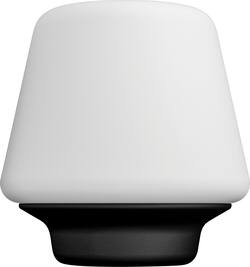
Design I was a bit surprised to find that Wellness Lamp by Philips Hue is just a table lamp with a white Philips hue bulb included. The metal base attaches to the frosted glass top with, what appears to be, small silicone "fingers" that hook the two pieces together. You can therefore pick the lamp up by the top and the bottom should not come off (but I would still hold on to both just to be safe). The frosted "lamp shade" provides a nice, ambient glow for the bulb inside. Features To use the Philips Hue Wellness Table Lamp, you'll need a Hue bridge to connect it to your network. The Hue app makes the setup process easy: just plug in the lamp and then open the Hue app and use the "add" function to find the light (it will show up as just the bulb). Once it is connected, you can set the table lamp between a cool white ("energize") and a warm white ("relax") setting. You can also adjust the brightness level as you see fit and make it part of "scenes" you may already have setup. Please note that this lamp does not light in different colors (other than white) as many of Hue's other products do. However, there is nothing stopping you from taking a Hue color bulb and using it in place of the white bulb that comes with the lamp. The lights gives off a nice glow and makes for good "mood" lighting. The light also gets fairly bright and can be used to light a small to medium-sized room. Value As this is just a lamp with a regular white Hue bulb included, you could probably achieve something similar by purchasing a Hue bulb and your own table lamp. There are no controls on the lamp itself (for example, no touch controls or dimming switch).
Posted by TechnicallyWell
I hadn’t used any Hue products prior to receiving this light, so I wasn’t sure what to expect. The light itself consists of a wooden base, a smart bulb and a frosted globe. It is very simple, somewhat modern, but subtle in appearance. I had to order and install a Hue Bridge before I could use the light. Be sure to note that before ordering this light. It also requires a mobile app, in my case from the Apple App Store. I had no problem installing the bridge, but it took a few minutes. Once the bridge was installed and updated, I was able to search for this light and add it to the Hue device list. Since the new Bridge is Apple Home Kit compatible, I was also able to add the system to Apple Home and control it from there. The system offers control over brightness and color temperature. Color choice is from bright white to warm yellow. Brightness from full to nightlight. The Hue app also allows you to choose from various “Scenes” that offer preset for color and brightness, The app also supports “routines” that offer support for home and away, wake up, sleep, and timer. I haven’t played with these too much yet, but the look like they offer quite a bit of flexibility. The lights can also be controlled by other apps as well. It was a positive first experience and I will likely expand my Hue system now that I have the bridge installed and can just add components to the system.
Posted by AncientGeek
Customers are enthusiastic about the light quality, ease of use, and stylish design of the Hue White Ambiance Wellner Dimmable LED Smart Table Lamp. Many appreciate its simple setup and integration with smart home systems, along with the high-quality glass construction. However, some customers find the price to be a significant drawback, and a few mention that the instructions could be improved for clarity. The voice control feature is also highlighted as both a pro and a con depending on user preference.