Plugable - 14-in-1 USB C Docking Station with 4x HDMI Displays - Quad Dock with 100W Charging - TAA Compliant - Black
About this product
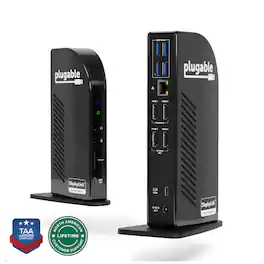
4 Monitor Docking Station for Ultimate Productivity The Plugable UD-3900C4 is the only solution of it’s kind - it’s the only quad monitor docking station combining DisplayLink and MST (multi-stream Transport) Alt mode technologies to deliver seamless four display expansion over USB-C. This TAA-compliant universal docking station drives four extended 1080p displays at 60Hz, with HDMI 1-2 powered by DisplayLink and HDMI 3-4 powered by MST Alt Mode. No other dock offers this hybrid integration, giving you unmatched flexibility in display configurations. Whether you're configuring a hot-desk environment, building out a permanent fixed workstation, or designing a multi-display content creation suite, this docking station for 4 monitors transforms your setup with performance and connectivity that cant’ be found anywhere else. Powerful Ports to Power Through Work This USB dock goes beyond displays. It features a USB-C port with 20W charging, four 5Gbps USB 3.0 ports, Gigabit Ethernet, audio in/out, and an SD Card Reader - offering everything you need to stay connected and productive. Plus, with up to 96W power delivery to your laptop, your system stays charged and ready to perform. System Compatibility Fully compatible with Windows 10 or later and ChromeOS 100+, the UD-3900C4 works with USB4, Thunderbolt 3/4, and USB-C hosts. Requires DisplayLink drivers (automatically installed with Windows Update). While it functions as a triple display docking station on macOS, the fourth display will mirror due to macOS’s lack of MST support. Lifetime Support Every Plugable product is backed by a 2-year warranty and lifetime support. Our US-based team is ready to assist before and after your purchase to ensure your docking experience is seamless. Included in the Box - The Plugable UD-3900C4 - Power Adapter and Cord - USB-C to USB-C Cable (1m / 3.3 ft): For host connection - Quick Start Guide: Easy setup instructions for DisplayLink driver installation and port usage
Features
More Ports, More Power
Expand your connectivity with a TAA-compliant 4 monitor docking station built for performance. This 14-in-1 USB-C docking station features 4x HDMI ports supporting 1080p @ 60Hz, 96W laptop charging, 4x USB 3.0, and 1x USB-C (20W) port. The perfect quad monitor docking station for professionals needing display flexibility and power on their desk.
Optimize Workstations
Drive productivity in Financial Services, Engineering or Media Teams with 4x 1080p monitors, 5Gbps USB data, and 96W laptop charging. This docking station transforms any hot desk or fixed workstation into a powerful hub; perfect for analysts or content creators who depend on multiple displays and constant peripheral connectivity.
Hybrid Display Technology
This 4 HDMI docking station uniquely combines DisplayLink and DisplayPort Alt Mode MST to enable four extended displays, HDMI 1-2 use DisplayLink, while HDMI 3-4 rely on Alt Mode. A compatible USB-C port with DisplayPort Alt Mode is required for HDMI 3 and 4 to function. Also includes 1x USB-C (5Gbps + 20W charging), 4x USB 3.0 (5Gbps), Ethernet, SD Card Reader, and audio in/out.
Compatibility
Works with USB4, Thunderbolt 3/4, and USB-C systems that support DisplayPort Alt Mode MST. Supports up to four monitors on Windows 10+ and ChromeOS 100+. On macOS, it supports three extended displays; the fourth will mirror due to a lack of MST support. Requires DisplayLink drivers,automatically installed via Windows Update for most users. In corporate environments, manual installation may be needed.
2-Year Coverage, Lifetime Support
Every Plugable product, including this 14-in-1 USB C docking station, is covered against defects for 2 years and comes with lifetime support. If you ever have questions, contact our North American-based team - even before purchase
Specifications
- Maximum Number of Displays Supported4Maximum Supported ResolutionFull HD (1080p)Number of DisplayPort Outputs (Total)0Passthrough PowerYes
Reviews
This product doesn't have any reviews yet.

- Poly - Voyager 4310 Wireless Noise Cancelling Single Ear Headset with mic - Black$113.99The price was $157.99
- HP - G6 USC-C 100W Docking Station - Black$199.99The price was $264.99

Compare similar products
4 Monitor Docking Station for Ultimate Productivity The Plugable UD-3900C4 is the only solution of it’s kind - it’s the only quad monitor docking station combining DisplayLink and MST (multi-stream Transport) Alt mode technologies to deliver seamless four display expansion over USB-C. This TAA-compliant universal docking station drives four extended 1080p displays at 60Hz, with HDMI 1-2 powered by DisplayLink and HDMI 3-4 powered by MST Alt Mode. No other dock offers this hybrid integration, giving you unmatched flexibility in display configurations. Whether you're configuring a hot-desk environment, building out a permanent fixed workstation, or designing a multi-display content creation suite, this docking station for 4 monitors transforms your setup with performance and connectivity that cant’ be found anywhere else. Powerful Ports to Power Through Work This USB dock goes beyond displays. It features a USB-C port with 20W charging, four 5Gbps USB 3.0 ports, Gigabit Ethernet, audio in/out, and an SD Card Reader - offering everything you need to stay connected and productive. Plus, with up to 96W power delivery to your laptop, your system stays charged and ready to perform. System Compatibility Fully compatible with Windows 10 or later and ChromeOS 100+, the UD-3900C4 works with USB4, Thunderbolt 3/4, and USB-C hosts. Requires DisplayLink drivers (automatically installed with Windows Update). While it functions as a triple display docking station on macOS, the fourth display will mirror due to macOS’s lack of MST support. Lifetime Support Every Plugable product is backed by a 2-year warranty and lifetime support. Our US-based team is ready to assist before and after your purchase to ensure your docking experience is seamless. Included in the Box - The Plugable UD-3900C4 - Power Adapter and Cord - USB-C to USB-C Cable (1m / 3.3 ft): For host connection - Quick Start Guide: Easy setup instructions for DisplayLink driver installation and port usage
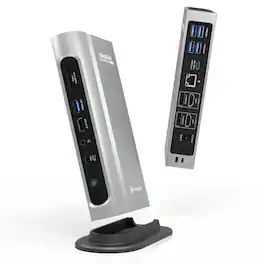
The Thunderbolt Certified 16-in-1 Quad docking station from Plugable delivers peak performance. The innovation starts with our display connections. Connect your 4K screens through 2x HDMI ports and 2x DisplayPort ports — a rare level of display flexibility in a Thunderbolt dock. But the real expansion picks up at the ports. Offering sixteen total ports to park your peripherals, including 7x USB ports, SD and microSD card readers, Audio, and 2.5Gbps Ethernet. It even adapts to your desk with an included stand for vertical or horizontal orientation options. Quad Display With this Thunderbolt 4 docking station Windows computers can use the 2x HDMI ports, and 2x DisplayPort ports to connect as many as 4x screens at up to 4K 60Hz. Can also be used a single, dual, or triple display docking station. On Mac (Intel, M1 / M2 / M3 Pro/Max, M4 / Pro/Max, M5 / Pro/Max CPU), extend your desktop to 2x screens using any combination of HDMI and/or DisplayPort. Macs with an M1 / M2 / M3 CPU only support one external display. 100W Power Delivery The laptop Thunderbolt docking station offers USB Power Delivery up to 100W (98W certified) — no more climbing under the desk to get plugged in. Not all laptop docking stations handle power the same. With the TBT4-UDZ, if your laptop needs less power, the docking station adjusts and only sends the optimal wattage. And with 6x available USB ports, and one USB-C port, your devices will always have a place to connect. Compatibility The TBT4-UDZ is compatible with *Windows 10 and later and **macOS 11+. Actual number of screens that can be extended depends on capabilities of the host computer. Be sure to see the Display Compatibility Chart below. *On some Windows laptops, enabling four displays may require a Windows settings change to disable the internal screen. **On Macs, additional monitors beyond specs below may not function, and/or will “mirror” rather than extend.
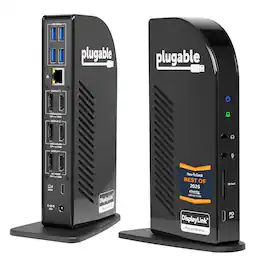
The Plugable UD-ULTC4K is a USB-C docking station designed for business and mixed-device environments. It supports up to three external displays through a combination of DisplayPort and HDMI connections, with up to 4K 60Hz resolution depending on host system capabilities. Named "Best Docking Station 2025" by How-To Geek. The dock includes 3 DisplayPort outputs and 3 HDMI outputs, allowing flexible monitor connections without requiring adapters for different display types. In addition to display connectivity, the dock features a front-facing USB-C port with up to 10Gbps data transfer and 20W charging for compatible accessories, 4 USB 3.0 ports with up to 5Gbps transfer speeds, an SD card reader, Gigabit Ethernet, and separate 3.5mm audio input and output ports. The host connection supports up to 100W USB-C Power Delivery, with 96W certified for supported laptops. The replaceable USB-C host cable can help simplify setup and maintenance in office deployments. Compatible with supported Windows, macOS, and ChromeOS systems. DisplayLink drivers are required for DisplayLink-based video outputs. HDCP is not supported, so protected content playback from some streaming services may be limited. Port configuration includes 1 USB-C host connection with up to 100W Power Delivery, 2 DisplayPort 1.2 outputs using DisplayLink, 1 DisplayPort 1.2 output using Alt Mode, 2 HDMI 2.0 outputs using DisplayLink, 1 HDMI 2.0 output using Alt Mode, 4 USB 3.0 ports, 1 USB-C port with 10Gbps and 20W charging, 1 SD card reader, 1 Gigabit Ethernet port, and 1 audio input.
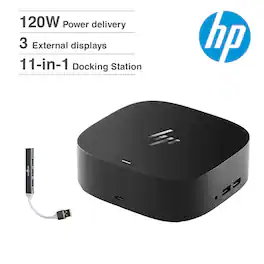
Seamless Productivity – Effortlessly go the extra mile with just a single USB-C cable. This essential dock seamlessly powers and supports 4 USB-A ports for all your accessories, up to 3 high-res displays。
Specs
Be the first to ask a question.
We’ll try to get your question answered within 24 hours by a Best Buy customer or brand representative.