Rating 4.4 out of 5 stars with 1478 reviews
4.4- Quality (370)
- Paddles (112)
- Ease of use (82)
- Weight (68)
- Feel (54)
- Stick Drift (43)
- Wired (36)
- Trigger (24)
- Buttons (12)
- Cord Length (11)
Customer Images
The vast majority of our reviews come from verified purchases. Reviews from customers may include My Best Buy members, employees, and Tech Insider Network members (as tagged). Select reviewers may receive discounted products, promotional considerations or entries into drawings for honest, helpful reviews.
- Rated 4 out of 5 stars
Great alternative to the Elite Series 1 controller
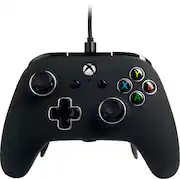
This will be an in-depth review of the Fusion Pro in comparison to the Elite Series 2. I used the Fusion Pro for about 2 weeks. (I never had the series 1 elite, so I can't compare to that, but I would honestly say that the Fusion Pro competes directly with the Elite s1 and not the s2 in terms of features and customization). As for the Fusion Pro. I can honestly say that @ $80, you are getting a premium feeling product, as far as 3rd party controllers go. Right out of the box, you are greeted with this big carrying case. I like the material it is made out of compared to the Elite case. You get a nice weight to the controller. Almost as, if not as heavy as the elite s2. -The feel and texture of the controller is nice. (feels almost similar to the PowerA Enhanced controller). So if you held any PowerA controller before, then the shape is not very different from that. Nice soft finish in the front and a textured grip on the back, though doesn't feel as grippy as the elite s2. -The sticks are made of qulality plastic and I wish it came with more swappable sticks. The ones with extra height are not that tall. They do add height for better precision, but if you were expecting to get kontrol freek height, then you will be disappointed. Kontrol freeks somewhat fit. I had plenty of times where the kontrol freeks came off the stick during heated battles in Apex. I guess to fix this problem, the stock xbox one controller sticks do fit on the Fusion pro since they are the same shape and have the same oval shape hole on the bottom (I tried it myself). Swapping the sticks and tension rings are not as easy as the elite controller, but easy enough. Just don't try to do it in minimal lighting. -Stick tension is tighter than the stock xbox one controller. Feels more like the tension you get on the xbox 360 controller. (if you want to compare it to the elite s2 tension, then it will be like if the s2 was set to the first tension setting). The tension rings do a great job making the sticks feel smooth, just like on the s2. -D Pad is clicky, but not as clicky as the elite s2, but is responsive. -Buttons are the same, not as clicky, but responsive as well. Never got stuck. -Bumpers sat a little higher than the elite s2, but was still comfy during gaming. -Triggers were responsive and had no problems with it. -As for the trigger stops, they do work as intended, BUT the setting difference between T1 (full press) and T2 (Half press) is very minimal and can't really tell the difference. I don't really see a use for having half press on any trigger stop. People either want full press or very minimal press. The T3 stop honestly feels like the half press when compared to the elite s2. That was one of the cons I had with this controller. I wish they did a better job of making T1 and T2 feel different and T3 having a very short press like on the elite s2 (where it becomes more like a button than a trigger, that's how minimal it is on the elite). -The paddles are very clicky and are easy to press and work as intended. They are pretty long especially the bottom paddles (from the pics, the bottom paddles are visible in comparison to the elite s2. I think the placement of the paddles compares more to the elite s1, just because of their lengnth. Accidental presses with the top two paddles will be rare or will not happen at all, but my experience with the two bottom paddles, accidental presses will happen. I'm what you call a "gripper" when holding the controller (using my ring and pinky fingers to hold the controller). So when I had the bottom paddles on, I couldn't hold the controller like I wanted, so I only played with two paddles. Mapping them to any button is easy and can be done while in-game which is nice. You cannot use the xbox controller app to remap/unmap the buttons and paddles. Another con, I wish PowerA sold the mappable pro pack seperately on their site. So in case you need extra paddles or need a replacement pro pack, you can just buy that seperately. On a side note, to combat the problem of long bottom paddles, I would have bought an extra pro pack and used the top paddles as bottom paddles. That way I can hold the controller comfortably w/o having accidental presses. -Removing and putting paddles back on was not hard, but not as easy as one would like. If you can see on picture 6 (where the paddles are off the pro pack), the pro pack has white markings where you would put the paddles back. Since the pro pack is plastic and the paddles are metal, the repeated on and off of the paddles will bend the plastic surrounding the holes. So be careful when putting them back on. -The included USB cable (mirco usb, wish they went with type-c), has a locking mechanism when plugged into the controller. I found it very hard to remove once in there. Had to really squeeze the side release buttons to get it off. This could either be a good thing or a bad thing, depends on how you see it. I always unplugged my controller after use, so the difficulty of removing the USB cable was a con for me. I just used the USB cable that came with my old PowerA Enhanced controller. -3.5mm headphone jack gave me no problems after I updated the firmware. Volume was loud coming out of my headset, mic was clear to others. To me, was the PowerA Fusion Pro worth $80? I would say yes IF I didn't have my modded xbox controller. What I mean modded is that I had the Collective Minds Mod pack (which made my controller wired and gave me 2 paddles in the back), and 3rd party trigger stops (which was mediocre @ best). Since I only used two paddles on the Fusion Pro, I felt like I already had the same features I was using in my modded xbox controller except the Fusion Pro had better build quality, tension rings, and somewhat better trigger stops. I did end up returning the Fusion Pro and kept my Elite s2. Now for others who are just coming from a stock xbox controller, I say YES, the Fusion Pro is worth the $80 if you don't want to shell out $100+ for the elite s1 (that's probably out of warranty and is used). I don't want to say Elite s2 because like I said before, IMO the Fusion Pro competes more with the Elite s1 in terms of features and design.
This review is from PowerA - Fusion Pro Wired Controller for Xbox One - White-B
Posted by JAMphib
- Rated 4 out of 5 stars
Good controller just uncomfortable
It’s a good remote that’s very durable, the wiring is the problem. The wire is very annoying and makes the controller uncomfortable. Other than that its pretty easy to use.
This review is from PowerA - Fusion Pro Wired Controller for Xbox One - White-B
Posted by AlexV
- Rated 5 out of 5 stars
Good Quality
Bought this controller after I returned the 4th xbox contorller. Wanted to see if this one last me more than a month or two. The quality is good it's heavy as the elite controller the joy sticks are the same if not a tad stiffer than the oem xbox controller. We'll see after a few weeks or months. Programming the back triggers are fast and easy you can do it on the fly takes less than 5 seconds each button to map. A lot of people might not like it since its wired but I prefer wired over wireless.
This review is from PowerA - Fusion Pro Wired Controller for Xbox One - White-B
- Rated 5 out of 5 stars
Best Controller I've Ever Used.
I'm a Sony Fan and that means I go for Playstation. Since the Labtop. That uses Mircosoft I went with an XBOX Controller. I WAS HEISTATE, At first. BUT TURNS OUT I LOVE THE CONTROLLER. CAME WITH UPGRADABLE ANALOG KNOBS. AND GREEN ANALOG RINGS. WITH PADDLES , Like HELLO oh YES and a Sweet Case to putt everything in a nice hard case to. NOT to heavy for the feel in your hands. Very well made. And usually a controller like that with upgrades you pay 120 or 180. I got a steal for only 79.99. Great Price Great Controller, still A Sony PS GUY. THOUGH.
This review is from PowerA - Fusion Pro Wired Controller for Xbox One - White-B
Posted by SmurphTheSurf
- Rated 4 out of 5 stars
Best, if not only alternative to Elite Series
I'm wasnt a fan of 2nd party controllers for any system. And PowerA was definitly part of the reason fir that opinion in the past.Thing is, I havent been a fan of the Xbox brand controllers fir this generation either (never had a probkem with 360 or original). Every controller ive used eventually either the shift,trigger buttons would break, the regular buttons would start to stick or the worst of them all, the analog would get so loose that it would make controlling anything that required precision pointless to play.The original elite was amazing except the analog issue eventually resurfaced. Then the elite 2 came along and wow the analog loose issue was addressed and might have been resolved but I couldnt find 1 in time to check it out. Thats when I noticed the PowerA Profusion on the shelf. It appeared to be down to 2 left in a spot where obviously more had been there. The associate there told me he had heard very good things about it but I didnt fully trust his opinion or the opinion of someone else through him. I looked it up on you tube and there were many, many good reviews. So many it baffeled me. PowerA? Really? I was so impatient and curious and the price was less than half of elite 2 so I just jumped in with the verbal assurance that it could be returned if it wasnt up to par. Long story short'ish. Its awesome. Worth every penny and even the fact that its wired wont stop me from ennoying it.Its presentation, the case to store it in, the feel of it and its seemingly plain but actually not plain at all design is above and bwyond my expectations for any compamy let alone PowerA. They did not produce this controller cheap or faulty in any way and its setup so nicely that changing the thumbsticks is quick and takes no time or effort to do. The cord is quality and its connections are set up so u wont ruin or damage either the cord itself or the connection points on the controller.The top shell is easily removed to change or fix if needed any parts on the controller. No tools or any kind of help is required to change it up and change it quick. It uses really strong magnets to hold it together. Which is funmy cause the Xbox controllers use magnets to hold the thumb sticks and screws to hold the top shell. And one other nice feature is the ability to add and remove the extra 4 bumpers on the bottom all at once or individually as well as switched out to appear as though it doesnt have them at all. There extremly easy to set as well. A little button thats completely unintrusive and easily forgotten is on the bottom, you just click it once, push the button you want to mirror and push the bumper on the bottom you wish to set it to. I like it so much I never bought the elite2 and even though my first one still works great im afraid theyll discontinue making them so I went out and searched and eventually bought 2 more to have in case amything happens to it. Its only fault,if its something that is that important to you is the fact that its not wireless. Its a concern I thought was a deal breaker but I was definitly wrong. Its worth your money and you wont regret it. You see one, Buy it. The black one you can maybe find still at aot of different places but my favorite is the white version only available at Best Buy. Ive included pictures of all the features I mentioned to help express how easy it is to program it the way you want to.
This review is from PowerA - Fusion Pro Wired Controller for Xbox One - White-B
Posted by MrBiGGxDeal