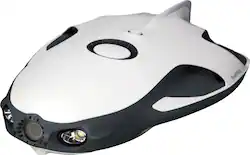
PowerVision - PowerRay Wizard Underwater ROV Kit - White
- Key Specs
- App-Controlled: true (Product is able to be controlled, configured, and/or managed by a program or software application installed on another device.)
- Wireless Range: 262 feet
- General
- Brand: PowerVision
- Model Number: PRW10
- Product Name: PowerRay Wizard Underwater ROV Kit
- Color: White
- Recommended Minimum Age: 18 years
- Features
- Toy Type: Boat
- Indoor Or Outdoor Use: Outdoor (Indicates the appropriate environment product was designed to be used in.)
- App-Controlled: true (Product is able to be controlled, configured, and/or managed by a program or software application installed on another device.)
- Wireless Range: 262 feet
- Number of Propellers: 3
- Power
- Rechargeable: true
- Battery Capacity: 6400 milliampere hours (The amount of energy stored in the battery.)
- Charging Time: 150 minutes
- Remote Control Power: 2.4 gigahertz
- Dimensions
- Product Weight: 8.38 pounds (The out of box weight of the item.)
- Warranty
- Warranty - Parts: 1 year
- Warranty - Labor: 1 year
- Other
- UPC: 852123007813
Open a world of ocean exploration with this PowerRay Wizard underwater camera. The detachable PowerSeeker fishfinder can be used by itself to map landscapes, and the 4K Ultra HD camera with wide-angle lens captures photos or videos in lakes or seas. Real-time streaming at 1080p from this PowerRay Wizard underwater camera lets you share your adventures via social networks.
- PowerRay ROV kit: Ideal for exploring the underwater world.
- Remote-controlled design: The internal Wi-Fi system allows transmission of images and data over a distance of up to 262 feet.
- Runs on lithium-polymer batteries: Equipped with a 6400mAh battery for PowerRay and a 3000mAh battery for the base station to provide long sailing time.
- Wireless transmitter controller: Offers wireless connection with the base station to operate the vehicle, or adjust LED lighting and speed.
- Fully integrated 4K UHD camera: Research and shoot underwater content for movies with Burst Mode photo shooting at 5 fps in 12 megapixels and real-time 1080p underwater streaming.
- PowerVision VR ONE Plus goggles: Travel the underwater world and explore its secrets with an immersive First Person View (FPV) experience.
- PowerSeeker fishfinder: The sonar system can detect underwater landscapes, temperature data, depth and fishing hot spots up to 230 feet below the surface.
- Vision+ app: View real-time transmitted photos or videos. Acquire detailed information from the underwater sonar and navigation. Operate the vehicle and adjust LED lighting and speed. (Supported iOS 8.0 or later, Android 4.2 or later).
- Recommended minimum age: Suitable for ages 18 and older.
- PowerRay ROV kit: Ideal for exploring the underwater world.
- Remote-controlled design: The internal Wi-Fi system allows transmission of images and data over a distance of up to 262 feet.
- Runs on lithium-polymer batteries: Equipped with a 6400mAh battery for PowerRay and a 3000mAh battery for the base station to provide long sailing time.
- Wireless transmitter controller: Offers wireless connection with the base station to operate the vehicle, or adjust LED lighting and speed.
- Fully integrated 4K UHD camera: Research and shoot underwater content for movies with Burst Mode photo shooting at 5 fps in 12 megapixels and real-time 1080p underwater streaming.
- PowerVision VR ONE Plus goggles: Travel the underwater world and explore its secrets with an immersive First Person View (FPV) experience.
- PowerSeeker fishfinder: The sonar system can detect underwater landscapes, temperature data, depth and fishing hot spots up to 230 feet below the surface.
- Vision+ app: View real-time transmitted photos or videos. Acquire detailed information from the underwater sonar and navigation. Operate the vehicle and adjust LED lighting and speed. (Supported iOS 8.0 or later, Android 4.2 or later).
- Recommended minimum age: Suitable for ages 18 and older.
Whats Included
- PowerRay Vehicle 64G
- PowerSeeker fishfinder
- ZEISS VR ONE Plus goggle
- Controller
- Base station
- 23--foot communication cable
- Intelligent charger
- Carry-on case
- PowerRay Vehicle 64G
- PowerSeeker fishfinder
- ZEISS VR ONE Plus goggle
- Controller
- Base station
- 23--foot communication cable
- Intelligent charger
- Carry-on case
Q: What is the maximum depth the drone can travel?
A: 98 ft. @aol for questions
Q: How many lumens does the light produce
A: Hi Danno, There are two dimmable lights at the very front of the PowerRay ROV. They each produce a maximum of 450 Lumens, which are also dimmable.using the Remote Controller. Their color temp is 6500 Kelvin. I have used this ROV with both lights ON and have produced pretty good photos in low light situations (see attached pics).
Q: How long does the battery last?
A: A good 2 hours @aol.
Q: can this subject project what it views to surface without using computer or cell phone
A: No, you’ll need a tablet or smartphone which has the PowerVision software that allows you to capture images.
Q: If there’s no power of it becomes disconnected deep down, will to unit come back to the surface.
A: Yes, it will come back to the surface. Plus, the device is on a cord. All you have to do is pull it back in. This is a fun device that gets very good images from underwater.
A: Between 3-4 knots.
Q: Can you catch fish with this
A: undefined