Rating 4.7 out of 5 stars with 1256 reviews
4.7- RGB Backlighting (409)
- Keyboard Quality (364)
- Key Feel (87)
- Ease of use (80)
- Price (76)
- Software (11)
- Space Bar (5)
Customer Images
The vast majority of our reviews come from verified purchases. Reviews from customers may include My Best Buy members, employees, and Tech Insider Network members (as tagged). Select reviewers may receive discounted products, promotional considerations or entries into drawings for honest, helpful reviews.
- Rated 5 out of 5 stars
After almost two years with mechanical keyboards,
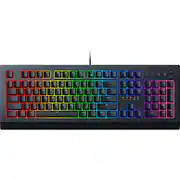
I have owned and used a blackwidow ultimate 2017 for almost two years and although I love the clicky loud green switches they have to offer, it was just time for an upgrade. The caps are beginning to wear and the cable has gone finicky. So I did some searching and got my self a switch tester with all various switches from manufacturers. I wanted something quiet, yet not so sensitive. I also own a blackwidow te tkl v2 with yellow switches and day to day typing is a nightmare (for me at least) with those super sensitive switches. I find myself typing a wrong key often. I barely owned that keyboard for 6 months before I went back to my blackwidow ultimate 2017 just this month. I felt cherry browns and razer orange might be the best switch to me, but I did not feel like spending much on a keyboard as I hardly use it when gaming on my PC now (controller user). Corsair offers the K55 (cheaper, also a membrane) and the newer K60 SE with cherry viola switches (more expensive, do feel nice), but I will admit I am a Razer fanboy as I have never had an issue with their products QA, dying on me, or issues with customer service since I switched over to using them in 2016. Out of the box, the cynosa v2 is presented in a much more generic looking package, the insert is brown and not padded like the more expensive offerings from Razer and it came wrapped in a clear plastic covering. One thing I did notice is Razer dropped from the previous cynosa is the LED logo from the bottom of the keyboard, now it just says 'Razer', definitely not a deal breaker though. Setting up the device was easy, W10 installed the driver and synapse detected a new peripheral automatically. Setting up the lighting was a breeze along with the macros. In terms of design, this board has a much more utilitarian look, matte black and a slim profile. One of the main reasons I went with the V2 over the original cynosa is due to the fact they included media keys, which do come in handy. The keys feel nice, and the keystrokes actuate with no issues. Definitely an easier typing experience already when compared to the yellow switches. I do wish Razer included a wrist rest like the ornata with the cynosa v2, but again not a deal breaker. I mean, it does what a keyboard should do, type. Keys register as they should and it has rollover, I have not missed a keystroke as of yet. But if you are picky and don't like what most call 'mushiness', then of course spend more and get a mechanical. But if your just a regular user, don't like mechanical, beginner PC gamer, or don't want to spend much on a gaming keyboard, the cynosa v2 definitely get's my thumbs up. Many would consider this a downgrade, but I did not see it as a downgrade for me personally. I was able to snag it for just under $30 buts it's a steal even @ $59.99.
Posted by ErickC94
- Rated 5 out of 5 stars
Great value for gaming
We have three of these keyboards in use in our house. Both of my children and I use this keyboard for gaming on our PCs and have no complaints about the function of the keyboard. Build quality is excellent. The keyboard feels quite solid for an all plastic build. There are three height adjustments to make typing more comfortable. The keyboard stays nicely in place with the rubber feet in contact with the XL mouse pad on my desk. There are plenty of RGB lighting effects available through the Razer Synapse software (if you are so inclined). I prefer to set it to a deep red, which allows me to see the keys in a dark room without being too bright. Is it as fast/accurate as a mechanical keyboard?... probably not. However, to maintain marital bliss, I did not want a loud "clicky" keyboard in the shared space of our home office. So, a membrane keyboard is a better choice for me anyway. All things considered, I believe this is a great keyboard at a reasonable price point.
Posted by ZekeMTU
- Rated 4 out of 5 stars
Good mechanics, awful software.The Bell for Razer.
Keyboard is really good, but I had discount ;-) certificate. BUT Software is awful, I have 2 university degree, seems it is not enough nowadays anymore for it - cant figure out (STILL) about make each key - individual color as advertisement screams about! Aha.... Go for a third degree now on Youtube. PS. Must go for YouTube Bloggers Videos to figure out the feature and will start to learn it for 40 minutes video-manuals! Overall otherwise if for not Fanatics - it is a Real Good feeling&touch Keyboard! Software is nightmare, slow, not-intuitive garbage piece of art in Top of garbage competition. Hello to Razer in this matter ;-)) I mean NOT. AT all. Wake up - bell is ringing, read and fix it.
Posted by Client
- Rated 5 out of 5 stars
Great, inexpensive keyboard
For the money', you absolutely cant beat this keyboard. Very fluid. Solid feeling. The keys dont feel cheap. Lights look nice and the customization about everything is what's tops. Razer puts out a wuality product, even for the cheaper products. I cant stand the kb/m on my Victus so this gets used, as well as a Deathadder V2 mini.
Posted by ElAsesno
- Rated 5 out of 5 stars
A Great Deal with Tons of Features
Individually lit RGB keys? Check. Easy typing? Check. Fully customizable color/animation profiles, including ones tied into specific apps/games? Check. Priced reasonably, unlike just about every other keyboard brand/model with these features? So many checks. I've had this keyboard for a couple of months now, and it continues to be a pleasure to use. I especially like that it had two different heights for the read stands to keep it at a perfect angle of tilt for comfort during long typing or gaming sessions. And the Razer Synapse software makes customizing it to almost insanely granular levels possible, even if it's sometimes a bit overwhelming. Coupled with the fact that you can also apply lighting effects to other compatible devices like the Basilisk 3 mouse with the click of a button, and the whole Razer Chroma ecosystem is just plain nice, and at much lower prices than other manufacturers. Oh, and how beautifully it ties in with that Basilisk mouse I mentioned. When part of an overall RGB setup, the possibilities for customizing one's work/gaming space become enormous. I'm not usually a 5-star reviewer, but when something works this well for such a good price, I have to give that extra little bump in its rating. I can easily recommend this keyboard, especially if you can get it on sale for even less.
Posted by ArkPhoto