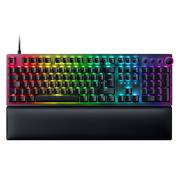
Rating 4.8 out of 5 stars with 142 reviews
4.8- Keyboard Quality (49)
- Key Feel (25)
- Wrist Rest (16)
- Switch Type (10)
- Media Controls (4)
- RGB Lighting (9)
- Price (3)
- Software (3)
- USB Port (3)
Customer Images
The vast majority of our reviews come from verified purchases. Reviews from customers may include My Best Buy members, employees, and Tech Insider Network members (as tagged). Select reviewers may receive discounted products, promotional considerations or entries into drawings for honest, helpful reviews.
- Rated 5 out of 5 stars
Satisfying Typing.
Red linear and tactile switches are the best, the feeling when typing, it's so smooth and also it is pretty silent, it is the perfect type of mechanical keyboard. I was there was a low profile keyboard that is also red switch linear tactile with the foam at the bottom that makes it silent like this one. I think the price could be a little lower though. I paid $200 plus taxes for this one, but it's not even wireless. Other than that, it's a great keyboard.
Posted by fredywnavas
- Rated 5 out of 5 stars
Mechanical Feel with Membrane Quietness
KEY FEATURES Per Key Re-mapping Numerous Lighting Options Up to 8000Hz Polling INITIAL SET-UP AND CONFIGURATION I will say right up front, that I am in no way a fan of the Razer Synapse software. It is slow to load and often consumes a significant amount of system resources. Especially considering the negative attention Razer has garnered over the past few months with its security and the Synapse 3 software, it is time for an overhaul. I downloaded and installed the latest version of the Synapse software prior to connecting the Huntsman V2 keyboard. Upon initial plug in, the Synapse software failed to detect and install the drivers for the keyboard. I had to go to the Synapse software and manually check for an update. Not only did the software weigh in at over 350MB on initial download, upon connecting the keyboard, the software required an additional 100+MB update to recognize and install the necessary drivers for proper operation. USE AND PERFORMANCE This keyboard is quite unique compared to my others. The additional sound damping material applied by Razer goes a long way to taming the loud clack of the switches. The dampening allows you to carry on a conversation or hear a TV or music where other keyboards constantly interrupt with their loud switch engagement. It's obvious Razer put a great deal of thought into improving this keyboard over the first generation and that R & D has payed off. It offers the consumer the best of both worlds, really. The tactile feel of a mechanical keyboard dulled down to the point it sounds like a membrane keyboard. Very nice. The construction is top notch. The machined aluminum top feels robust and extremely sturdy with a nice heft to the piece. The keys have a unique texture to them, unlike any of my other keyboards whether they are mechanical or membrane. At first use, the texture seemed quite odd, but after only a couple of minutes, now feels great! The lettering and illumination are also top notch. This is easily the most legible keyboard that I own. Even better than my Logitech Carbon. The lighting is also far superior to not only my beloved Carbon, but also my Corsair keyboard as well. The colors are rich and vibrant and combined with the font on the keys, make for an excellent typing experience. While I thoroughly dislike the Synapse software, it does allow for a great deal of customization for this keyboard. It seems as the owner's customization options are nearly endless. Each individual key, knob, and button is customizable and re-mappable. There are so many options available for customization, that it would be hard to get them all into one review. With polling options up to 8000 times per second, this keyboard is VERY responsive. FINAL THOUGHTS The keyboard is a great piece of hardware. The look, feel, performance, design, etc are all top notch and make the keyboard a worthy competitor for a premium keyboard. The font and back lighting are the best I've ever experienced on a keyboard to date. Way better than my Corsairs' and even better than my Carbon (I didn't think I'd ever say that). The colors are bright and vibrant. Some of my other illuminated keyboards seem washed out and the RGB colors are dull and not true looking. Not with this Razer keyboard. Every aspect of the unit itself feels high end and luxurious. The only thing holding the overall experience back is the Synapse software. It is just too much of a resource hog and every single device I've plugged in needs over a 100MB update to get it to work properly. I wish Razer would have spent as much time on the Synapse software as they did on the keyboard. Studying the Corsair iCue software or the Logitech GHub software would pay huge rewards for Razer. In conclusion, this is a 5 star keyboard with 3 star software. I don't see how the keyboard wouldn't serve any buyer very well.
Posted by NAMO
- Rated 5 out of 5 stars
A great all around mechanical keyboard
I’ve always been a fan of mechanical keyboards and even though I tend to use a slim Bluetooth keyboard for most daily tasks, I still love the feel of a good mechanical keyboard. I’ve been a fan of Razer products for a long time and was excited to be able to try out the Huntsman V2. It comes in a brightly colored Razer-branded box. The keyboard plugs right into a USB-A port and can be used right out of the box. You are given the option of registering the keyboard and installing the Razer Synapse software for full customizable control of the keyboard. This is only available for users who are connected to a Windows 10 or higher operating system. The keyboard has a full layout including the number pad. The switches are optical switches which means they use infrared light and photoelectric switches to detect a key press. Optical keyboards tend to have a faster reaction time than metal switches and they are quite a bit quieter than standard mechanical switches. This keyboard is actually the first time I’ve used a keyboard with optical switches and it’s a completely different experience than other mechanical keyboards. The presses are soft, but accurate. One of the things I usually do in order to test a keyboard is just a simple typing test. This helps me determine how quickly I can move around the keyboard and how accurately I can type with it. I usually have a 72WPM adjusted speed with 100% accuracy. This time I had a 71WPM sped with 95% accuracy. I think part of that is because the keys are so much higher than I am used to since I use a slim profile keyboard most of the time. One of the big features of this keyboard is its wrist pad. The keyboard comes with a super plush wrist pad that connects to the keyboard magnetically. It makes typing for longer periods of time very comfortable. This keyboard is a great complement to any gaming set-up. The cable is even easy to tuck away since it's braided. I’m not a big fan of the fact that you can't customize your experience unless you run a Windows OS, but it functions really well as a classic mechanical keyboard without all the noise that goes along with it.
Posted by nickcal
- Rated 4 out of 5 stars
Solid performance with minor quirks
Pros Aluminum top plate Four on device spaces for profiles Keys nearly silent Quick response Keycap labels don’t wear off Customized keycaps available directly from Razer Adjustable sensitivity for typing and gaming Magnetic wrist rest Adjustable backlight brightness Allows guest access to Synapse Cons Keycap backlight inconsistent Key sound inconsistent, some rattle Activation point feels deeper than normal Typing mode causes missed keys Media keys activation feels cheap Design and Appearance One could be forgiven for thinking the Huntsman V2 is entirely plastic as the finish on the top deck makes it appear plastic, but it is metal. The keys are made of PBT instead of regular ABS which should mean better wear, but only time will tell. One thing that should stand up over time are the keycap labels. Unlike some keycaps where the pigment is just on the surface and wears over time, the “Doubleshot PBT” keys are two parts model together where the top shell is molded over the keycap labels. This should mean even as the keycaps wear down, the labels will not change as they are the actual color of the material. The downside of this is it means the backlight uniformity of the keys is inconsistent. The surface has a slight texture and is dished left to right curve. In previous generations, you could swap out switches if you wanted. On the Huntsman V2, there doesn’t seem to be any mention of the ability. The wrist rest is soft faux leather and attaches magnetically to the keyboard. The magnetic design makes installing and removing a snap and thankfully means you won’t accidentally break the thin retaining clips on tradition style wrist rests. Setup and Performance Setup is straightforward. Shortly after plugging in the Huntsman V2 you are prompted to install Razer Synapse if you don’t already have it installed. Of course, Synapse isn’t unique to the Huntsman but one thing different is that you get 4 on device storage slots for custom profiles. Within Synapse you can configure a profile, then drag to a panel on the right where it shows you the onboard storage. This way, if you bring your keyboard to another computer without synapse you can still bring your four favorites if you upload them before moving. Of course, there is too much to cover in a short review and a lot is like other Razer products. The important question is how it feels and performs. The linear operation of the switches is very smooth and consistent between keys. However, keycaps do exhibit a bit of wobble as you press on them. The corner you press dips a lot more the opposing corner. That said, if you have never experienced a keyboard can press even a long key like the space bar and it depresses perfectly flat, regardless of where you press it, you will likely never notice this effect on the Huntsman. The activation point is consistent while feeling slightly deeper than average. If you have a light touch on the keys, you may have to adjust slightly as you may initially miss button presses. If type heavy, the Huntsman V2 is pretty forgiving with long key travel before bottoming out. To a point, you can adjust the responsiveness by changing the default profile from typing to gaming. The polling frequency is also adjustable from 125Hz to 4000Hz. While activation feels consistent, noise is a bit more of a mixed bag. Overall operation is noticeably quieter, but some keys have a plastic sound, and some others have a metal spring sound. It’s subtle but it does detract slightly from the overall experience. The media keys at the top right of the keyboard feel slightly out of place in operation. They feel rigid with almost no movement and a hard click. After using keys with deep travel, linear, silent switches the short travel buttons with a loud click just seems odd. That said, they get the job and will be used much less often so it really depends on how picky you are. The volume wheel has a nice feel and can be adjusted without looking. Just place your hand on the right side of the keyboard and you can feel the dial which can be operated from the side or top. The center of the dial is also a mute button which glows red when you are muted. Gameplay is harder to quantify but in Doom Eternal movement felt more predictable. Key switches are forgiving enough to allow you to lay your hand on WASD to rest and ready to press quickly. This is nice because some keyboards are overly sensitive requiring you to hover your fingers above and eventually the tiredness hits, your hand twitches and who knows what you selected and where you moved. While maybe not so helpful for typing situations, the long travel came in handy here. Final Thoughts While there are some minor cosmetic issues, gameplay is consistent and enjoyable. Overall, if you have liked Razer products in the past you will find the Huntsman V2 to be very familiar and enjoyable. If you haven’t used Razer products and are in the market for a new near silent gaming keyboard, the Huntsman V2 is worth taking a look.
Posted by CraigB
- Rated 5 out of 5 stars
Amazing keyboard that does everything right
I’m relatively new to gaming PCs, but I’ve had many keyboards over the years. My newest PC goes in the gaming category and was my first introduction to gaming keyboards with RGB lighting. The lighting was overly bright and the keys had very loud clicks. I don’t know if that’s what gamers want, but it certainly didn’t interest me. That’s where the Razer Huntsman V2 comes in. I’ve only had this keyboard for a few days, but I can already say that I agree with the design choices. The keys have a layer of foam that absorbs the clicking sounds in a satisfying way. I very much prefer this to the loud clicks from my other gaming keyboard. I’m also in favor of the RGB lighting on this keyboard. It’s not over-the-top, just the right amount to read the keys and get the RGB lighting effects that gamers crave. This also happens to be very customizable, thanks to the Razer Synapse software. Let’s just say that the only real limitation is your imagination, but you can either use various presets to get there quickly, or go deep into the editing of each key. If you match it with a Razer mouse, you can edit both in the same program. The keys have a nice feel to them, and I enjoy typing on them. Thanks to optical switches, the latency is incredibly low, making every keystroke feel instantaneous. My left hand felt perfectly fine after a long gaming session with this keyboard, so I’m looking forward to using it from this point forward, as it improves my overall gaming experience and comfort. If comfort is your thing, a wrist rest is included that will allow you to rest your hand and wrist even more. The Huntsman V2 is definitely a pricier than a typical gaming keyboard, but with that being said, it’s in the same price range as the most recommended gaming keyboards, so you get what you pay for. It’s a step above, so I believe it’s worth it. Overall, this is a premium keyboard for someone who’s looking for a quieter and more comfortable experience, and quite honestly, you don’t even have to be a gamer to appreciate the features. A great keyboard for everyone!
Posted by Porsche