Rating 4.5 out of 5 stars with 750 reviews
4.5- Wireless (100)
- Button Configuration (90)
- Battery Life (61)
- Ease of use (52)
- Side Plates (45)
- Size (8)
Customer Images
The vast majority of our reviews come from verified purchases. Reviews from customers may include My Best Buy members, employees, and Tech Insider Network members (as tagged). Select reviewers may receive discounted products, promotional considerations or entries into drawings for honest, helpful reviews.
- Rated 4 out of 5 stars
Almost 2 years of use
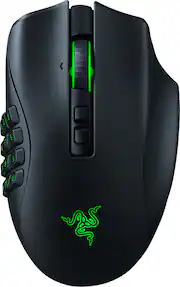
After almost two years using the Razer Naga Pro Wireless, I can say it’s one of the most versatile mice I’ve owned. It has some excellent strengths, but also one major issue that affects its use in competitive games. What I like the most • Real versatility thanks to the interchangeable side plates (2, 6, and 12 buttons). For RPGs, MMOs, or games with lots of abilities, it’s perfect. • Comfortable and well‑balanced weight: it feels great in the hand even during long sessions. • Solid build quality: after two years, it still feels sturdy. • Multiple connection modes (2.4 GHz, Bluetooth, and wired). • Synapse works well with this model; I’ve had almost no issues. • Great customer support: I had a problem with one button and Razer sent me the replacement quickly. • RGB looks great and adds a nice presence to the PC setup. The main problem Even though it has several wireless modes, in Dota 2 it disconnects for a moment, no matter if I use Bluetooth or 2.4 GHz. It’s the only game where this happens, but it’s the one I play every day. And in a game like Dota 2, a one‑second disconnect means losing a fight, dying, losing the lane, or even losing the entire match. Because of that, I ended up using it permanently wired, which defeats the purpose of having a wireless mouse. Battery The battery lasts quite well, but since I keep it wired most of the time, I can’t give a full long‑term opinion. Still, when I used it wirelessly, it easily lasted a full day. Conclusion The Razer Naga Pro Wireless is a very versatile, comfortable, and well‑built mouse, perfect for players who switch between different genres and need quick configuration changes. However, if you plan to use it wirelessly in competitive games, be aware that it can have momentary disconnections, and in games like Dota 2, that can cost you the match. If it weren’t for that issue, it would be close to a perfect mouse.
Posted by Alexandermllg94
- Rated 5 out of 5 stars
Best gaming mouse with tons of customization
Amazing mouse with TONS of customization. Three side plates that are magnetically switched already offer a ton of button choices and setups. You can also create multiple button profiles with Razer's Synapse program so you can have different keybinds for different games. RGB lighting looks great and the DPI is excellent. Overall, the best gaming mouse I've used and it looks great too.
Posted by Yoshi
- Rated 4 out of 5 stars
Great for MMO Gaming, But Synapse is Annoying
As an avid MMO player, particularly in FFXIV, the Razer Naga Pro Wireless Optical Gaming Mouse has been a game-changer for me. The interchangeable side plates with 2, 6, and 12-button configurations offer unparalleled flexibility and customization, which is essential for handling high-level content. Over the years, I've purchased five of these mice, and each one has consistently delivered exceptional performance. The precision and responsiveness of the Naga Pro make it the perfect tool for executing complex rotations and macros in MMOs. It's the only mouse that allows me to perform at my best during intense gameplay sessions. However, the one drawback that prevents me from giving it a perfect 5/5 rating is the Razer Synapse software. While it offers powerful customization options, it can be quite cumbersome and frustrating to use at times. Despite this, the Naga Pro remains my top choice for MMO gaming due to its outstanding hardware design and functionality.
Posted by dbuy3
- Rated 5 out of 5 stars
This is an amazing addition to my set up
So far I’ve had this for a couple weeks now, and it has been absolutely perfect. I am a longtime gamer, streamer, and designer, and this mouse just feels amazing for all the above being able to switch out the side panels for whatever game I’m playing is a game changer and the fact that I can go wireless and use it on my laptop or my PC a bonus the mouse feels good has a nice shape but things don’t get in the way and it has a nice feedback on the mouse clicks. I would highly recommend this to anyone who’s thinking about it. Catch me on twitch
Posted by Stricknines
- Rated 5 out of 5 stars
Razer Naga Pro
I've been using razer products for over 10 years. This mouse has had a lot of time and ingenuity invested into it and it shows. If you've never owned a Razer mouse before I highly recommend one. Latency on the Naga Pro feels inexistent as if a wired mouse. The texture and grips allow for a firm and comfortable hold. Buttons have a satisfying mechanical feel with a crisp sound. The Razer Synapse software is highly customizable, easy to use, works smoothly and without bugs unlike competing software for other mice. It has a functional sleek shape which gives a pleasant Lamborghini like aesthetic. The interchangeable buttons make this a universal mouse for different game genres and macro capabilities a good solution for work.
Posted by Reeson