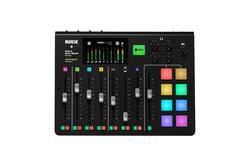
- General
- Brand: RØDE
- Model Number: RCP
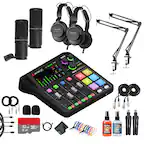
- Product Name: RØDECASTER PRO Integrated Podcast Production Console
- Color: Black
- Dimensions
- Product Width: 13.8 inches (The out of box width of the item. Width is measured as the horizontal distance from one side of the item to the other as it would be primarily used or placed.)
- Product Height: 3.23 inches (The out of box height of the item. Height is measured as the vertical distance from the bottom of the item to the top as it would be primarily used or placed.)
- Product Length: 10.8 inches (The out of box length of the item. Length is measured as the longest dimension of the item.)
- Product Weight: 4.37 pounds (The out of box weight of the item.)
- Features
- Effect Type(s): Compressor, De-esser, Exciter, Other
- High/Low Pass Filters: High pass
- On-Screen Display: true
- Input(s): XLR
- Number Of Inputs: 4
- Output(s): 1/4 in. audio, 3.5mm audio, TRS, USB Type C
- Number of Outputs: 5
- Headphone Jack: true (The device features an interface that allows for the connection of headphones.)
- Other
- UPC: 698813005543
The RØDECaster Pro is the world's most powerful all-in-one solution for podcasting. Designed to offer superb audio quality and expansive features while being incredibly easy to use, it's the ultimate tool for beginners and professionals alike. Featuring four microphone inputs with studio-grade preamps for recording crystal-clear audio, smartphone, USB, and Bluetooth channels for seamlessly integrating remote guests, eight sound pads for triggering music and sound effects, powerful audio processing at the touch of a button and so much more, the RØDECaster Pro is all you will ever need to create incredible podcasts.
- Easy-to-Use: Easy-to-use integrated podcast production console
- Audio Levels: 8 faders to control audio levels
- Mic Inputs: 4 high-quality XLR mic inputs
- Programmable Pads: Instant jingle playback via programmable pads (with companion app)
- Echo Free: Echo Free Phone connectivity via either TRRS or Bluetooth with automatic mix-minus
- OnBoard Processing: Aphex Big Bottom and Aural Exciter processing onboard
- Direct Recording: Record direct to microSD card or computer via USB
- Easy-to-Use: Easy-to-use integrated podcast production console
- Audio Levels: 8 faders to control audio levels
- Mic Inputs: 4 high-quality XLR mic inputs
- Programmable Pads: Instant jingle playback via programmable pads (with companion app)
- Echo Free: Echo Free Phone connectivity via either TRRS or Bluetooth with automatic mix-minus
- OnBoard Processing: Aphex Big Bottom and Aural Exciter processing onboard
- Direct Recording: Record direct to microSD card or computer via USB
Whats Included
- RODE RODECaster Pro
- Power adapter
- 78.7" USB-A to USB-C cable
- Scribble sheet for pads
- Owner's manual
- RODE RODECaster Pro
- Power adapter
- 78.7" USB-A to USB-C cable
- Scribble sheet for pads
- Owner's manual
A: Rode offers a 2 years Warranty (1 year plus 1 with online registration). My recommendation is to get the RODECASTER if your interested and quickly put it through its paces and see if it works for you - I'd do this quickly to fall into your ability to return the product to BBY. I'm very impressed with the mixer - it's been stable and zero issues with almost daily use. Also, a google search of videos on the RodeCaster Pro turns up a lot of very positive reviews of the mixer and lots of tips to make it work for your needs.
A: Yes has phantom +48v can be switched on or off as needed.
Q: Is the RODECaster Pro compatible with the Macbook M1?
A: Hello, yes, it is compatible with the Macbook Pro M1.
Q: Is RodecasterPro compatible with an HP Laptop with Windows 11?
A: Yes, Before you can use the Rodecaster Pro, you first need to download and install the Rodecaster Pro app, as well as the firmware. The Rodecaster Pro is considered class-compliant on Mac, which means it doesn’t need third-party audio drivers. PC users will need to download ASIO4All for proper connectivity. Follow the steps below to get started. Go to the Rodecaster Pro download page and download the Rodecaster Pro installer. Go to your Downloads folder and run the Companion App installer. PC: Right-click the rodecaster_app_installer.zip file, select Extract all…, and then click Extract. Mac: Double-click the rodecaster_app_installer.zip file.
A: You cannot control Rodecaster with any recording software. It records to a microUSB card. It creates very high definition WAV files, either stereo or multitrack. It transfers those files to your computer via USB, with the touch of a button. You then take those files and import them into Logic, Audition, Audacity, or any other recording software. Rodecaster does come with software, but it is basically only to control effects, you cannot control the hardware from your computer. This is a great mixer/recorder for the price. It is VERY popular with podcasts because it gives you "that sound" out of the box. When you think of Joe Rogan, Howard Stern, etc., that's what you're going to sound like right out of the box.
A: Yes. Every cord you need.
People also viewed



Today's top picks
- $429.99The price was $689.99