
Ricoh - 132 p Desktop Wired Laser Printer - 34 ppm Mono - 1200 x 1200 dpi Print - 300 Sheets Input - Ethernet - Monochrome
Ricoh - 132 p Desktop Wired Laser Printer - 34 ppm Mono - 1200 x 1200 dpi Print - 300 Sheets Input - Ethernet - Monochrome
Specifications
- NetworkingWired, WirelessPrinter TypePrinterMonochromatic/ColorMonochromatic
- Key Specs
- Networking: Wired, Wireless
- Printer Type: Printer
- Monochromatic/Color: Monochromatic
- General
- Brand: Ricoh
- Product Name: Ricoh 132 p Desktop Wired Laser Printer - Monochrome - 34 ppm Mono - 1200 x 1200 dpi Print - 300 Sheets Input - Ethernet
- Color: Monochrome
- Display Screen: true
- Dimensions
- Product Height: 10.3 inches (The out of box height of the item. Height is measured as the vertical distance from the bottom of the item to the top as it would be primarily used or placed.)
- Product Width: 14.6 inches (The out of box width of the item. Width is measured as the horizontal distance from one side of the item to the other as it would be primarily used or placed.)
- Product Depth: 15.4 inches (The out of box depth of the item. Depth is measured as the distance from the front of the item to the back as it would be primarily used or placed.)
- Product Weight: 35.32 pounds (The out of box weight of the item.)
- Features
- Automatic Document Feeder: false
- Photo Printing: false
- Automatic Two-Sided Printing: false
- Connectivity
- Wired Connectivity: Ethernet, USB-A
- Wireless Connectivity: None (The manner in which a device sends data to another device over a short distance without the use of wires or cables.)
- Ink
- Compatible Cartridges: Brother TN110
- Ink Cartridges Required: 1 x Black (The quantity and color of ink cartridges required for the printer to operate.)
- Ink Cartridges Included: 1 x Black (The quantity and color of ink cartridges included.)
- Performance
- Approximate Page Yield (Black): 35000
- Paper Info
- Supported Paper Sizes: Letter
- Tray Capacity: 300
- Warranty
- Warranty - Parts: 1 year
- Warranty - Labor: 1 year
- Other
- UPC: 026649340550
Designed for optimal performance, the RICOH 132 P facilitates the jobs you need printed. Enjoy sharp, precise monochrome print quality with options to print on a variety of paper types. Our Locked Print feature keeps your confidential information secure. With print speeds of up to 34 ppm, and the ability to print remotely, the 132 P is sure to keep up with the busiest of workloads.
- Ricoh 132 p Desktop Wired Laser Printer - Monochrome - 34: Designed for optimal performance, the RICOH 132 P facilitates the jobs you need printed. Enjoy sharp, precise monochrome print quality with options to print on a variety of paper types. Our Locked Print feature keeps your confidential information secure. With print speeds of up to 34 ppm, and the ability to print remotely, the 132 P is sure to keep up with the busiest of workloads.
- Ricoh 132 p Desktop Wired Laser Printer - Monochrome - 34: Designed for optimal performance, the RICOH 132 P facilitates the jobs you need printed. Enjoy sharp, precise monochrome print quality with options to print on a variety of paper types. Our Locked Print feature keeps your confidential information secure. With print speeds of up to 34 ppm, and the ability to print remotely, the 132 P is sure to keep up with the busiest of workloads.
- Ricoh 132 p Desktop Wired Laser Printer - Monochrome - 34: Designed for optimal performance, the RICOH 132 P facilitates the jobs you need printed. Enjoy sharp, precise monochrome print quality with options to print on a variety of paper types. Our Locked Print feature keeps your confidential information secure. With print speeds of up to 34 ppm, and the ability to print remotely, the 132 P is sure to keep up with the busiest of workloads.
Whats Included
- MS632dwe Laser Printer, Safety Sheets, Warranty Info, Return Program Imaging Unit, Return Program Toner Cartridge, Power Cord, Printer Setup Sheet
- MS632dwe Laser Printer, Safety Sheets, Warranty Info, Return Program Imaging Unit, Return Program Toner Cartridge, Power Cord, Printer Setup Sheet
- MS632dwe Laser Printer, Safety Sheets, Warranty Info, Return Program Imaging Unit, Return Program Toner Cartridge, Power Cord, Printer Setup Sheet
Compare similar products
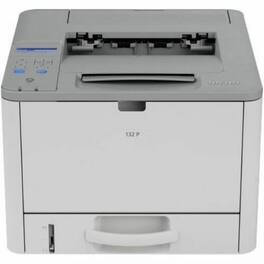
Designed for optimal performance, the RICOH 132 P facilitates the jobs you need printed. Enjoy sharp, precise monochrome print quality with options to print on a variety of paper types. Our Locked Print feature keeps your confidential information secure. With print speeds of up to 34 ppm, and the ability to print remotely, the 132 P is sure to keep up with the busiest of workloads.

The imageCLASS MF3010 is designed for home and small office environments where black-and-white multifunction capability is needed, and productivity and ease of use are priorities. This model has paper capacity of up to 150 sheets and is backed by Canon's Service and Support network.

Designed for home and small office environments, the imageCLASS LBP122dw model prioritizes productivity and ease of use, features a compact design while still delivering speedy overall performance to accomplish daily tasks. The 5-line, black-and-white LCD panel allows you to navigate through the menu seamlessly and customize the settings to access the features you use most. Produce crisp, bold documents with fast print speeds of up to 30 pages per minute1, using high quality Canon Genuine Toner 071 and optional toner 071 H. The LBP122dw offers paper capacity of up to 150 sheets in the paper tray. Easily connect and print through wirelessly from computers or mobile devices. Print using a variety of mobile apps, including the Canon PRINT Business2, Apple AirPrint, Mopria Print Service app using your compatible mobile device.
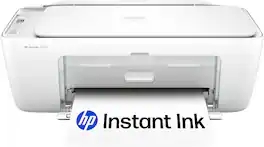
The HP DeskJet 2827e delivers color printing, 60-sheet paper capacity, and a flatbed scanner for easy scanning and copying. It's AI-enabled to intuitively adapt to your workflow, with wireless and security features that keep your multifunction printer up to date and secure.
| Pros for Ricoh - 132 p Desktop Wired Laser Printer - 34 ppm Mono - 1200 x 1200 dpi Print - 300 Sheets Input - Ethernet - Monochrome | |||
|---|---|---|---|
| There were no pros for this product— | There were no pros for this product— | Print Quality, Connectivity, Ease of use, Value, Noise Level | Print Quality, Connectivity, Setup Ease, Size, Design |
Specs
Reviews
This product doesn't have any reviews yet.