Main Content
product image

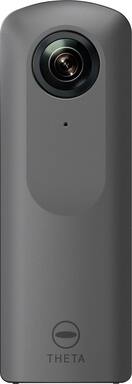
Ricoh - Theta V 360-Degree Digital Camera - Metallic Gray

Model: THETA V 4K SPHERICAL VR CAMERA
SKU: 6096201
This item is no longer available in new condition. See similar items below
  • Key Specs
    • Effective Pixels: 14 megapixels (The actual number of pixels which make up the viewable image.)
    • Standardized Video Resolution: Full HD (1080p) (An approximated measurement of the product’s video resolution. This may not be the exact resolution of the product, which may be slightly more or less when using a pixel-by-pixel measurement.)
  • General
    • Brand: Ricoh
    • Model Number: THETA V 4K SPHERICAL VR CAMERA
    • Product Name: Theta V 360-Degree Digital Camera
    • Color: Metallic Gray
  • Imaging
    • Image Sensor Type: CMOS (CCD and CMOS are the two main technologies used in image sensors. CCD, the older of the two types, turns analog light signals into digital pixels. This conversion happens without distortion, resulting in high-quality images. Newer CMOS sensors use transistors at each pixel to move electrical charges. CMOS sensors are typically less expensive, but also require more light to create distortion-free images.)
    • Digital Zoom: None (A digital zoom is accomplished electronically, with no adjustment of the camera's optics, and no optical resolution gained in the process. The existing data is not enhanced or added to, merely displayed at a lower resolution, thereby giving an illusion of an enlarged image.)
    • Optical Zoom: None (The optical zoom uses a combination of lenses that magnify the image prior to it being registered at high resolution by the imaging sensor.)
    • Image Stabilization: None (This feature helps reduce image/video blur or distortion that may occur from unsteady motion.)
    • 360 Degree Capture: true (The capability of the product to record an image incorporating a 360 degree point of view.)
    • Low Light/High Sensitivity: true (High sensitivity digital imaging devices are designed to work in low light conditions to produce a high dynamic range image.)
  • Focus
    • Auto/Manual Focus: Automatic
    • Focus Modes: Automatic
  • Exposure Control
    • White Balance Modes: Auto, Outdoor, Shade, Cloudy, Incandescent light 1, Incandescent light 2, Daylight color fluorescent light, Natural white fluorescent light, White fluorescent light, Light bulb color fluorescent light, Color (Settings that calibrates how the color white is rendered in an image/video, reducing the appearance of unnatural contrasts caused by various light sources.)
    • Effective Pixels: 14 megapixels (The actual number of pixels which make up the viewable image.)
  • Display
    • Aspect Ratio: 4:3 (The measurement of the width of a screen compared to the height of a screen, expressed as a ratio.)
  • Video
    • Standardized Video Resolution: Full HD (1080p) (An approximated measurement of the product’s video resolution. This may not be the exact resolution of the product, which may be slightly more or less when using a pixel-by-pixel measurement.)
    • Maximum Video Frame Rate: Up to 30 fps (The maximum frequency at which consecutive images can be captured by a video recording device.)
    • HDR Mode: true (HDR Mode uses multiple photos taken at different exposures to add more dynamic range to photographs. HDR technology displays content with greater contrast between bright and dark, resulting in clearer and more lifelike images.)
    • Slow Motion Recording: false
  • Compatibility
    • Tripod/Monopod Mountable: true (A support function that allows the device to be mounted to monopods and tripods for leveling and stability.)
    • Memory Card Compatibility: None (The type of memory card(s) recommended for use with the product.)
  • Features
    • Action Camera: false
    • Integrated Speaker(s): true
    • Night Recording: true (The ability to capture and record video in low-light conditions, typically via infrared light or intensifier tubes that amplify existing light to illuminate the scene.)
    • Special Effects: 360-degree video; 360-degree photo; 360-degree spatial audio (Image effects accomplished through software applied to images. These can change noise level, gradient, and other aspects of your image.)
  • Connectivity
    • Wireless Connectivity: WiFi (The manner in which a device sends data to another device over a short distance without the use of wires or cables.)
    • Output(s): USB
    • Microphone Input: true (The device features an input for connecting an external microphone.)
    • Headphone Jack: false (The device features an interface that allows for the connection of headphones.)
    • Number of USB Port(s): 1
    • Charging Interface(s): Micro-USB (The connection for transmitting power to charge the device.)
  • Power
    • Rechargeable Battery: true
    • AC Adapter Compatible: true (The device is able to be charged using an external power adapter which meets input and output voltages specified by the manufacturer.)
    • Removable Battery: true
    • Battery Size: Not Applicable (The battery size required for operation.)
  • Performance
    • Minimum Operating Temperature: 32 degrees fahrenheit (The lowest recommended ambient (surrounding) temperature in which the product can ideally operate stated by the manufacturer. Generally long-term exposure of the product to temperatures less than the minimum can result in ineffective operation.)
    • Maximum Operating Temperature: 104 degrees fahrenheit (The highest recommended ambient (surrounding) temperature in which the product can ideally operate stated by the manufacturer. Generally long-term exposure of the product to temperatures more than the maximum can result in ineffective operation.)
  • Included
    • Batteries Included: true (Indicates whether the product comes with the required batteries for its operation.)
    • Remote Control Included: false
  • Dimensions
    • Product Height: 5.1 inches (The out of box height of the item. Height is measured as the vertical distance from the bottom of the item to the top as it would be primarily used or placed.)
    • Product Width: 1.8 inches (The out of box width of the item. Width is measured as the horizontal distance from one side of the item to the other as it would be primarily used or placed.)
    • Product Depth: 0.9 inches (The out of box depth of the item. Depth is measured as the distance from the front of the item to the back as it would be primarily used or placed.)
    • Product Weight: 0.27 pounds (The out of box weight of the item.)
  • Warranty
    • Warranty - Parts: 1 year
    • Warranty - Labor: 1 year
  • Other
    • UPC: 026649107252

Shoot 360-degree video for virtual reality applications with this Ricoh Theta V spherical camera. High-speed data transfer lets you upload stills and video wirelessly for immediate sharing and viewing, and downloadable software plug-ins let you add functions including remote playback. Connect this Ricoh Theta V spherical camera to your iOS or Android device for seamless control.

Camcorder

  • 360-degree video and photo capable: From still images to movies, this camera records your memories in ultra HD resolution.
  • Two 14MP 1/2.3-type image sensors: Provide stunning detail and clarity with both video and still images.
  • Qualcomm® Snapdragon™ main processor: Provides high-resolution 360° spherical images and video.
  • Ultra HD 4K 360° live streaming: Shoot high-definition smooth 360° video at 30 fps at a resolution of 3840 x 1920 pixels.
  • Record 360-degree spatial audio with a four-channel microphone: Enjoy a completely new, realistic experience with linked video and audio.
  • Built-in 19GB memory: Store digital photos and videos.
  • Bluetooth and Wi-Fi communication: Enjoy instant remote shooting and change shooting settings wherever you are.
  • Faster data transfer speed: Upload your video and pictures to social media sites to share with friends and family via Wi-Fi.
  • USB interface: Offers convenient charging.
  • Ricoh Theta mobile application: Offers live view, camera control and sharing functions.
  • Compatible with Google Street View app: Allows you to capture and publish your photo spheres instantly to Google Maps for people all over the world to explore.
  • 360-degree video and photo capable: From still images to movies, this camera records your memories in ultra HD resolution.
  • Two 14MP 1/2.3-type image sensors: Provide stunning detail and clarity with both video and still images.
  • Qualcomm® Snapdragon™ main processor: Provides high-resolution 360° spherical images and video.
  • Ultra HD 4K 360° live streaming: Shoot high-definition smooth 360° video at 30 fps at a resolution of 3840 x 1920 pixels.
  • Record 360-degree spatial audio with a four-channel microphone: Enjoy a completely new, realistic experience with linked video and audio.
  • Built-in 19GB memory: Store digital photos and videos.
  • Bluetooth and Wi-Fi communication: Enjoy instant remote shooting and change shooting settings wherever you are.
  • Faster data transfer speed: Upload your video and pictures to social media sites to share with friends and family via Wi-Fi.
  • USB interface: Offers convenient charging.
  • Ricoh Theta mobile application: Offers live view, camera control and sharing functions.
  • Compatible with Google Street View app: Allows you to capture and publish your photo spheres instantly to Google Maps for people all over the world to explore.
Whats Included
  • Instruction manual
  • Ricoh Theta V 360-Degree Digital Camera
  • Soft case
  • USB cable
  • Instruction manual
  • Ricoh Theta V 360-Degree Digital Camera
  • Soft case
  • USB cable

Q: Do you need a special software for the 360 photo use? For example if I wanted to show a home layout in 360 view!

A: Yes... You will need an online 360 host like Matterport to host your tours. There are some differences so make sure you way pros and cons. I currently use Matterport and I like the fact it allows you to upload the tour right from your phone. Definitely look at others though for features. Ricoh does have an app you download to your phone that allows you to take 360 pics and transfer them to your PC, IPad to edit etc... If you dont use Matterport, you would then have to upload them to other 360 tours and order them properly. You can also use this with Zillow tour software as well.

Q: Will I be able to upload videos I record onto another device like my phone or chromebook? How would I do this?

A: Yes. You can either transfer them via the included usb cable or through your mobile device (which downloads the images as you take photos/videos). I personally have my videos/images upload to the cloud from my phone and I retrieve them on my PC from there.

Q: Does the camera have to be physically rotated around to capture 360?

A: No, it takes 3D photos from a static position.

Q: What is the best tripod to use for this camera?

A: Get one without a handle on it. It will show up in the shots if it’s too long. Also, make sure it goes at least 48” tall or more.

Reviews