Rating 4.7 out of 5 stars with 1040 reviews
4.7- Sound Quality (382)
- Cable Length (179)
- Price (86)
- Ease of use (84)
- Compatibility (21)
- HDMI (4)
- Fit (3)
Customer Images
The vast majority of our reviews come from verified purchases. Reviews from customers may include My Best Buy members, employees, and Tech Insider Network members (as tagged). Select reviewers may receive discounted products, promotional considerations or entries into drawings for honest, helpful reviews.
- Rated 5 out of 5 stars
Premium Quality Digital Optical Cable Priced Right
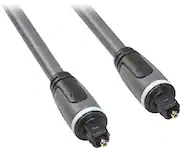
Rocketfish offers Premium Digital Audio Cables that deliver the clearest audio & are built to last a lifetime! I use premium cables to bring out DTS & Dolby Atmos while viewing the latest LG OLED 4K UHD TV. I chose a Rocketfish cable from Best Buy instead of the much more expensive and highly advertised premium cable brand. The 2 photos show this Rocketfish Digital Optical Cable. The sound quality through the Rocketfish HDMI is stunning using DTS & Dolby Atmos source material. I could not hear any difference between the Rocketfish and the most highly advertised brands that cost several times more. Examinations of the cable's physical attributes show very expensive materials, with no shortcuts. The cable is very thick (approximately 3/8" diameter) showing extra durability in the cable. The plugs are super heavy duty, an incredibly strong, lightweight material with the highest physical strength - the thickness & the plugs are exactly the same as the most expensive "premium brand" cables. Beware of THIN optical cables. They do not flex many times without breaking the optical cable inside. Thin cables cost less, and are less expensive to manufacture. On the "high end" extreme, well engineered plugs add physical strength (they won't break if hit). This cable made a believer out of me. Rocketfish offers the absolute BEST in quality digital optical audio signal transmission with the highest quality construction at the best value. Rocketfish earns my HIGHEST RECOMMENDATION!
Posted by gadgetguy11
- Rated 5 out of 5 stars
Rocketfish Digital Audio Cable
The Rocketfish gigital audio cable is a no brainer. Its easier to connect than rca and better quality.
Posted by deweyld
- Rated 5 out of 5 stars
Wall cables are great!
I am excited about having my cables inside the wall! It makes my entertainment area look so neat and well put together. Thanks Geek Squad for that recommendation!!
Posted by BBCustomer
- Rated 5 out of 5 stars
Great Cable
I purchased this item because of the exceptional value. At 12 feet, this cable meet my needs for connecting my DVR to my Sony Amp. Making this conversion was fast and simple. Once I had the cable connected, I only had to make a small adjustment on my amp to enable this cable and deliver the sound. I found the improvement to be fantastic. The sound is richer and fuller than previously and the range of sound delivered digitally does not compare to what I had been using. This cable was well worth the small investment and I would recommend it to anyone with a system which can use a digital sound signal..
Posted by Buyer
- Rated 5 out of 5 stars
good quality for sound bar
Got it because I need it. The length is what I need and so far the sound bar is working wonderfully. Have no complaints with this and the price was very reasonable. Not the cheapest but not the most expensive either. I'd totally recommend it.
Posted by workfromhome