Rocstor - Premium USB-C to HDMI 4K Adapter, USB-C 100W PD Charging & USB Type-A port - USB Type C - HDMI Digital Audio - Aluminum Gray
Reviews coming soon
More Buying Options from Marketplace sellers
Related Item

About This Item
- Key Specs
- Connector Type (End 1): USB-C
- Connector Type (End 2): USB-A
- General
- Brand: Rocstor
- Model Number: Y10A265-A1
- Product Name: Rocstor Premium USB-C to HDMI 4K Adapter, USB-C 100W PD Charging & USB Type-A port - USB Type C - HDMI Digital Audio
- Color: Aluminum Gray
- Connectivity
- Cable Type: HDMI, USB
- Product Type: Adapter
- Connector Type (End 1): USB-C
- Connector Type (End 2): USB-A
- Other
- UPC: 810606037498
Rocstor Premium USB-C® to HDMI® 4K Mini-Multi Adapter relieves you from the trouble of carrying multiple devices, by providing the connection availability of 3 different adapters in just one compact sized connector. Supporting Windows®, macOS®, Linux®, Android®, and ChromeOS®, this light-weight mini adapter, sets up an entire dock for you at anywhere and anytime. It offers wide compatibility with USB-C enabled devices and Thunderbolt(tm) 3/4 laptops including HP® EliteBook, Dell(tm) XPS, Lenovo® ThinkPad X1, and MacBook Pro® & MacBook Air®.
- 3-in-1 Mini-Multiport Adapter: This mini-multiport adapter features 3 different output ports including an HDMI output of resolution up to 4K@30Hz (3840x1260), a USB-A port supporting 5Gbps and 7.5W (5V/1.5A) charging power to connect and charge devices, and USB-C port with 5Gbps data transmission speed and 100W Power Delivery (PD) for charging or connecting your laptop to a USB-C equipped device. Depending upon the application type, this Rocstor premium aluminum
- Support 4K Ultra-High Definition HDMI Display: This mini-multiport adapter gives you the facility to extend your laptop's display by connecting it to a 4K high-definition HDMI monitor, projector, or HDTV to deliver quality presentations and run the most resource demanding applications. This Rocstor adapter provides 4K HDMI 3840x21060 resolution transmission
- Offers Portable and Light-weight Design with Strain-free ...: Rocstor high quality multi HDMI adapter is created with such a light-weight and easy-to-carry design that smoothly fits into your pocket or office briefcase without occupying any extra space. Whether you are traveling around or working from anywhere, this adapter sets up a docking station for you at any location. It is a stylishly designed multiport HDMI adapter enclosed in an aluminum case that not only provides. durability and
- Attributes: USB-C to Mini-Multi HDMI Adapter 3-in-1 compact dock 4K high resolution display at 30Hz Wide compatibility 3-year warranty Aluminum gray adapter
Reviews
This product doesn't have any reviews yet.
Compare similar products
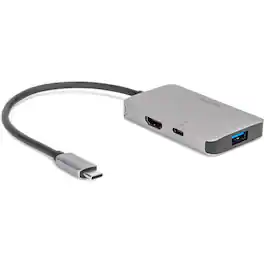
Rocstor Premium USB-C® to HDMI® 4K Mini-Multi Adapter relieves you from the trouble of carrying multiple devices, by providing the connection availability of 3 different adapters in just one compact sized connector. Supporting Windows®, macOS®, Linux®, Android®, and ChromeOS®, this light-weight mini adapter, sets up an entire dock for you at anywhere and anytime. It offers wide compatibility with USB-C enabled devices and Thunderbolt(tm) 3/4 laptops including HP® EliteBook, Dell(tm) XPS, Lenovo® ThinkPad X1, and MacBook Pro® & MacBook Air®.

Connect your laptop to a 4K monitor, projector, and other devices with our USB-C 4-in-1 Multiport Adapter. This compact USB-C adapter is the perfect solution for home, the office, or in-between workstations. It features two USB-A ports to charge and connect your smartphone, tablet, keyboard, thumb drive, mouse, or other high consumption device while its HDMI port connects your MacBook Pro, Chromebook, or other USB-C laptop to a display with up to 4K resolutions. This Belkin USB-C Hub supports pass-through charging up to 100W so you don’t have to choose between port expansion and power. Gain up to 5 Gbps of bandwidth between connected devices, for quick data transfer between computer and peripheral devices. This computer docking station also supports high-definition display resolutions up to 4K through the HDMI Port. Encased in a sleek aluminum finishing that matches popular devices, this compact USB port hub is a stylish addition for your work, study, or play setup.

This Best Buy Essentials 6' Mini DisplayPort to HDMI Cable can mirror or extend the display from your Mini DisplayPort device to an HDMI-supported monitor—without the use of a separate cable or adapter. It supports resolutions up to 1920 × 1080 for high-quality video (and audio is supported when provided by the source). It has 24K gold plating to help guard against corrosion and loss of quality.
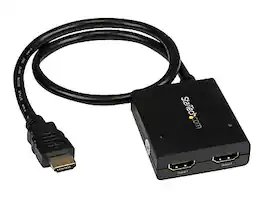
The ST122HD4KU 2-port video splitter supports Ultra HD (4K) ensuring astonishing picture quality, four times the resolution of high-definition 1080p, while sharing a 4K HDMI video source between two HDMI displays. The 4K splitter is backward compatible with previous HDMI revisions, supporting 1080p / 720p HDMI video resolution devices such as computers, Blu-ray players and cable TV set-top boxes. Even if you don't require 4K video today, the video splitter ensures you'll be ready to take advantage of tomorrow's display technology while still working with the devices you already have. Plus, this splitter supports 3D, enabling you to use the splitter with your stereoscopic 3D video source on active or passive 3D displays. For a hassle-free setup you can power the HDMI splitter with the included USB cable, or power adapter depending on which is most convenient for you. Plus, the splitter features a built-in HDMI source cable, which lets you connect it directly to your HDMI source without the expense of additional cabling. The ST122HD4KU is backed by a StarTech 2-year warranty, and free lifetime technical support.
| Pros for Rocstor - Premium USB-C to HDMI 4K Adapter, USB-C 100W PD Charging & USB Type-A port - USB Type C - HDMI Digital Audio - Aluminum Gray | |||
|---|---|---|---|
| There were no pros for this product— | Ease of use, HDMI, Overall Performance, Connectivity, Size | HDMI, Ease of use, Quality, Compatibility, Cable Length | There were no pros for this product— |
| Cons for Rocstor - Premium USB-C to HDMI 4K Adapter, USB-C 100W PD Charging & USB Type-A port - USB Type C - HDMI Digital Audio - Aluminum Gray | |||
| There were no cons for this product— | Price, Cable Length, Heat | Resolution, Connectivity | There were no cons for this product— |