FREE shipping to
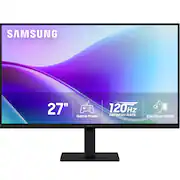
Scheduled delivery options available in checkoutSamsung's 27" Monitor with FHD Resolution consistently delivers stunning colors across the entire display with the IPS panel. The 120Hz refresh rate reduces lag and motion blur when playing fast-paced games, watching videos, or working on creative projects. Game Picture Mode shifts any game to fill the screen with every detail in view and optimizable game settings enable color and image contrast to be instantly adjusted for more clarity. Eye Saver Mode protects vision by reducing irritating screen flicker and minimizing blue light. Features a super slim design with ultra-thin border bezels for a lightweight and stylish addition to any environment. Devices can be plugged directly into monitor for increased flexibility and convenience.
Q: Can I use a Rocu Stick with this TV?
A: Yes and no .. you will get picture but NO SOUND … there are no internal speakers .. no Bluetooth .. no headphone jack either !!! You will need to get a Bluetooth sound bar or Bluetooth headphones pair them to Roku stick to use it as a TV ..this is a MONITOR designed for a PC or laptop .. @ 99 bucks it’s a good deal (120 refresh rate ) normally @ $100 bucks it’s 75 or 100 refresh …. To top it all off you WILL need to MANUALLY turn it ( monitor) off !!!!.. no remote or sensor on this monitor..
A: undefined
Q: Does the monitor have a VGA input?
A: undefined
Q: Does this monitor support multi-screen transport? MST?
A: undefined
Q: is this monitor touch screen
A: undefined
Q: Just to be sure, this doesn’t need anything hooked up to it to play games or use Google or anything?
A: You DO need to connect a computer to this monitor. It will not do anything on its own. You can’t play games on it or access Google without connecting it to a computer. This is just a screen.
Q: Does my Monitor turn off when I TURN OFF MY LAPTOP?
A: undefined
Q: Does my turn MONITOR off when I SHUT DOWN MY COMPUTER
A: undefined

Samsung's 27" Monitor with FHD Resolution consistently delivers stunning colors across the entire display with the IPS panel. The 120Hz refresh rate reduces lag and motion blur when playing fast-paced games, watching videos, or working on creative projects. Game Picture Mode shifts any game to fill the screen with every detail in view and optimizable game settings enable color and image contrast to be instantly adjusted for more clarity. Eye Saver Mode protects vision by reducing irritating screen flicker and minimizing blue light. Features a super slim design with ultra-thin border bezels for a lightweight and stylish addition to any environment. Devices can be plugged directly into monitor for increased flexibility and convenience.

The 27" Full HD (1920 x 1080) IPS monitor delivers sharp, vibrant visuals from virtually any viewing angle—ideal for working ...and even playing from home. Whether you're tackling emails, browsing the web, or managing projects, this monitor helps you stay clear, focused, and productive. The display's ultra-slim bezels and 3-side virtually borderless design bring a clean, modern look to any home office setup. The sleek stand adds a floating feel that’s perfect for dual monitor workstations or minimal desk spaces. A 120Hz refresh rate ensures smoother scrolling and frame transitions, while 1ms Motion Blur Reduction (MBR) keeps fast-moving visuals crisp—great for multitasking or after-hours gaming. With HDR10 support and up to 99% sRGB color gamut coverage, this LG monitor delivers vivid, accurate color across everything from video calls to creative projects. Whether you're outfitting a new home office or upgrading your current work-from-home setup, the LG 27U41YA-B monitor offers the clarity, speed, and style you need to stay productive and inspired.

Samsung's ViewFinity S7 Monitor with 4K UHD Resolution reveals crystal-clear visual excellence and increased levels of detail with higher pixel density. HDR10 provides near-limitless hues and true-to-life color representation with deeper contrast for darker darks and brighter brights. Multiple ports enable convenient connectivity that simplify setup and enhance productivity. Requiring no tools or screws, the Easy Setup Stand offers flexibility with the simple push of a button. TÜV-certified for intelligent eye care, with Eye Saver Mode to protect eyes against excessive blue light.

Samsung’s 27" S3 Monitor enables smooth performance, heightened productivity, and greater comfort. The IPS Panel delivers a stunning color experience across the entire display with less color washing, offering clarity from any viewpoint so tones stay consistent and accurate. The 100Hz refresh rate reduces lag and motion blur while playing games, watching videos, or working. Game Picture Mode with optimizable game settings enables instant adjustment of color and image contrast. Eye Saver Mode protects vision, reduces blue light and screen flicker, and extends comfort even during long sessions. The ergonomic super-slim design is a stylish addition to any environment, while ultra-thin border bezels make the most of screen space. Multiple connectivity enables devices to be plugged straight into the monitor for increased flexibility.
| Pros for Samsung - 27" S3 (S32GD) FHD IPS 120Hz Slim Monitor (2x HDMI) - Black | |||
|---|---|---|---|
| There were no pros for this product— | |||
| Cons for Samsung - 27" S3 (S32GD) FHD IPS 120Hz Slim Monitor (2x HDMI) - Black | |||
| There were no cons for this product— | There were no cons for this product— |
The vast majority of our reviews come from verified purchases. Reviews from customers may include My Best Buy members, employees, and Tech Insider Network members (as tagged). Select reviewers may receive discounted products, promotional considerations or entries into drawings for honest, helpful reviews.
I ordered 2 of these so I could hook them up to my new tower. Problem is the tower only has 1 hdmi port and these monitors only have 2 hdmi plugs, no usb... I did order a cable to convert one of the hdmi-s to usb and hopefully that will work. The monitor that I did hook up so far does have a beautiful picture. They were easy to assemble as far as the stand goes.
Posted by DanaG
Great for gaming! Quality is great Speed also perfect for gaming
Posted by DanielaP
The size is good, the picture is good. What I HATE is the power button-one it's in the BACK! Very difficult to get to to turn it on and off every day! Why didn't they put it on the top, the front, or the side???! Two it's a toggle switch. I cannot figure out how it works! You can't see what you're pressing because it's on the back! Every time I think I'm hitting the right tiny area on it's toggle, something else comes up. So, forget it! We plugged the monitor in to a power strip and I turn the strip off every night instead of having to use the power button. The other thing I don't like about this monitor is that every time I turned it on, a big black box appeared on the screen, stating that I needed to register it. It also appeared every time I "woke it up" after it had gone to sleep. I finally did register it, the box still appeared for a day. Then the next day, the black box changed to showing options and features-and it is on there every day since, every time it is turned on or woken up. Why? Just put the features in the manual, and if we want to know them we can look them up. I, and probably most people, leave the monitor display on what it is and don't change it. We may set it to our preference, so why change it every day? So we don't need the black box popping up every time all day long.
Posted by nachomamma