Winter SaleEnds 1/19. Limited quantities. No rainchecks.Shop now

Skip to contentGo to Product SearchGo to Footer
Main Content

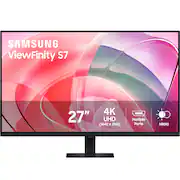
Samsung - 27” ViewFinity S7 LED 4k UHD 60Hz Monitor with HDR 10 (DisplayPort, HDMI) - Black

Model: LS27D702EANXGO
SKU: 6581702
$199.99
Save $150
Comp. Value: $349.99
or
$25.25/mo.
suggested payments with12-Month Financing
Show me how
Finance OptionsView your offers
Special OffersOn related products
Standard Geek Squad Protection
Availability
Fulfillment Options
Order now for pickup on Tue, Jan 20 at
Sold by Best Buy

More Buying Options

Highlights

  • Key Specs
    • Refresh Rate: 60Hz (The number of frames per second the device can produce natively without enhancement. Higher rates help produce smooth, seamless pictures.)
    • Maximum Resolution: 3840 x 2160 (Maximum resolution refers to the highest number of pixels that a screen can process and display. Higher resolution signals produce more detailed images.)
    • Response Time: 5 milliseconds (The speed at which pixels can change colors is called response time. It is measured in milliseconds (ms).)
    • Panel Type: VA (Technology that affects response time and image quality.)
    • Synchronization Technology: Not Applicable (Generally, these technologies allow syncing between a computer/console game's frame rate and the device's refresh rate for a smoother display without tearing.)
    • Screen Size: 27 inches (Size of the screen, measured diagonally from corner to corner.)
    • Display Connector(s): 1 x DisplayPort 1.2, 1 x HDMI 2.0 (The number and type of connectors used to connect to an external display.)
  • General
    • Brand: Samsung
    • Model Number: LS27D702EANXGO
    • Product Name: 27” ViewFinity S7 LED 4k UHD 60Hz Monitor with HDR 10 (DisplayPort, HDMI)
    • Color: Black
    • Operating System Compatibility: Not Applicable
  • Display
    • Refresh Rate: 60Hz (The number of frames per second the device can produce natively without enhancement. Higher rates help produce smooth, seamless pictures.)
    • Maximum Resolution: 3840 x 2160 (Maximum resolution refers to the highest number of pixels that a screen can process and display. Higher resolution signals produce more detailed images.)
    • Native Resolution: 3840 x 2160 (Native resolution of a screen refers to its single, fixed resolution. Sometimes screens must scale an image up or down in order to fit the native resolution. This can cause a loss of resolution or detail.)
    • Contrast Ratio: 1000:1 (Measured difference between a displayed image's brightest whites and darkest blacks. The larger the first number, the more detail and color that can be displayed.)
    • Response Time: 5 milliseconds (The speed at which pixels can change colors is called response time. It is measured in milliseconds (ms).)
    • Display Type: LED
    • Panel Type: VA (Technology that affects response time and image quality.)
    • Synchronization Technology: Not Applicable (Generally, these technologies allow syncing between a computer/console game's frame rate and the device's refresh rate for a smoother display without tearing.)
    • Aspect Ratio: 16:9 (The measurement of the width of a screen compared to the height of a screen, expressed as a ratio.)
    • Curved Screen: false
    • Brightness: 350 candela per square meter (A measure of the total light output.)
    • Screen Size: 27 inches (Size of the screen, measured diagonally from corner to corner.)
    • High Dynamic Range (HDR): true (An HDR-compatible 4K TV or other HDR-compatible product displays HDR video content when it's available from sources like 4K Ultra HD Blu-ray Discs and 4K streaming services.)
    • High Dynamic Range Format: HDR 10 (There are a few HDR formats that tell the TV or other HDR-compatible product how to best utilize its capabilities to display HDR content. HDR technology can support one or multiple formats, each with various benefits to picture quality.)
    • Horizontal Viewing Angle: 178 degrees (The maximum angle at which the display can be viewed with acceptable visual performance from either side.)
    • Vertical Viewing Angle: 178 degrees (The maximum angle at which the display can be viewed with acceptable visual performance from above or below.)
    • Touch Screen: false (Touch-screen devices make navigating more intuitive. Using a touch-screen display, you can do things such as tap to select, hold and drag to move items, swipe to scroll, and pinch to zoom.)
    • Display Surface: Standard glass
    • Color Gamut (NTSC): 0 percent
    • Color Gamut (Standard RGB): 99 percent
  • Connectivity
    • Number of DisplayPort Inputs (Total): 1
    • Number of HDMI Inputs (Total): 1
    • Number of VGA Ports: 0 (VGA (Video Graphics Adapter or Video Graphics Array) is a display standard that transmits via analog signals. This type of interface is typically used to connect a computer to a display device such as a monitor, projector, or TV.)
    • Number of DVI Inputs: 0 (The number of digital cables carrying analog (VGA) video signals that can be connected to the product.)
    • Number of Mini DisplayPort Inputs: 0
    • Number of Thunderbolt Ports (Total): 0
    • Display Connector(s): 1 x DisplayPort 1.2, 1 x HDMI 2.0 (The number and type of connectors used to connect to an external display.)
    • Number of USB Ports (Total): 0
    • USB Ports: None (The number and type of USB ports the product has.)
    • Headphone Jack: true (The device features an interface that allows for the connection of headphones.)
  • Compatibility
    • Wall Mountable: true (The product is able to be secured to a wall. Some products are designed ready to mount, while others may require additional hardware/accessories for installation.)
    • VESA Wall Mount Standard: 100mm x 100mm (VESA wall mount standards refer to the spacing of screw holes built into a TV in order to fit with standard TV wall mounts. These standards are implemented into most TVs and monitors.)
    • Voice Assistant Built-in: Not Applicable (A digital assistant built into the device that uses voice commands to answer questions and control smart devices.)
  • Features
    • Tiltable: true
    • Adjustable Stand Height: true
    • Anti-Glare: false (Product has features, such as a matte finish, that reduce the likelihood for screen glare.)
    • Eye Relief Features: Flicker free, Low blue light
    • Built-In Webcam: false
    • Integrated Speaker(s): false
    • Smart Capable: false (Smart, or smart-capable devices are able to connect directly to your home network in order to stream content from the Internet, run Internet-based apps, or connect to other smart devices.)
  • Dimensions
    • Product Height With Stand: 18.2 inches
    • Product Height Without Stand: 14.5 inches
    • Product Width: 24.1 inches (The out of box width of the item. Width is measured as the horizontal distance from one side of the item to the other as it would be primarily used or placed.)
    • Product Depth (With Stand): 7.1 inches
    • Product Depth Without Stand: 1.6 inches
    • Product Weight: 11 pounds (The out of box weight of the item.)
    • Stand Included: true
    • Cord Length: 59 inches
  • Power
    • Power Consumption: 80 watts
  • Certifications Listings & Approvals
    • ENERGY STAR Certified: false (Devices carrying the ENERGY STAR service mark, such as computer products and peripherals, kitchen appliances, and other products, generally use 20% to 30% less energy than required by federal standards.)
    • EPEAT Qualified: false (The Electronic Product Environmental Assessment Tool (EPEAT) was designed to provide an environmental assessment tool for purchasers. In order to qualify for EPEAT, a product must meet all 23 required criteria.)
  • Warranty
    • Warranty - Parts: 3 years
    • Warranty - Labor: 3 years
  • Other
    • UPC: 887276836843

Samsung's ViewFinity S7 Monitor with 4K UHD Resolution reveals crystal-clear visual excellence and increased levels of detail with higher pixel density. HDR10 provides near-limitless hues and true-to-life color representation with deeper contrast for darker darks and brighter brights. Multiple ports enable convenient connectivity that simplify setup and enhance productivity. Requiring no tools or screws, the Easy Setup Stand offers flexibility with the simple push of a button. TÜV-certified for intelligent eye care, with Eye Saver Mode to protect eyes against excessive blue light.

  • 4K UHD Resolution: Delivers the crystal-clear visual excellence that is demanded by designers and creators everywhere. 4K UHD (3840x2160) Resolution reveals increased levels of detail with higher pixel density. Greater color detail and more screen space enable a smoother workflow for creative professionals to build intricate designs, complex diagrams, and dynamic video content.
  • 1.07 billion colors with HDR10: With near-limitless hues, view a wider gamut of colors for stunning accuracy and details. HDR10 provides true-to-life color representation with deeper contrast for darker darks and brighter brights. Every piece of content becomes a joy to look at and can be experienced exactly as intended
  • Multiple Ports: Featuring HDMI, DP, USB-A, and USB-B ports, connecting your peripherals is as straightforward as it gets. Simplify your setup and enhance your productivity with convenient connectivity that ensures a seamless workflow.
  • Easy Setup Stand: Create your ideal workspace effortlessly with the Easy Setup Stand, which doesn't require any tools or screws. When it's time to change things up, you'll enjoy flexibility and convenience with the simple push of a button.
  • TÜV-Certified Intelligent Eye Care: Keep your eyes fresh, with less strain from viewing the screen, even for an extended time. For those late-night projects, brightness and color temperature automatically optimize for your environment. TÜV-certified for intelligent eye care, Samsung reduces screen flickering and protects eyes against excessive blue light with Eye Saver Mode
  • 4K UHD Resolution: Delivers the crystal-clear visual excellence that is demanded by designers and creators everywhere. 4K UHD (3840x2160) Resolution reveals increased levels of detail with higher pixel density. Greater color detail and more screen space enable a smoother workflow for creative professionals to build intricate designs, complex diagrams, and dynamic video content.
  • 1.07 billion colors with HDR10: With near-limitless hues, view a wider gamut of colors for stunning accuracy and details. HDR10 provides true-to-life color representation with deeper contrast for darker darks and brighter brights. Every piece of content becomes a joy to look at and can be experienced exactly as intended
  • Multiple Ports: Featuring HDMI, DP, USB-A, and USB-B ports, connecting your peripherals is as straightforward as it gets. Simplify your setup and enhance your productivity with convenient connectivity that ensures a seamless workflow.
  • Easy Setup Stand: Create your ideal workspace effortlessly with the Easy Setup Stand, which doesn't require any tools or screws. When it's time to change things up, you'll enjoy flexibility and convenience with the simple push of a button.
  • TÜV-Certified Intelligent Eye Care: Keep your eyes fresh, with less strain from viewing the screen, even for an extended time. For those late-night projects, brightness and color temperature automatically optimize for your environment. TÜV-certified for intelligent eye care, Samsung reduces screen flickering and protects eyes against excessive blue light with Eye Saver Mode
Whats Included
  • HDMI Cable
  • HDMI Cable

Q: What comes with the Samsung monitor?

A: The Samsung monitor comes with a stand.

Q: Does this monitor have anti-glare?

A: No, this monitor does not have anti-glare.

Q: How does the Easy Setup Stand work?

A: The Easy Setup Stand doesn't require any tools or screws and offers flexibility with the simple push of a button.

Q: What is the benefit of HDR10?

A: HDR10 provides a wider gamut of near-limitless hues and true-to-life color representation with deeper contrast for darker darks and brighter brights.

Q: Why is this monitor good for my eyes?

A: This monitor is TÜV-certified for intelligent eye care and reduces screen flickering. It also protects your eyes against excessive blue light with Eye Saver Mode.

Q: What is the contrast ratio of this Samsung monitor?

A: This Samsung monitor has a contrast ratio of 1000:1.

Sponsored

Compare similar products

Samsung - 27” ViewFinity S7 LED 4k UHD 60Hz Monitor with HDR 10 (DisplayPort, HDMI) - Black
3.4(13)

Samsung's ViewFinity S7 Monitor with 4K UHD Resolution reveals crystal-clear visual excellence and increased levels of detail with higher pixel density. HDR10 provides near-limitless hues and true-to-life color representation with deeper contrast for darker darks and brighter brights. Multiple ports enable convenient connectivity that simplify setup and enhance productivity. Requiring no tools or screws, the Easy Setup Stand offers flexibility with the simple push of a button. TÜV-certified for intelligent eye care, with Eye Saver Mode to protect eyes against excessive blue light.

Dell - S2725QC 27" IPS LED 4K UHD 120Hz FreeSync Premium Monitor (USB-C, HDMI) - Ash White

Dell 27 Plus 4K USB-C Monitor - S2725QC. Whether you're watching movies or playing games, enjoy an immersive viewing experience with improved eye comfort on a 4-star certified monitor*.

Samsung - 27" ViewFinity S7 4K UHD High Resolution Monitor with HDR 10 - Black
4.8(36)

Samsung's ViewFinity S7 Monitor with 4K UHD Resolution reveals crystal-clear visual excellence and increased levels of detail with higher pixel density. HDR10 provides near-limitless hues and true-to-life color representation with deeper contrast for darker darks and brighter brights. Multiple ports enable convenient connectivity that simplify setup and enhance productivity. Requiring no tools or screws, the Easy Setup Stand offers flexibility with the simple push of a button. TÜV-certified for intelligent eye care, with Eye Saver Mode to protect eyes against excessive blue light.

LG - UltraFine 27" IPS UHD 60Hz Monitor with HDR10 (HDMI, DisplayPort) - White
4.5(11)

Upgrade your setup with the LG UltraFine 27” 4K UHD (3840 x 2160) IPS Monitor—offering razor-sharp resolution, impeccable color, and a sleek, ultra-narrow bezel design. With HDR10 and up to 90% DCI-P3 color gamut coverage, everything from spreadsheets to streamed content looks bold, vibrant and immersive. Gaming features like Black Stabilizer and Dynamic Action Sync keep you a step ahead of the competition. And the LG Switch app adds display multitasking capabilities, letting you switch devices and manage screen layouts with ease. Whether you’re working, creating, or gaming, the UltraFine 4K UHD monitor delivers image clarity, comfort, and performance—all in one streamlined display.

Pros for Samsung - 27” ViewFinity S7 LED 4k UHD 60Hz Monitor with HDR 10 (DisplayPort, HDMI) - Black
There were no pros for this productScreen Quality, Connectivity, Refresh Rate, Overall Performance, Port CountThere were no pros for this productThere were no pros for this product
Cons for Samsung - 27” ViewFinity S7 LED 4k UHD 60Hz Monitor with HDR 10 (DisplayPort, HDMI) - Black
Screen QualityThere were no cons for this productThere were no cons for this productThere were no cons for this product

Specs

Reviews

The vast majority of our reviews come from verified purchases. Reviews from customers may include My Best Buy members, employees, and Tech Insider Network members (as tagged). Select reviewers may receive discounted products, promotional considerations or entries into drawings for honest, helpful reviews.

  • Rated 4 out of 5 stars

    Love the clarity, but no Height adj

    This is an upgrade from an older HP model that ran on display port and was a 1080i model. Much better image quality and better color rendition. Height as delivered is OK, but I should have gone for adjustablity. Base is stable and bezel is minimal. Power button is located on the lower back side and is a multi-function button. Other than lack of adjustability (my fault) it is a 5-star product.

    Posted by ohana25

  • Rated 3 out of 5 stars

    Na

    A monitor menu keeps popping up that says something about eye care etc. How do you get that menu to stop. Inititally it was a setup menu. This happened before. No good.

    Posted by SLumdog

  • Rated 4 out of 5 stars

    Great monitor

    Love this monitor. Great to have a big screen to do your work. I do just wish it was a little brighter.

    Posted by LexW

No content
Sponsored

Similar products from outside of Best Buy

sponsored

Finance Options

My Best Buy® Credit Card
Choose a benefit:
$25.25/mo.suggested payments with 12-Month Financing
Or
10% back in rewardson your first day of purchases when approved for the My Best Buy® Credit Card.
Buy Now, Pay Later
4 payments starting at $75.75
Lease to own
Apply today with no credit needed and enjoy flexible payment options.

Special Offers

Included with Purchase
Free 6-month security software & 1 more: $29.99 value
