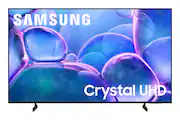
Upgrade your home theater with this stylish 4K TV featuring vibrant colors, rich contrast and an advanced 4K processor. Stay endlessly entertained with thousands of on demand shows and movies for free and enjoy peace of mind as watch thanks to our proprietary triple layer security that protects your personal data across all connected devices at once.
A: Hi ct, The U7900 TV can be connected to an external antenna for local channels. ~Samsung Advisor
Q: can UNWANTED apps and features be disabled or preferably deleted? ie: facebook, ESPN, Alexa, etc
A: Hi gus, Yes, you can customize your Home Screen and remove apps that you do not want. ~Samsung Advisor
Q: do it have the xfinity streaming app
A: Yes, the Samsung 43" Class U7900 Series UHD 4K Smart Tizen TV (2025) supports the Xfinity Stream app.
Q: What are the actual dimensions, length and width?
A: Hi curtis, The 43" U7900 dimensions are 37.7" x 22" x 3" without the stand and 37.7" x 24" x 6.2" with the stand (WxHxD). ~Samsung Advisor
Q: can this TV connect to a headphone via blue tooth?
A: Hi Tarek, Yes, the U7900 TV is Bluetooth-enabled. ~Samsung Advisor
A: Hi there, You will need an external Alexa device connected to your U7900 TV to utilize a voice assistant. To access local channels, run Auto Program to scan for available channels: Settings > All Settings > Broadcasting > Auto Program. Should you need more help, we're here for you. You can reach us at 1-800-SAMSUNG (8AM – 12AM EST, 7 days a week), or connect with a LiveChat agent by selecting ‘Support’ on our website. ~ Samsung Advisor
Q: How do you deactivate the closed caption on the remote?
A: Hi Sly, You can turn Closed Captions on/off and change the settings such as separating it from the broadcast screen, font color, background color, size, position, language, etc. by going to: Settings > All Settings > General & Privacy > Accessibility > Caption Settings. ~Samsung Advisor
Q: does this tv have the samsung tv plus app installed?
A: Hi curious, Yes, Samsung TV Plus is installed on the U7900 TV. ~Samsung Advisor

Upgrade your home theater with this stylish 4K TV featuring vibrant colors, rich contrast and an advanced 4K processor. Stay endlessly entertained with thousands of on demand shows and movies for free and enjoy peace of mind as watch thanks to our proprietary triple layer security that protects your personal data across all connected devices at once.

Upgrade your home theater with this stylish 4K TV featuring vibrant colors, rich contrast and an advanced 4K processor. Stay endlessly entertained with thousands of on demand shows and movies for free and enjoy peace of mind as watch thanks to our proprietary triple layer security that protects your personal data across all connected devices at once.

This 43-inch screen uses 4K Ultra HD technology for vibrant, true-to-life images. HDR10 contrasts bright highlights with dark shadows, so you can catch subtle details. Plus, DTS Virtual-X audio technology delivers life-like sound from your TV. Access live over-the-air channels and streaming—and control it all with your voice. Ask Alexa to launch apps, search for titles and more. The Insignia 43” Class F50 Series LED 4K UHD Smart Fire TV is ready for an unforgettable night of entertainment.

Step up to Full HD for a significantly clearer picture than regular HD. Enjoy impressive, fine-tuned colors and deep contrast, all wrapped in a sleek design and secured by triple-layer protection. Virtual 3-D sound is enhanced and tracks movement on screen for a truly immersive experience.
| Pros for Samsung - 43" Class U7900 Series UHD 4K Smart Tizen TV (2025) | |||
|---|---|---|---|
| Picture Quality, Setup Ease, Size, Weight, Connectivity | Picture Quality, Setup Ease, Size, Weight, Design | Picture Quality, Setup Ease, Size, Weight, Connectivity | Picture Quality, Setup Ease, Size, Weight |
| Cons for Samsung - 43" Class U7900 Series UHD 4K Smart Tizen TV (2025) | |||
| There were no cons for this product— | Remote Control, Brightness | Button Layout, Remote Pairing | Remote Control, Responsiveness, User Interface, Viewing Angle |
The vast majority of our reviews come from verified purchases. Reviews from customers may include My Best Buy members, employees, and Tech Insider Network members (as tagged). Select reviewers may receive discounted products, promotional considerations or entries into drawings for honest, helpful reviews.
The menus are very easy to navigate on this tv. If you have a console and hook it up to the tv, you don’t have to switch to certain HDMI channels it just allowed you to click on an app to open your console. The overall picture quality is great too.
CoryT Posted
Great TV for the price. Delivers good picture quality and decent build quality (although since it’s on the lower end it has a cheap feeling plastic on the back). It is a Smart TV so it has all the features you would expect - integration with Amazon fire stick/cube, apps already built into the software, and connectivity with your phone through the Smart Things app. We had an issue with a glass chip in the screen with our initial purchase (picture attached) but Best Buy replaced it without an issue.
LFlores Posted
Great picture great price great sound easy to operate
MarshallC Posted