Outlet EventEnds Oct. 26. Limited quantities. No rainchecks.Shop now

Skip to content
Main Content
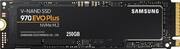
product image

Samsung - 970 EVO Plus 250GB Internal SSD PCIe Gen 3 x4 NVMe

Model: MZ-V7S250BAM
SKU: 6324467
This item is no longer available in new condition. See similar items below
  • Key Specs
    • Storage Capacity: 250 gigabytes (Measured in megabytes (MB), gigabytes (GB) and terabytes (TB), this is the amount available for storing files, music, movies, photos and more. The total includes the capacity of the hard disk drive and solid state drive if both are included on the computer.)
    • Storage Drive Type: SSD (Traditional, mechanical hard disk drives are the most common type of storage because they're relatively inexpensive and offer huge capacities. However, they also generate both noise and heat. Solid state drives, also known as SSDs, are many times faster than hard disk drives and have no moving parts to wear out, but typically offer less capacity for the same price.)
    • Maximum Read Speed: 3500 megabytes per second (The greatest speed at which the device can read information; for example, opening files.)
    • Maximum Write Speed: 3300 megabytes per second (The greatest speed at which the device can write information; for example, saving files.)
    • Form Factor: M.2
    • Interface(s): PCIe Gen 3 x4 (Refers to the types of connections that devices use to interact and communicate with each other.)
  • General
    • Brand: Samsung
    • Model Number: MZ-V7S250BAM
    • Product Name: 970 EVO Plus 250GB Internal SSD PCIe Gen 3 x4 NVMe
  • Capacity
    • Storage Capacity: 250 gigabytes (Measured in megabytes (MB), gigabytes (GB) and terabytes (TB), this is the amount available for storing files, music, movies, photos and more. The total includes the capacity of the hard disk drive and solid state drive if both are included on the computer.)
  • Performance
    • Storage Drive Type: SSD (Traditional, mechanical hard disk drives are the most common type of storage because they're relatively inexpensive and offer huge capacities. However, they also generate both noise and heat. Solid state drives, also known as SSDs, are many times faster than hard disk drives and have no moving parts to wear out, but typically offer less capacity for the same price.)
    • Maximum Read Speed: 3500 megabytes per second (The greatest speed at which the device can read information; for example, opening files.)
    • Maximum Write Speed: 3300 megabytes per second (The greatest speed at which the device can write information; for example, saving files.)
    • SSD Endurance: 150 terabytes (The total amount of data that the solid-state drive (SSD) is able to write before it wears out, as specified by the manufacturer. Endurance is limited because the flash on a SSD has a finite number of cycles that it can complete.)
  • Compatibility
    • Internal Or External: Internal
    • Product Compatibility: Desktop computers, Laptop computers
    • Form Factor: M.2
    • Interface(s): PCIe Gen 3 x4 (Refers to the types of connections that devices use to interact and communicate with each other.)
  • Features
    • Security Features: None
    • Data Encryption: true
    • Encryption Algorithm: 256-bit AES (The algorithm standard used to encrypt data on a device.)
    • Usage: Everyday computing
  • Memory
    • Cache Buffer Size: 512 megabytes (The data capacity of the cache buffer (or disk buffer) that acts as temporary memory for the drive. The cache holds the most recently and frequently used data to save the drive the extra step of pulling it from permanent storage every time it's needed, which helps increase the drive's overall speed.)
    • NAND Flash Memory Type: MLC (Single Level Cell (SLC) stores 1 bit of data per memory cell; Multi Level Cell (MLC) stores 2 bits per cell, Triple Level Cell (TLC) 3 bits, and Quad Level Cell (QLC) 4 bits. Vertical NAND (V-NAND) or 3D NAND stores more data by layering cells vertically. Similarly, there are 3D MLC, 3D TLC and 3D QLC stacked cells.)
  • Dimensions
    • Product Height: 0.1 inches (The out of box height of the item. Height is measured as the vertical distance from the bottom of the item to the top as it would be primarily used or placed.)
    • Product Width: 0.9 inches (The out of box width of the item. Width is measured as the horizontal distance from one side of the item to the other as it would be primarily used or placed.)
    • Product Weight: 0.3 ounces (The out of box weight of the item.)
  • Warranty
    • Warranty - Parts: 5 Years
    • Warranty - Labor: 5 Years
  • Other
    • UPC: 887276303734

Store and retrieve files quickly with this Samsung 970 EVO Plus M.2 250GB SSD. The sequential read/write speeds of up to 3500/2300MB/sec. together with firmware optimization ensure faster computing performance. This Samsung 970 EVO Plus M.2 250GB SSD has a dynamic thermal guard for optimal temperature regulation, and V-NAND architecture maximizes internal speeds.

Drives and Storage Buying Guide

  • 250GB storage capacity: Provides ample storage space for your music, movies and other files.
  • PCI Express 3.0 x4 (NVMe) interface: Offers simple connection to your computer.
  • AES 256-bit hardware encryption: Helps safeguard sensitive data.
  • 512MB cache buffer: Offers rapid processing speed.
  • 250GB storage capacity: Provides ample storage space for your music, movies and other files.
  • PCI Express 3.0 x4 (NVMe) interface: Offers simple connection to your computer.
  • AES 256-bit hardware encryption: Helps safeguard sensitive data.
  • 512MB cache buffer: Offers rapid processing speed.
Whats Included
  • Samsung 970 EVO Plus 250GB Internal PCI Express 3.0 x4 (NVMe) Solid State Drive with V-NAND Technology
  • Samsung 970 EVO Plus 250GB Internal PCI Express 3.0 x4 (NVMe) Solid State Drive with V-NAND Technology

Q: Will this work in a Dell Inspiron 3180?

A: You get to look for the specs of your computer. You can find them in the dell website. Look for the motherboard ports if it does have m.2

Q: can i put it on a ASUS - TUF GAMING X570-PLUS

A: Yes you can, you can put 2.

Q: Does it support on Macbook Pro mid 2014?

A: How am I supposed to use SATA ssd on my laptop?

Q: Will this work in 2010 MacPro 5,1?

A: BEEKAY: No, a 2010 Macbook Pro is not compatible with an M.2 Solid State Drive such as the 970 EVO Plus, however it is compatible with SATA Solid State Drives. For assistance in finding an SSD that suits your needs, please contact Samsung Customer Support and a rep will be happy to help you. Call: 1-800-SAMSUNG (ask for Memory or press #, then 6 for Memory products) Available 9AM – 12AM EST (Mon-Fri) ~ Samsung Memory

Q: So having issues with a HP590 p0066 and WD M.2 NVME drives with cloning an internal MX500 SSD and getting it to boot (works as data drive). Tried everything. Does the Samsung software version do a better job at cloning????? ARGH!

A: I use Acronis, it’s a little technical but it does work. You can buy it on their website but stay away from the more expensive enterprise version it’s actually designed for large companies and you won’t use those features. Hypothetically you could clone one drive and do thousands exactly the same it’s that good.