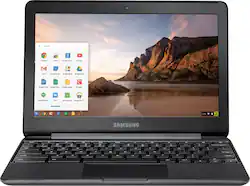
Samsung 3 Chromebook: Get compact power with this Samsung Chromebook laptop. Its 11.6-inch HD display provides clear graphics with anti-reflective technology, and its 4GB of RAM and Intel Celeron processor keep multitasking operations moving smoothly. This Samsung Chromebook laptop includes a 720-pixel camera and a 32GB flash drive to store documents, photos and programs.
Q: what's the difference between this model (XE500C13-K03US) and XE500C13-K02US which is $20 less?
A: I live chatted with Samsung last night about this. I can only gather that the K03 is related to the store. I feel like it is related to the configuration as well because I do not see the 4Gig/32Gig set up OR this model anywhere else online. I just this morning bought the K03 so we'll see how it goes over the weekend.
Q: What kind of charger does it come with?
A: Its a DC adapter, but a strange size. It's like a small, thin, hollow cylinder that plugs into the left side of the Chromebook. As a side note, I've personally used one of these before and loved it. It's light, fast and works like a charm. Unfortunately it was in my bag when it was stolen. I also use Chromebooks, especially these Samsung books, in my ESL school. They're absolutely brilliant for work as well! If you're on the fence about them, don't be.
A: It is a Chrome Book and comes with Google Docs. So yes you can do most of what you could do with Office but the apps are called different names The apps are interchangeable with Office for the most part. There is a small learning curve and the apps are not as polished but it is all cloud based and can be saved live to your Google Drive that you can access from any Google device like your smart phone etc. Its a great notebook for work type stuff but not something you would want to get for extensive media type functions.
A: Technically yes you could put your photos on this chromebook. I wouldn't recommend it, it will be messy, take forever, and the chromebook itself only comes with 32gb of onboard storage (the same about as the base model of the iphone 7 for storage). If you really want to use this laptop I would suggest purchasing a large (maybe 128gb) micro SD card and basically storing them on that using the slot on the chromebook. Otherwise, I would not recommend it.
A: I would think you could use for classes. It is a very nice book and tablet..
A: Excellent
A: Yes, per the note under Product Features: Built-in media reader for simple photo transfer;Supports microSD memory card formats.
Q: Would this computer be good to do school work
A: What level of school are you looking to use it for? ( ie- Many primary and secondary schools utilize Chromebooks in the classroom along with Google app product offerings.) Post secondary schools historically use more traditional workstations and laptops (PC and Macs) due to needing more resources (RAM, processor and storage) for running higher level applications. If all you need to use it for is surfing the web and writing up documents it will probably be sufficient; but if you need to run more intensive applications, you will probably be better off to invest in a device with as expandable memory (or the maximum memory it's sold with), the largest processor offered, along with the largest storage you can afford (although you can always expand on storage options later using external or cloud storage options if needed.)