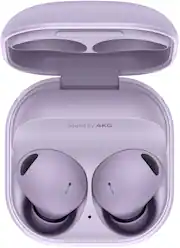
Rating 4.6 out of 5 stars with 5993 reviews
4.6- Sound Quality (3741)
- Fit (967)
- Battery Life (755)
- Comfort (688)
- Connectivity (142)
- Price (38)
- Touch Controls (38)
- Volume (20)
Customer Images
The vast majority of our reviews come from verified purchases. Reviews from customers may include My Best Buy members, employees, and Tech Insider Network members (as tagged). Select reviewers may receive discounted products, promotional considerations or entries into drawings for honest, helpful reviews.
- Rated 5 out of 5 stars
Samsung does it again! Excellent upgrade!
I am surprised, as I wasn't expecting an actual or noticeable upgrade to the Bud Pro's ... Although many say these are actually an upgrade to the Galaxy Buds 2 - I am just certain of one thing... These arw Samsung's best TWS set to date! The ANC is an improvement, Sound is also superior to previous iterations, the one area where these completely sold me is the Fit/Comfort. It has a lightweight, ergonomic and pleasant fit. I've been listening to media for 2.5 hrs straight with no irritation, no discomfort (I did switch to Small Size eartips though) the Buds2 Pro will now enter my daily rotation w/ (Sony XM4's, & AirPods Pro). The Galaxy Buds2 Pro don't sound as good as the XM4's but I wasn't expecting them too, also the out of box tuning is a bit sibilant but you can choose different presets. I enjoy the voice-detect feature which is similar to the XM4's Speak-to-Chat. I cannot recommend these enough, they are very comfortable, sound great! (Better than the now returned Pixel Buds Pro) and are of great quality. Samsung is still in the running with the top guns of the TWS Market.
Posted by HulkMann18
- Rated 5 out of 5 stars
Best Earbuds You'll Ever Need Again!
Fantastic upgrade from the previous Galaxy Buds Pro! Not only do they remain cleaner, not only do they stay comfortable in your ears, they also sound amazing! I admit I don't use all the features these buds provide, I will say that they do have an excellent battery life. I mainly use them at work, listening to music to listening to YouTube videos while making the paper doughnuts! They are great to use, more discrete than the previous pros (they don't stick out as much so others don't really notice them in your ears), and they don't apply any discomfort after a long period of use. The previous model applied a bit too much pressure on the ear canal from where the contact charging plates are located. Highly recommend these, even if you are not a Samsung user (though, I recommend a Samsung Galaxy device whether a phone or tablet if you want to utilize the full features of this amazing product!) A praise, also, to Best Buy for shipping this product a day after it was ordered. Wasn't available in store, but their team made sure you'd get your product on time right when you need them! Thank you Best Buy CS and Samsung!
This review is from Samsung - Galaxy Buds2 Pro True Wireless Earbud Headphones - Graphite
Posted by Caltosy
- Rated 5 out of 5 stars
Samsung Galaxy Buds2 Pro True Wireless Earbuds
I've gone through no telling how many headphones over the years. They either didn't fit properly, the sound was terrible, the batteries never held up, or I just lost them. II work outside a lot, and I sweat profusely on the summer. These have been so amazing! They fit perfectly with the right ear fittings (there are several to choose from). They feel much more secure than any other I had. The sound is awesome with great noise reduction. We recently went on an Alaska cruise and these held up the entire day of travel, about 7 hours. They charge wirelessly, so I was able to use them with my cordless charger, and it took no time at all to get them at 100%. I am very hard of hearing, so using these really helps me to adapt to the sounds. A soft touch on the buds allows me to answer phone calls and hear the conversation quite well. Being these are Bluetooth, they connect to any device I have. Overall, these are the best ear buds I have ever had. I'd definitely buy these again and again!
This review is from Samsung - Galaxy Buds2 Pro True Wireless Earbud Headphones - Graphite
Posted by breid1966
- Rated 5 out of 5 stars
Samsung Galaxy Buds2 Pro Compact & Comfortable
These earbuds are noticeably smaller and lighter than their predecessors, making them super comfortable for long listening sessions. The matte finish on the case feels premium and helps resist fingerprints. Excellent Sound & ANC: The audio quality is fantastic with rich bass and clear highs. Active Noise Cancellation effectively blocks out most ambient noise, letting you focus on your music or podcasts. Seamless Samsung Ecosystem: If you're already in the Samsung ecosystem, these earbuds shine with features like easy switching between devices and 360 Audio for a more immersive experience. Minor Drawbacks: Battery life is decent but not outstanding. The touch controls can be a bit finicky at times. Overall: The Samsung Galaxy Buds2 Pro are a great choice for Android users, especially those within the Samsung ecosystem. They offer superb sound, effective ANC, and a comfortable fit in a compact package.
Posted by JennW
- Rated 5 out of 5 stars
Expensive, but worth it.
I've owned many wireless earbuds and these are by far my favorite. They fit in my ear perfectly, cancel out all noise, and the bass sounds better than any other I've tried out before. I absolutely love these. I own a Samsung Galaxy phone and have never had any issues with them connecting or charging. Expensive, but worth it.
This review is from Samsung - Galaxy Buds2 Pro True Wireless Earbud Headphones - Graphite
Posted by wpIII