Deals for every list.Start early, save early.Shop now

Skip to contentGo to Product Search
Main Content

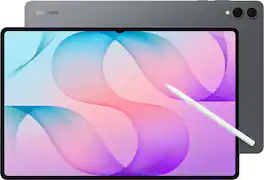
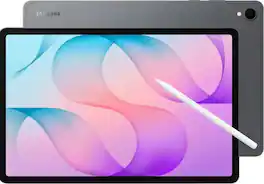
Samsung - Galaxy Tab S12 Ultra - 14.6" 256GB - Wi-Fi 7 - with S-Pen - Gray

Model: SM-X940NZAAXAR
SKU: 6688292
Sold byBest Buy

About this product

Give your biggest ideas room to come to life. Galaxy Tab S12 Ultra gives you the space to work, watch and create in a form that’s easy to take with you. Whether you’re building creative concepts, editing content or managing complex tasks to bring an ambitious project together, it’s built to fit into whatever the day demands. Take on bigger projects and multitask smoothly with the powerful MediaTek Dimensity 9500 processor. See everything come to life on the expansive 14.6" Dynamic AMOLED 2X display and dive deeper into everything you enjoy. The long lasting battery and Super Fast Charging 2.0 will keep you moving for up to 23 hours. Gemini Notebook can connect information across documents, websites and audio files to uncover insights and create summaries. And Note Assist with Galaxy AI can summarize, translate and organize your notes. At just 5.1mm thin and with IP68 rated water and dust resistance, Galaxy Tab S12 Ultra is designed to go wherever your day takes you. From productivity to passion projects and everything in between, get the power, screen and tools to go further.
See it in-store: Roseville has a demo model on display.

Highlights

Features

  • Performance that keeps up with what’s next

    Whether you’re running demanding apps, multitasking, creating with AI or gaming, the MediaTek Dimensity 9500 processor on Galaxy Tab S12 Ultra gives you the performance you need to keep everything running smoothly so you can take on bigger projects without slowing down.

  • Your favorite content, beautifully displayed

    See what you enjoy on the big 14.6" Dynamic AMOLED 2X display¹ of Galaxy Tab S12 Ultra. With slim bezels and a bright, captivating screen, everything from creative projects, online content, videos and games comes to life with stunning detail.

  • Power that keeps you going further

    Stay powered and get back to 100% quick with the long-lasting battery and Super Fast Charging 2.0² of Galaxy Tab S12 Ultra. Enjoy up to 23 hours³ tackling your projects, multitasking, creating and doing what you enjoy.

  • Your AI research and thinking partner, grounded in your sources

    Gemini Notebook is an AI research tool and thinking partner that can analyze your sources, turn complexity into clarity, and transform your content - all safely grounded in the sources you provide⁴.

  • You note it. Galaxy Tab S12 Ultra organizes it.

    Capture your meetings, ideas and everyday notes with Galaxy Tab S12 Ultra, and let Note Assist⁵ with Galaxy AI⁶ summarize, translate and organize your notes so you can spend less time managing them and more time on what you enjoy.

  • Ultra slim. Ultra powerful.

    At just 5.1mm thin, Galaxy Tab S12 Ultra pairs its big screen with an impressively slim and lightweight profile. With IP68 rated⁷ water and dust resistance, it’s ready for big ideas, big projects and wherever your day takes you.

  • Pen on paper precision

    Put your ideas down with the included S Pen on your Galaxy Tab S12 Ultra. Its pencil inspired shape and precise tip make writing, sketching and creating feel natural so you can capture inspiration whenever it strikes.

  • The big screen productivity with tablet flexibility

    Multitask like you would on a PC using your Galaxy Tab S12 Ultra with Samsung DeX . Open, resize and arrange multiple apps and workflows with up to four workspaces⁸ to help you stay organized and get more done wherever you are.

  • Your second screen is one tap away

    Need an extra space? Use Galaxy Tab S12 Ultra as a second screen. ⁹Extend or mirror your PC display wirelessly to get more room for your projects, apps and entertainment.

  • Seamless sharing across different devices

    Sending and receiving files is so easy with Quick Share. ¹⁰From photos and videos to large work files, transfer to and from your Tab in a snap. It even works when sending to non-Galaxy devices.

  • Upgrade to a new Tab. Keep your old memories.

    When we say switching to Galaxy Tab S12 Ultra is easier than ever with Smart Switch, ¹¹we mean it. Initiate the swap with no app to download and no wires to mess with.

  • Move more of your info than ever before - including your photos, music, passwords and calendars - and that’s just the beginning. Plus, the guided system helps you every step of the way, making the act of switching as stress free as it could be.

  • A premium tablet with more to offer

    Make the most of your Galaxy Tab S12 Ultra with more to explore right out of the box. Get six months of Notability Plus and four months of Adobe Photoshop at no cost for more ways to jump start your ideas and get creative.

Specifications

  • Screen Size
    14.6 inches
    Screen Resolution
    2960 x 1848
    Processor Model
    MediaTek Dimensity 9500 (MT6993)
    Total Storage Capacity
    256 gigabytes
    Operating System
    Android 17
Sponsored

Reviews

Rating 4.9 out of 5 stars with 27 reviews

5 star rating. 24 reviews4 star rating. 3 reviews
100% would recommend to a friend

Customer Images

The vast majority of our reviews come from verified purchases. Reviews from customers may include My Best Buy members, employees, and Tech Insider Network members (as tagged). Select reviewers may receive discounted products, promotional considerations or entries into drawings for honest, helpful reviews.

  • Rated 5 out of 5 stars

    This tablet is great for editing

    This tablet is not only great at editing photos or videos but also great for productivity.

    Posted by MAXG

  • Rated 5 out of 5 stars

    Mega Screen Meets Light Chassis

    I’ve admired Samsung’s 14.6” Galaxy Tabs for a few years now because I crave screen real estate. I’ve been using a 13” tablet, which is a generous size until you enable split screen mode. Since the Samsung recently launched its newest, the Galaxy Tab Ultra S12 (S12 Ultra) I thought it was time to give the 14.6” a try. Having the extras space has been transformative for both my productivity and entertainment, and with no real weight or awkwardness penalty. The S12 Ultra, while mostly intuitive, is loaded with a massive number of features and abilities from displaying multiple resizable screens to being used like a computer connected to a monitor and pointing device to on-device AI and more. There’s so much I’m going to limit this review to broad, usability aspects – the S12 Ultra’s screen, frame, log-in security, performance including with the S-Pen, and battery life. A SCREEN GEM The screen is the marquee feature here, both as a productivity enhancer and entertaining eye candy. The 4K/120Hz OLED screen is a real stunner with colors that pop, deep blacks, crisp whites, text definition that reads like it’s printed, and a solid brightness range up and down the scale. It’s also easy on the eyes easy on the eyes whether staring at a static page of monotone text, scrolling, or game play. Samsung didn’t just plop in large econo-screen so it could have bragging rights to the biggest tablet. It’s what one would expect in a top-tier tablet. I know many are intimidated, or even repulsed, by the thought of such a large tablet. Samsung did a phenomenal job though making the S12 Ultra be big while being light, slim, and easy to hold. I checked the specs of the 12” S12+ and it’s just a half pound lighter. So, if you are scared it’s too unwieldly check it out in person. I think you’ll change your mind. The benefits of the bigger screen, even just a couple inches more, are numerous. Bigger split screens, less scrolling when reading a document or web browsing, easier viewing movies and video conferences, game play, you name it. The screen is not unmitigated joy though. It’s a finger smudge magnet and, based on my experience with screen devices, think Samsung could have made it less reflective. BEGS TO BE HELD Its all-aluminum frame feels so amazing in hand I can’t bear to put it in a case. I neat feature of the S12 Ultra is it’s built-in MMC card holder. Rather than the typical open slot that leaves the card vulnerable, the S12 Ultra’s holder resembles a phone’s SIM card holder. Just pop in a MMC card for additional storage above the Ultra’s built-in amount. Especially if you get the 256GB model, this helps to “future proof” a bit. However, it’s less convenient if you have a card full of video files to import and don’t have a USB-C cable handy. The S12 Ultra is even IP68 water resistant. So, no excuse not to work at the pool, I guess. But it’s also great for anyone who works near dusty areas like construction zones. The only part of the Ultra S12’s case I don’t care for is the placement of the power and volume buttons. It’s near the top left corner, when held horizontally, but not quite, and wholly out of reach of my fingers. It’s easier to find when held vertically, which I do only when editing documents. To be fair, a swipe down on the upper right corner gets you the control center with a volume control and screen sleep button. SET UP & SECURITY The S12 Ultra Android-based operating system is a duck to water for regular Android users. But it’s also intuitive if, like me, you are more of an iOS or iPad OS user. I’ve had a few “learning curve” moments, mostly in one-time system settings. But just like in iPad OS, if you are trying to find a setting just type it into the search bar and it will be revealed. Still, if you are new to Android expect to relearn how to do certain tasks. For both Android and iPhone/iPad users, many accounts, contacts, and so on can be automatically transferred to the S12 Ultra at set up, making this as stress-free as possible. You will need both a Google and Samsung account to get full use out of the S12 Ultra. As with all modern devices today, you’ll also have to choose which ways to secure your S12 Ultra. It offers many including fingerprint, facial recognition, and PIN. I found the fingerprint is the most reliable of the biometric options. Face recognition works well, but only if the S12 Ultra is squarely in front of your face, not at an angle. All the biometrics are encrypted and stored on device for maximum security. Once all your information is in place and you’ve installed whatever apps you need from the Google Play Store you are ready to go. If you are a multi-tasker like me you can set up multiple virtual desktops and place specific apps in each. You can then switch to each as needed. This really helps to prevent app clutter. S-PEN & OVERALL PERFORMANCE While the lovely screen is the marquee feature, there is another one that is a close second, the included Samsung S-Pen. It’s a natural feeling smart pen that has numerous uses and truly adds to my enjoyment of the S12 Ultra. I “discovered” a pre-installed drawing and coloring app called “PENUP” that I’ve become enchanted with because it’s such a great way to clear the mind. It has a bunch of free coloring templates, pencil and brush styles. Pick a sheet and color away. But on more serious terms the S-Pen works great with Microsoft Word to edit documents or add in comments to share with a group effort. If you have writing to text enabled it will convert to type and I found my scrawls nearly 100% accurate. All the well-known notes apps work with it too, allowing to write in a note, doodle, brainstorm, and so on. When not in use the S-Pen magnetically hangs and charges on the upper right side (held horizontally). Unfortunately, if you are holding the S12 Ultra vertically it gets in the way. However, you can temporarily relocate it to the upper left side when holding vertically. It won’t charge there, but it won’t be a nuisance either. If you are a mobile Photoshop user the S-Pen makes lasso selections crazy fast and easy. I can’t say if other photo editing apps have S-Pen compatibility. All the other mobile Photoshop features are fast and efficient too. Movie watching is especially enjoyable because of the OLED screen, its size, and that the S12 Ultra is 16:10 so widescreen movies and TV shows fills most of the screen. There is some vertical letterboxing. The person sitting next to you on a plane will be jealous, but only because you’ll be wearing headphones and won’t know how awful the S 12 Ultra speakers are. While the S12 Ultra has four speakers they are weak and tinny, definitely not Ultra. BATTERY For any portable device battery life can be a deal killer. I was skeptical of Samsung’s advertised 12-hour battery life because the S12 Ultra is so skinny. Where would they hide all that battery? But in my use with the screen a medium brightness I did get around 12 hours until the warning notification, even after watching several episodes of a TV show, playing around with Photoshop, and web browsing, and yes, some actual work too. BOTTOM LINE The S12 Ultra is the perfect tablet for those who enjoy tablets but dream of more screen space. More room here doesn’t mean perceptibly extra weight than an 11, 12, or 13” tablet. But it’s also a great choice for people who want both a tablet and “office suite” laptop but not two devices. Just add a keyboard case and it’s like a top end Chromebook experience. Of course, the S12 Ultra shares many features with its smaller screen siblings. The S12 Ultra bigger screen is what distinguishes itself from them and allows you to use those features more productively and comfortably.

    Posted by TechO

  • Rated 5 out of 5 stars

    An Objectively Good Tablet

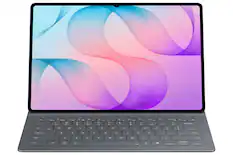
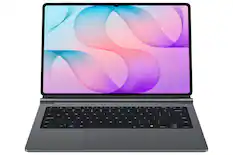
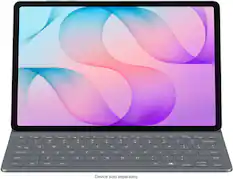
    The Samsung Galaxy S12 Ultra is my first Android tablet and it has completely sidelined my 11” M3 iPad Air. I only feel a little bad about it. The story of how we got here is boring and not incredibly important. Let’s just say that people can learn and grow and change. Sometimes different brands and products fit your needs better than the ones you’re used to. The first thing you notice when you unbox and power on the Tab S12 Ultra is the beautiful 14.6” AMOLED display. Compared to a traditional 60 Hz LCD display, the adaptive 120 Hz AMOLED panel is buttery smooth, with cinematic contrast and beautifully inky blacks. Then as you pick it up, you realize the entire tablet is only 5.1mm thick and weighs a mere 692 grams. Somehow, Samsung managed to stuff a 11,600 mAh battery in there. Insane. Compared to the M5-powered iPad Pros, the Dimensity 9500 chip is quite simply not as impressive or powerful. That being said, it has handled all of my day-to-day workloads and multitasking with ease. In the end, the overall experience is more important than hitting benchmarks. I commend Samsung for including an S Pen in the box and keeping expandable storage alive. The S Pen might not offer every capability of an Apple Pencil, but Samsung includes it in the box, and it doesn’t need to be charged. That’s a pretty compelling value proposition. The S12 Ultra accepts one microSD card up to 2 TB in size. Apple would never. Over the last week, whenever I’ve needed to check my emails, take notes, surf the web, or jump down a YouTube rabbit hole, I’ve reached for the S12 Ultra. It can just do it all in a form factor that I genuinely love using. Samsung’s pricing is competitive and gives you extras that you’re going to shell out more money for from other brands. The one gripe that I do have is that the Samsung accessories are overpriced, in my opinion. I’d love to pick up a Pro keyboard, but it doesn’t protect the tablet well and costs roughly $400. There’s also a book cover keyboard for about $240, but it doesn’t include a trackpad. Even just the book cover is $120. Why? To keep the value proposition intact, buy the tablet with the included S Pen, pick up a third-party case or keyboard, take advantage of the expandable storage, and enjoy what is genuinely one of the most satisfying tablets to pick up, hold, and use. That’s my two cents.

    Posted by Dakingindanorf

  • Rated 5 out of 5 stars

    The king of tablets

    This is my 2nd 14.6” tablet from Samsung, the first being the Tab S9 Ultra. I have nothing but good things to say about my 3 years with it, and I have never factory restored the unit. The Tab S9U has always performed as it should. With this said, I have used the S12U much the same way, music, movies, reading. Not in that order mind you, since all 3 can and were used simultaneously. Really handy when watching baseball, social and browsing can be done with no issues like stuttering and pausing. With that said, I chose to stay with this ginormous screen variant, instead of going smaller to maximize AMOLED screen real estate. I feel the screen looks better than previous tabs from Samsung. One factor is the screen brightness goes to1600 nits, which is higher than I'm used to. The S-Pen in this year's tab has been updated to feel more like a pencil. Compared to the smooth all around feel that I am used to. Going from the pen to pencil figure is definitely a choice here. I personally prefer the smoother version. I wish Samsung would sell different types of S-Pens for this reason. I definitely see improvement in word recognition when writing, which I wouldn't be surprised if AI had a part in that. Actually, with my handwriting, this is quite impressive! :D This year, Samsung removed bluetooth, hence taking away air actions. I did not notice a huge loss in overall use as the pen is fine for my needs. My only complaint about the S-Pen is that it does feel lighter and a cheaper feeling of plastic. Also the magnets took a bit to get used to as they only seem to rest on a specific spot on the pen. When lined up correctly though, the pen almost clicks into the tablet. I love that. I like that the pen can go on the top or bottom of the tablet and on the back as well. After you find what works, dealing with the bigger size becomes much easier. The design of the Tab S12 Ultra is basically exactly the same in hardware. Of course Samsung just had to change around the volume and power buttons. So frustrating, the first 2 days were a slight annoying struggle, because I was constantly hitting the volume button or power button accidentally. Software is more than adequate. I took a pic of the AI apps that are included under the Galaxy folder, but know that at least half require some sort of subscription. I am messing with the Photoshop app the most so far. I am really enjoying the customization Samsung has incorporated into OneUI over the years. The MediaTek chip so far is bulldozing everything in front of it. I ran a new game from the market for testing. I was able to unlock 60 fps in the game at max settings. Having such a positive experience already with this line of tablets, my bar is set rather high because now I expect the dependability and future updates that I am used to. I really appreciate that Samsung will continue to update this for several more years in the future. For a tablet, this is the best there is spec wise. You really could not do worse for what you can do with it. This tablet is not for existing users who have one already.

    Posted by badradio

  • Rated 5 out of 5 stars

    The best tablet for business and personal.

    An absolute productivity powerhouse of a tablet. Samsung really set the bar for a tablet here. The 14.6 inch AMOLED display is like a portable TV in your hand. Stunning visuals, clear, crispy and vivid. Consume all the content you want right in your hands and lap. I messed around with Goodnotes to test out building a concept map to see how I can start utilizing this along with the S-Pen for work purposes and I am definitely looking to be more effective and efficient with work to assist me with future projects I will be on. The S12 Ultra is a multitasking, multipurpose device. Whether its for work personal, it checks off all boxes. Hook up a wireless controller and you have yourself a portable gaming device. One thing I am looking forward to getting to enhance my experience is the mechanical genuine keyboard Samsung makes for this. It turns this into a full fledge laptop. With the enhanced Galaxy AI and productivity tools provided, this is a all in one type of device to fit all needs. If you are consuming video content, music or making video conference calls, you have fantastic speakers to make this experience better and enhance both personal and business uses. Battery is awesome, overall hardware is exceptional. Slim and sleek, lightweight design makes this more comfortable to hold than you would think for a tablet so big. It's actually impressive how light this feels. If you're in the market for a tablet, that can be used in every aspect of your life, this is the one. If you want not only a tablet but a full fledge laptop like experience, this is also the one. I looked forward to seeing how far my creativity can go the more and more I use this.

    Posted by Anthony116288

Compare similar products

Samsung - Galaxy Tab S12 Ultra - 14.6" 256GB - Wi-Fi 7 - with S-Pen - Gray
4.9(27)

Give your biggest ideas room to come to life. Galaxy Tab S12 Ultra gives you the space to work, watch and create in a form that’s easy to take with you. Whether you’re building creative concepts, editing content or managing complex tasks to bring an ambitious project together, it’s built to fit into whatever the day demands. Take on bigger projects and multitask smoothly with the powerful MediaTek Dimensity 9500 processor. See everything come to life on the expansive 14.6" Dynamic AMOLED 2X display and dive deeper into everything you enjoy. The long lasting battery and Super Fast Charging 2.0 will keep you moving for up to 23 hours. Gemini Notebook can connect information across documents, websites and audio files to uncover insights and create summaries. And Note Assist with Galaxy AI can summarize, translate and organize your notes. At just 5.1mm thin and with IP68 rated water and dust resistance, Galaxy Tab S12 Ultra is designed to go wherever your day takes you. From productivity to passion projects and everything in between, get the power, screen and tools to go further.

Samsung - Galaxy Tab S12 Ultra - 14.6" 512GB - Wi-Fi 7 - with S-Pen - Gray
4.9(52)

Give your biggest ideas room to come to life. Galaxy Tab S12 Ultra gives you the space to work, watch and create in a form that’s easy to take with you. Whether you’re building creative concepts, editing content or managing complex tasks to bring an ambitious project together, it’s built to fit into whatever the day demands. Take on bigger projects and multitask smoothly with the powerful MediaTek Dimensity 9500 processor. See everything come to life on the expansive 14.6" Dynamic AMOLED 2X display and dive deeper into everything you enjoy. The long lasting battery and Super Fast Charging 2.0 will keep you moving for up to 23 hours. Gemini Notebook can connect information across documents, websites and audio files to uncover insights and create summaries. And Note Assist with Galaxy AI can summarize, translate and organize your notes. At just 5.1mm thin and with IP68 rated water and dust resistance, Galaxy Tab S12 Ultra is designed to go wherever your day takes you. From productivity to passion projects and everything in between, get the power, screen and tools to go further.

Samsung - Galaxy Tab S12 Ultra - 14.6" 1TB - Wi-Fi 7 - with S-Pen - Gray
5.0(1)

Give your biggest ideas room to come to life. Galaxy Tab S12 Ultra gives you the space to work, watch and create in a form that’s easy to take with you. Whether you’re building creative concepts, editing content or managing complex tasks to bring an ambitious project together, it’s built to fit into whatever the day demands. Take on bigger projects and multitask smoothly with the powerful MediaTek Dimensity 9500 processor. See everything come to life on the expansive 14.6" Dynamic AMOLED 2X display and dive deeper into everything you enjoy. The long lasting battery and Super Fast Charging 2.0 will keep you moving for up to 23 hours. Gemini Notebook can connect information across documents, websites and audio files to uncover insights and create summaries. And Note Assist with Galaxy AI can summarize, translate and organize your notes. At just 5.1mm thin and with IP68 rated water and dust resistance, Galaxy Tab S12 Ultra is designed to go wherever your day takes you. From productivity to passion projects and everything in between, get the power, screen and tools to go further.

Samsung - Galaxy Tab S12+ - 12.6" 256GB - Wi-Fi 7 - with S-Pen - Gray
4.7(23)

Whether you’re planning a passion project or simply exploring an idea, Galaxy Tab S12+ helps you focus on whatever catches your attention and bring it to life. A bright 12.6" Dynamic AMOLED 2X display gives your ideas the room to come alive, while the MediaTek Dimensity 9500 processor keeps things moving smoothly, whether you are researching using AI, taking notes, opening another app or creating something of your own. When you want to go deeper, AI experiences help you make more of what you discover. Bring documents, websites and audio files into Gemini Notebook to uncover connections and turn information into helpful summaries, guides and insights. Note Assist with Galaxy AI can summarize, translate and organize your notes, so you can spend less time managing your thoughts and more time following them somewhere interesting. The included S Pen is ready to capture ideas, with a pencil inspired shape and precise tip that make writing, sketching and creating feel natural. With up to 21 hours of battery life and Super Fast Charging 2.0, there’s plenty of power to keep going. And at just 5.3mm thin, with a light design and IP68 rated water and dust resistance, Galaxy Tab S12+ is built with everything you need to take an idea to the next level.

Specs

Questions & Answers

Ask a question
No content

Customers often buy these together

Sponsored