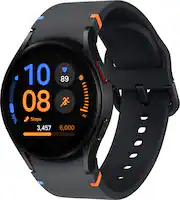
Rating 4.4 out of 5 stars with 548 reviews
4.4- Overall Performance (115)
- Ease of Use (46)
- Features (22)
- Design (14)
- Sleep Tracking (12)
- Battery Life (102)
- Connectivity (5)
- Watch Band (5)
- Compatibility (3)
Customer Images
The vast majority of our reviews come from verified purchases. Reviews from customers may include My Best Buy members, employees, and Tech Insider Network members (as tagged). Select reviewers may receive discounted products, promotional considerations or entries into drawings for honest, helpful reviews.
- Rated 4 out of 5 stars
Great deal on Geek Squad serviced watch
The watch si far is very good. There is a l earning curve since there is basically no instructions other than to plug in charger. I do wish there was more battery life as if you wear for a 23 hour time and charge basically the battery will show 12% life before charging. The wstch has numerous free faces available along with more detailed faces atxa monthly cost. The watch advertised blood pressure but you need to buy a few certian brands all new models to calibrate. A three year old Omeron blood presure is not on the list, only current year models. You can see pretty detailed info on sleep but it takes some searching to see info and the information page is not consistent in format. The watch being a Geek Squad repair seems to work fine, at a substantially reduced priced as it looked brand new. One thing that doesn’t work is the pinch fingers to activate. Not sure if it is me or the watch, will stop by a store where i get back.
Posted by lardog
- Rated 5 out of 5 stars
Bang For Yo Buck
The FE is the perfect workout watch. Basically does the same thing as the other watches. The band is size S/M though. Definitely recommend if youre on a budget.
Posted by SammyP
- Rated 5 out of 5 stars
Gotta get you one!
I love this watch. Easy set up. Reasonably priced. A must have! I purchased more bands and protectors ao i can color coordinate with my outfits.
Posted by BikerChick
- Rated 4 out of 5 stars
Nice look, lousy battery life
I love the look of the watch and the screen is so easy to read. But the battery makes me crazy. Hardly lasts a day. My old watch easily lasted two. It's just annoying, especially when I'm trying to track sleep, but always have to charge it at night instead
This review is from Samsung - Galaxy Watch FE Smartwatch 40mm BT with Pink Band - Pink Gold - (2024)
Posted by AllieP
- Rated 4 out of 5 stars
Nice Smartwatch
Loving my Samsung watch. I like the health features e.g., health insights and ability to answer calls and read text messages. I mostly use it to track my steps and execises. The battery lasts for a day with a full charge so I can charge it the next day while getting ready in the mornings.
Posted by VanessaP