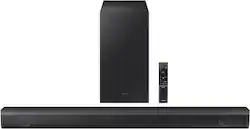
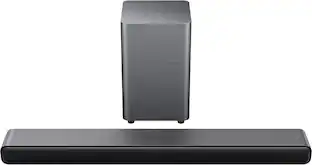
Samsung - HW-B550 2.1ch Soundbar with Dolby Audio / DTS Virtual:X - Black
- Key Specs
- Wireless Connectivity: Bluetooth (The manner in which a device sends data to another device over a short distance without the use of wires or cables.)
- Wireless Subwoofer Connectivity: true
- App Compatible: false (The product can be connected to a program or software application on a mobile device, which then receives collected data from the product.)
- Wall Mountable: true (The product is able to be secured to a wall. Some products are designed ready to mount, while others may require additional hardware/accessories for installation.)
- Dialogue Enhancement: true (Improves clarity of dialogue in audio playback. This is typically achieved with dedicated speakers and/or technology that separates dialogue from the rest of the audio in order to make it clearer.)
- Voice Assistant Built-in: Not Applicable (A digital assistant built into the device that uses voice commands to answer questions and control smart devices.)
- General
- Brand: Samsung
- Model Number: HW-B550/ZA
- Product Name: HW-B550 2.1ch Soundbar with Dolby Audio / DTS Virtual:X
- Color: Black
- Audio
- Number of Channels: 2.1 (The number of discrete channels of sound output. This can be a single number or multiple numbers separated by decimal(s). The first number is the primary, horizontally directed audio channels. The number after the first decimal, if applicable, is the number of subwoofer outputs or channels. The number after the second decimal, if applicable, is the number of height or atmospheric channels designed to immerse the listener by producing overhead sound effects.)
- Surround Sound Supported: DTS Virtual:X, Surround Sound (Surround sound systems use multiple audio channels and speakers to create an immersive sound experience for the listener. There are also various proprietary technologies that imitate this kind of sound via a device's built-in speakers or soundbar.)
- Connectivity
- Wireless Connectivity: Bluetooth (The manner in which a device sends data to another device over a short distance without the use of wires or cables.)
- Wireless Multi-Room Audio: false (Technology that allows multiple speakers and/or soundbars to be connected wirelessly and play audio in separate rooms.)
- Wireless Subwoofer Connectivity: true
- Satellite Speakers: Optional (sold separately) (Using satellite speakers in conjunction with a soundbar allows for a surround sound experience; the soundbar can serve as a center channel speaker while satellites provide rear channel audio or additional front channel audio.)
- HDMI Audio Return Channel (ARC): ARC
- Audio Only Inputs: 1 x Optical digital audio, 1 x USB-A
- Number of HDMI Inputs (Total): 1
- Number of USB Inputs: 1
- Number of Optical Audio Inputs: 1
- Number of HDMI Outputs (Total): 1
- Features
- App Compatible: false (The product can be connected to a program or software application on a mobile device, which then receives collected data from the product.)
- Wall Mountable: true (The product is able to be secured to a wall. Some products are designed ready to mount, while others may require additional hardware/accessories for installation.)
- Dialogue Enhancement: true (Improves clarity of dialogue in audio playback. This is typically achieved with dedicated speakers and/or technology that separates dialogue from the rest of the audio in order to make it clearer.)
- Speaker
- Subwoofer: Included
- Dimensions
- Product Height: 2.3 inches (The out of box height of the item. Height is measured as the vertical distance from the bottom of the item to the top as it would be primarily used or placed.)
- Product Width: 33.9 inches (The out of box width of the item. Width is measured as the horizontal distance from one side of the item to the other as it would be primarily used or placed.)
- Product Depth: 3 inches (The out of box depth of the item. Depth is measured as the distance from the front of the item to the back as it would be primarily used or placed.)
- Product Weight: 4.6 pounds (The out of box weight of the item.)
- Subwoofer Height: 13.6 inches
- Subwoofer Width: 7.2 inches
- Subwoofer Depth: 11.6 inches
- Subwoofer Weight: 11.2 pounds
- Included
- Remote Control Included: true
- Cable(s) Included: Optical digital audio, Power
- Mounting Hardware Included: true
- Certifications Listings & Approvals
- ENERGY STAR Certified: true (Devices carrying the ENERGY STAR service mark, such as computer products and peripherals, kitchen appliances, and other products, generally use 20% to 30% less energy than required by federal standards.)
- Warranty
- Warranty - Parts: 1 year
- Warranty - Labor: 1 year
- Compatibility
- Voice Assistant Built-in: Not Applicable (A digital assistant built into the device that uses voice commands to answer questions and control smart devices.)
- Other
- UPC: 887276636269
Dolby Audio creates realistic 3D sound by projecting it from all around you, including from above, while DTS Virtual: X expands your listening experience without having to add extra speakers. Boost the bass with a touch of a button. Experience the intensity of action movies with the powerful bass coming from the included subwoofer. .Enjoy optimized audio with enhanced voice clarity on all your favorite video content.
- Dolby Audio / DTS Virtual:X: Elevate your favorite content. Dolby Audio creates realistic 3D sound by projecting it from all around you, including from above, while DTS Virtual: X expands your listening experience without having to add extra speakers.
- Bass Boost: Feel the rumble of distant thunder as your listening experience is taken to another level. Give your bass an instant boost with the push of a button.
- Subwoofer Included: Experience the intensity of action movies or the excitement of sports with the rich, powerful bass coming from the included subwoofer.¹
- Adaptive Sound Lite: Enjoy sound that’s continuously optimized as you switch between content, including sports, games, movies and more.
- Game Mode: Plug in your console and get the amazing sound effects you expect, right away.
- Bluetooth® Multi-Connection: Connect two smart devices simultaneously and share the sound tower with ease. No more jumping back and forth, just deciding what’s next.
- One Remote: Control both your Samsung TV and soundbar with the Samsung OneRemote².
- Voice Enhanced & Night Mode: Voice Enhance Mode optimizes the equalizer to maximize voice clarity. Night mode will lower the bass to prevent disturbing others while they sleep.
- Wireless Surround Sound Compatible: Connect easily and seamlessly to the optional Samsung speakers and enjoy room-filling sound without the wires.
- Bluetooth® TV Connection: Set up is a breeze. Easily connect your soundbar to your TV wirelessly³.
Whats Included
- Samsung HW-B550 2.1ch Soundbar
- Wireless Subwoofer
- Wall Mount Kit
- Remote Control
- User Manual
Product Manuals
A: The remote button for volume is a single button. Unlike most remotes where you hit left to lower and the right to raise the volume. The button acts more like a toggle switch. Toggle up for volume up and toggle down for volume down. If you press it, it acts as another mute button. It took some getting used to for me as well.
Q: Does this soundbar have HDMI ARC capability?
A: Hi Brian! The HW-B550 does have HDMI ARC capability. ^Patty
A: Hi Erin, The HW-B550 Soundbar is only compatible with the SWA-9100S and SWA-9200S Wireless Rear Speaker Kits. It is not compatible with the SWA-8500S Wireless Rear Speaker Kit. ~Samsung Solutions
A: Hi there, We recommend using HDMI as this will offer the best audio and user experience available. First, connect a HDMI cable from the Soundbar to a TV's ARC HDMI input. Then you will select HDMI as the source using the Soundbar remote using the Source button (which is the upper most right button). From here you will be all set. And can now use the TV remote to control the overall volume of your Soundbar. ~Samsung Solutions
Q: Does this soundbar system work with other brands of TVs? I have an LG 50QNED80.
A: Yes. My daughter has a TCL 55”tv and it pairs great with her tv
A: Hello Ginger456! Try using Dynamic Range Control (DRC). DRC lets you apply dynamic range control to Dolby Digital tracks. With DRC turned on, loud sounds will be reduced. 1) Turn off your Soundbar. 2) While the Soundbar is off, press and hold the Sound Mode button on the remote control for 6 seconds until you see “DRC ON” shown on the display. 3) To turn off DRC, repeat steps 1 and 2 above. You can also try optimizing audio performance for your specific content by pressing the SOUND MODE button on your soundbar remote, and then selecting the desired sound effect by choosing STANDARD, SURROUND SOUND, BASS BOOST, GAME, or ADAPTIVE. If you need more help with your HW-B650 soundbar, Samsung is here for you. Please call us at 1-800-SAMSUNG, 8AM - 12AM EST (Ask for Soundbars), 7 days a week. Our Live Chat agents are also available by clicking on the ‘Support’ link on our website. ~ Samsung Solutions
A: Hello JeremysMom, The HW-B550 Soundbar doesn't have the ability to connect to the internet. You will be able to connect to your TV using HDMI, Bluetooth or Digital Optical. ~Samsung Solutions
A: Hello TJC1, The mounting holes are going to be different between each model soundbar as they are different sizes. ~Samsung Solutions
People also viewed
 $1,599.99The price was $1,999.99
 $249.99The price was $399.99



Today's top picks
- $249.99The price was $399.99
- $1,599.99The price was $1,999.99
 $299.99The price was $399.99
 $129.99The price was $159.99