Appliances Presidents’ Day SaleEnds 2/25. Limited quantities. No rainchecks.Shop now

Main Content
product image

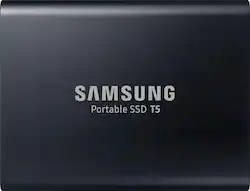
Samsung - T5 1TB External USB Type C Portable SSD - Deep black

Model: MU-PA1T0B
SKU: 6026202
This item is no longer available in new condition. See similar items below
  • Key Specs
    • Storage Capacity: 1000 gigabytes (Measured in megabytes (MB), gigabytes (GB) and terabytes (TB), this is the amount available for storing files, music, movies, photos and more. The total includes the capacity of the hard disk drive and solid state drive if both are included on the computer.)
    • Storage Drive Type: SSD (Traditional, mechanical hard disk drives are the most common type of storage because they're relatively inexpensive and offer huge capacities. However, they also generate both noise and heat. Solid state drives, also known as SSDs, are many times faster than hard disk drives and have no moving parts to wear out, but typically offer less capacity for the same price.)
    • Maximum Read Speed: 540 megabytes per second (The greatest speed at which the device can read information; for example, opening files.)
    • Maximum Write Speed: 540 megabytes per second (The greatest speed at which the device can write information; for example, saving files.)
    • Interface(s): USB Type C (USB 3.1 Gen1) (Refers to the types of connections that devices use to interact and communicate with each other.)
  • General
    • Brand: Samsung
    • Model Number: MU-PA1T0B
    • Product Name: T5 1TB External USB Type C Portable SSD
    • Color: Deep black
  • Capacity
    • Storage Capacity: 1000 gigabytes (Measured in megabytes (MB), gigabytes (GB) and terabytes (TB), this is the amount available for storing files, music, movies, photos and more. The total includes the capacity of the hard disk drive and solid state drive if both are included on the computer.)
  • Performance
    • Storage Drive Type: SSD (Traditional, mechanical hard disk drives are the most common type of storage because they're relatively inexpensive and offer huge capacities. However, they also generate both noise and heat. Solid state drives, also known as SSDs, are many times faster than hard disk drives and have no moving parts to wear out, but typically offer less capacity for the same price.)
    • Maximum Read Speed: 540 megabytes per second (The greatest speed at which the device can read information; for example, opening files.)
    • Maximum Write Speed: 540 megabytes per second (The greatest speed at which the device can write information; for example, saving files.)
  • Compatibility
    • Internal Or External: External
    • External Hard Drive Type: Portable (Physical characteristics of the hard drive, including size, weight and how you connect to your device.)
    • Interface(s): USB Type C (USB 3.1 Gen1) (Refers to the types of connections that devices use to interact and communicate with each other.)
    • Operating System Compatibility: Android, Mac, Windows
    • Minimum System Requirements: Windows 7 or above; MacOS X 10.9 or above; Android 4.4 or above
  • Features
    • Security Features: Password Protection
    • Data Encryption: true
    • Encryption Algorithm: 256-bit AES (The algorithm standard used to encrypt data on a device.)
    • Usage: Backup, Enterprise/server, Everyday computing, Gaming, Low power storage
    • Lighting Type: None
  • Memory
    • NAND Flash Memory Type: V-NAND (Single Level Cell (SLC) stores 1 bit of data per memory cell; Multi Level Cell (MLC) stores 2 bits per cell, Triple Level Cell (TLC) 3 bits, and Quad Level Cell (QLC) 4 bits. Vertical NAND (V-NAND) or 3D NAND stores more data by layering cells vertically. Similarly, there are 3D MLC, 3D TLC and 3D QLC stacked cells.)
  • Power
    • Power Source: USB port
  • Dimensions
    • Product Height: 2.3 inches (The out of box height of the item. Height is measured as the vertical distance from the bottom of the item to the top as it would be primarily used or placed.)
    • Product Width: 2.91 inches (The out of box width of the item. Width is measured as the horizontal distance from one side of the item to the other as it would be primarily used or placed.)
    • Product Weight: 0.11 ounces (The out of box weight of the item.)
  • Included
    • Included Software: Samsumg Portable SSD Software
  • Other
    • UPC: 887276226316

Store files securely on this 1TB Samsung portable SSD. It transfers data at speeds of up to 540MB/s for increased work productivity, and it connects to Android smart phones with a downloadable app, so you can backup pictures and music. This Samsung portable SSD is smaller than a standard business card for easy transport.

Drives and Storage Buying Guide

  • 1TB portable storage capacity: Gives you simple and efficient access to your massive data so you can complete tasks quickly and on the move. Take along your documents, large-sized photos or videos, and get things done wherever you go.
  • USB Type-C interface: Offers convenient connection to an extensive range of devices from PCs, Macs, smartphones and other devices.
  • Transfer speeds of up to 540 MB/s: With Samsung V-NAND flash memory and a USB 3.1 Gen 2 interface, the T5 provides transfer speeds of up to 540 MB/s.*
  • Password protection with AES 256-bit hardware encryption: Keeps your personal and private data more secure.
  • Solid inside and out: Stay worry-free. The T5 has no moving parts and a sturdy body, so it can handle drops of up to 6.6'.**
  • Top-to-bottom metal design: Comes in a rounded unibody that fits comfortably in the palm of your hand.
  • Management software: The T5 comes embedded with an intuitive software for PCs and Macs to easily set the password and get the latest firmware updates. You can also download the mobile app for Android smartphones and tablets.
Whats Included
  • Samsung T5 1TB External USB Type C Portable Solid State Drive
  • USB Type-C to C cable
  • USB Type-C to A cable

Q: Has Samsung updated this drive to be compatible with Mac Catalina?

A: I am using one on a 2019 iMac 27" (w/256GB SDD internal) as an external 1TB for storage and on a 2017 iMac 21.5" as an external SSD boot disk in lieu of the 1TB internal Fusion. Both are running Catalina. No problems with either.

Q: Could this also be used with a PlayStation or Xbox backups

A: I use one on an XBox One X. Really made load times faster.

Q: My husband has a desktop Dell. How much data will this external hard drive hold? Also, will it connect to his Dell? We have a lot of pictures saved on the Dell and would like to unload them. We are not that computer savvy? Thanks.

A: I use this for my entire catalog of photos in Lightroom and there is only about half the drive space taken up. Not sure how many photos you're talking about and being a non static number for the size, as every photo is different, then it it hard to say if 1TB will store all your photos. I can tell you I have 230,000 and most are taken in a RAW format by the camera and those are the ones I have on this drive that is now half full. You can also connect this to your Dell desktop without worry. I myself have a Dell and I use it regularly with this drive. You plug it into your USB port on the computer and you should see it in your file manager very shortly after that. (takes a few moment s to read and or set itself up). Hope everything works out for you and you get the storage space you need.

Q: Can this device be used on a 2.0 USB connection?

A: Yes it can. Use the appropriate cable (supplied with ssd) that has the physical connector for the usb 2.0 port. You won’t get the speed out of the drive because the usb 2.0 port will essentially choke. The ssd is orders of magnitude faster in data throughput than a usb 2 port. So it may be an expensive solution as compared to a regular external HD. However, it will be more reliable than a regular HD and also be somewhat future proof when you upgrade to a usb 3.xx port with faster data throughput. It is also smaller and lighter with all-metal construction compared to most 2.5 in external bus powered HDs.

Q: Hi I bought a gaming desktop was going to get another ssd getting one externally would be easier my question is will the USB type c be just as fast as having one internally?

A: On a new computer I'm having built, the speed on that internal SSD drive and this external one appear to match fairly closely. Joke; probably because of those irritatingly short cables.)

Q: Anyone using this external SSD unit had experience with doing a firmware update on the T5 1TB? Reading support documentation @ Samsung support, their wizard isn't Mac compatible as I read it. Thanks, W

A: I downloaded the app that came with the drive, (Samsung Portable SSD) and its pretty straightforward. You plug the SSD in, launch the app, and hit the update button within the app. It should update within a couple seconds.

Reviews