Rating 4.7 out of 5 stars with 103 reviews
4.7- Ease of use (40)
- Installation (12)
- App (10)
- Security (8)
- Wi-Fi (6)
- Battery Life (4)
Customer Images
The vast majority of our reviews come from verified purchases. Reviews from customers may include My Best Buy members, employees, and Tech Insider Network members (as tagged). Select reviewers may receive discounted products, promotional considerations or entries into drawings for honest, helpful reviews.
- Rated 5 out of 5 stars
Peace of mind product
Great product that is compatible with apple products. I now have a great peace of mind with the app for alerts when door locks and unlocks. No more worries when I leave my home and the kids forget to lock the door. Super happy with product
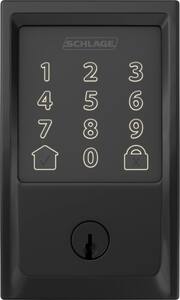
This review is from Schlage - Encode Wi-Fi Touch Screen Deadbolt - Satin Nickel
Posted by BennyC
- Rated 4 out of 5 stars
Very nice lock.
I was happy with the installation but wish old bolt latch would have work, swapped it out and put in new one that came with lock. Made ajustments so it would slide with no friction on strike plate, smooth as butter now so hope batteries last. Easy to use but Wish they had a brass finish and also auto unlock via bluetooth feature when approaching lock. That's why only four stars. The button below the lock is just my door bell. Hope they can add the auto unlock with firmware upgrade then would it be awesome!
Posted by Gonzo
- Rated 5 out of 5 stars
Encode WiFi Deadbolt Lock
The Encode WiFi Deadbolt lock was a great buy for me. It was easy to install the set up on my ring security system was compatible and it works flawlessly. I highly recommend this product if you’re looking for a great Deadbolt lock.
Posted by MrBaras1
- Rated 4 out of 5 stars
Initial Assessment: 2 Thumbs up
We bought this wi-fi deadbolt to replace an August Lock (2nd Gen). We have just updated with a Ring security system. We had decided to replace the August video doorbell with the Ring Doorbell 3 Pro hoping that the latency of the Ring would greatly outperform the August (latency with the August doorbell is horrible). As part of this upgrade, we wanted a wi-fi lock that "works with" the current system. The installation was pretty simple. Some of the parts did quite seem as "sturdy" as parts I had seen for the Yale lock. However, they do appear sufficient and the supplied strike reinforcer definitely makes the security of this lock seem solid. Setup is a breeze for the Schlage app and the Homekit. There's an option to add an Amazon key as well. However, I'm not sure both can be added. I'm currently looking into this. The only real negative to the entire installation was the lack of the inside assembly screws. Having begun the installation a little late in the evening there was nowhere I could go to find the screws needed so, I spent a solid hour searching the whole house for 2 screws that would fit properly. I had briefly checked the packaging before installation but had evidently overlooked these two screws. All in all, it's a great lock. My wife and I really like the look which matches our house style perfectly (modern) and it was an easy installation. Look for an update after we've incorporated it with our new Ring system.
Posted by J2CEO
- Rated 5 out of 5 stars
Awesome product
Awesome product for our smart home. Easy to install and connect to our internet network. Remote access to our lock is a must have. Great product. Better connectivity that previous Schlage lock. Different series that requires a WiFi adapter that would connect. This lock is real deal and very secure.
Posted by Jazzy