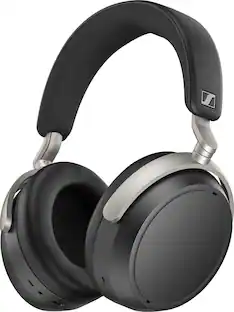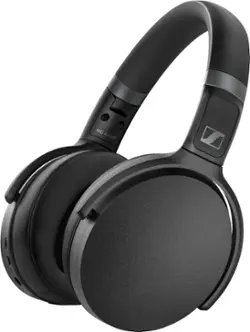
Sennheiser - HD 450BT Wireless Noise Cancelling Over-the-Ear Headphones - Black
- Key Specs
- Noise Cancelling (Active): true
- Sound Mode: Stereo
- Connection Type: Wireless
- Wireless Connectivity: Bluetooth (The manner in which a device sends data to another device over a short distance without the use of wires or cables.)
- True Wireless: false (These headphones not only lack wires between the device and headphones, they also lack wires between the headphones themselves. (true wireless is really only possible with in-ear headphones))
- Built-In Microphone: true
- Headphone Fit: Over-the-Ear
- Adjustable Headband: false
- Battery Life: 30 hours (Battery life will vary depending on the product configuration, product model, applications loaded on the product, power management setting of the product and the product features used by the customer. As with all batteries, the maximum capacity of this battery will decrease with time and usage.)
- Battery Charge Time: 2 hours (Battery charge time will vary depending on the product configuration, product model, applications loaded on the product, power management setting of the product and the product features used by the customer. Charging time will likely decrease with time and usage of the battery.)
- General
- Brand: Sennheiser
- Model Number: HD 450BT BLACK
- Product Name: HD 450BT Wireless Noise Cancelling Over-the-Ear Headphones
- Color: Black
- Audio
- Noise Cancelling (Active): true
- Sound Isolating: true
- Minimum Frequency Response: 18 hertz (Describes the maximum range of frequencies or musical tones a product can reproduce, from very low tones to very high treble tones. The minimum frequency or musical tone the speaker can reproduce. High treble tones have higher frequencies while low tones and deep bass have lower frequencies.)
- Maximum Frequency Response: 22 kilohertz (Describes the maximum range of frequencies or musical tones a product can reproduce, from very low tones to very high treble tones. The maximum frequency or musical tone the speaker can reproduce. High treble tones have higher frequencies while low tones and deep bass have lower frequencies.)
- Total Harmonic Distortion: 0.3 percent (Measurement of the harmonic sound distortion. The lower the percentage, the cleaner the sound.)
- Sound Mode: Stereo
- Connectivity
- Connection Type: Wireless
- Wireless Connectivity: Bluetooth (The manner in which a device sends data to another device over a short distance without the use of wires or cables.)
- True Wireless: false (These headphones not only lack wires between the device and headphones, they also lack wires between the headphones themselves. (true wireless is really only possible with in-ear headphones))
- Bluetooth Version: Other (The Bluetooth specification formalized by the Bluetooth Special Interest Group. All versions of the Bluetooth standard are backwards compatible with previous versions.)
- Features
- Built-In Microphone: true
- Maximum Talk Time: 30 hours
- Design
- Headphone Fit: Over-the-Ear
- Style: Travel
- Adjustable Headband: false
- Foldable Design: true
- Power
- Rechargeable: true
- Battery Life: 30 hours (Battery life will vary depending on the product configuration, product model, applications loaded on the product, power management setting of the product and the product features used by the customer. As with all batteries, the maximum capacity of this battery will decrease with time and usage.)
- Battery Charge Time: 2 hours (Battery charge time will vary depending on the product configuration, product model, applications loaded on the product, power management setting of the product and the product features used by the customer. Charging time will likely decrease with time and usage of the battery.)
- Battery Capacity: 600 milliampere hours (The amount of energy stored in the battery.)
- Charging Accessory Included: Case
- Charging Interface(s): USB (The connection for transmitting power to charge the device.)
- Dimensions
- Product Height: 0.01 inches (The out of box height of the item. Height is measured as the vertical distance from the bottom of the item to the top as it would be primarily used or placed.)
- Product Width: 0.01 inches (The out of box width of the item. Width is measured as the horizontal distance from one side of the item to the other as it would be primarily used or placed.)
- Product Length: 0.01 inches (The out of box length of the item. Length is measured as the longest dimension of the item.)
- Product Weight: 0.52 pounds (The out of box weight of the item.)
- Warranty
- Warranty - Parts: 2 years
- Warranty - Labor: 2 years
- Other
- UPC: 615104340961
Enjoy your playlists while on the move with these black Sennheiser HD Series over-the-ear wireless headphones. The closed-back design and active noise cancelation keep out ambient sounds, while the easy-touch buttons offer convenient, intuitive control. These Sennheiser HD Series over-the-ear wireless headphones feature a powerful 30-hour battery to easily last through long travels and extended workouts.
- Rechargeable battery: Offers up to 30 hours of use on a charge.
- Active noise cancellation: Actively cancels waveforms from outside the earcup to completely eliminate extraneous sounds.
- Built-in microphone: Enables simple hands-free chatting via a compatible device.
- Bluetooth 5.0 interface: Enables simple wireless pairing with your Bluetooth-enabled device. Supports HFP, HSP, A2DP and AVRCP Bluetooth profiles.
- Over-the-ear design: For a secure fit.
- Folding design: Along with an included carrying case enables easy portability.
- Carrying case included: For easy portability.
- 18Hz - 22kHz headset frequency response: Along with a 80Hz - 6kHz microphone frequency response ensures faithful sound reproduction.
- Dynamic transducer design: For reference-grade audio.
- Stereo design: Delivers crisp tones.
Whats Included
- Sennheiser HD 450BT
- Carrying case
Product Manuals
Q: Does this headphone power off automatically? is that a feature for power saving ?
A: I dont belive it does. I tested this by using the headset to listen to music while I took a nap. When I woke up an hour later my music was done but the headset was still powered on.
A: I was listening to XM radio when phone rang. Simply pressed button to answer and went to phone. When call ended went back to listening to music
Q: Can these headphone be used in the wired mode? I'm concerned about security.
A: They sure can even have a 2.5mm jack into it with a cable included 2.5mm male to 3.5mm male aux
A: what you'll need is a rca to female headphone adapter and a Bluetooth transmitter. You plug the transmitters headphone jack into the adapter. Make sure the adapter is a rca to female adapter.
A: Yes it’s 100% annoying. I try to turn down the sound because of noise and then the speaker is too soft to understand then I turn it up and the noise is too loud. Absolutely infuriating.
Q: Can I use these via pc while in a call and gaming?
A: Yes you can use
Q: Are the ear pads made of leather?
A: They are made of faux synthetic leather.
A: No it is not. When the manual said the media controls aren't usable, they meant everything. What's also not in the manual is that you also can't use the microphone wired.
People also viewed
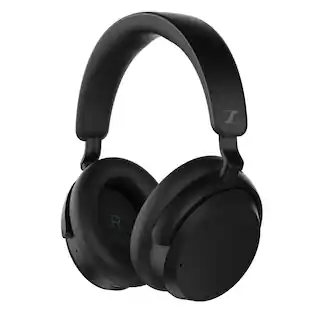 Black Friday in July Deal$99.99The price was $189.99
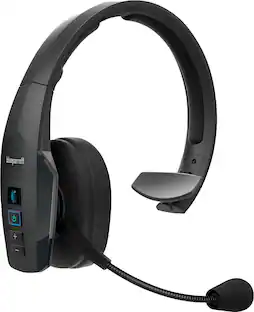 $179.95The price was $189.00
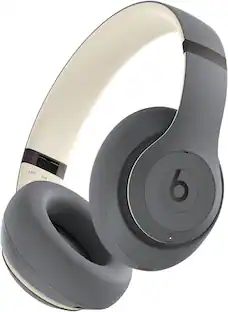
Today's top picks
 Black Friday in July Deal$199.99The price was $249.99
 Black Friday in July Deal$149.00The price was $179.00
 Black Friday in July Deal$139.99The price was $249.99
 $349.99The price was $429.00
 Black Friday in July Deal$248.00The price was $398.00
 Black Friday in July Deal$149.99The price was $179.99