Main Content

Skylight - Calendar 2: 15 Inch Touchscreen Smart Calendar and Chore Chart - Charcoal

Model: 152UEKa
SKU: 6665549
$319.99
or
$26.67/mo.
suggested payments with 12-Month Financing
Show me how
Standard Geek Squad Protection
96% of reviewers would recommend
Warranty Protection Plans
Availability
Pickup at
Sold by Best Buy
  • General
    • Brand: Skylight
    • Model Number: 152UEKa
    • Product Name: Calendar 2: 15 Inch Touchscreen Smart Calendar and Chore Chart
    • Color: Charcoal
  • Dimensions
    • Product Width: 9.375 inches (The out of box width of the item. Width is measured as the horizontal distance from one side of the item to the other as it would be primarily used or placed.)
    • Product Height: 1.25 inches (The out of box height of the item. Height is measured as the vertical distance from the bottom of the item to the top as it would be primarily used or placed.)
    • Product Depth: 15 inches (The out of box depth of the item. Depth is measured as the distance from the front of the item to the back as it would be primarily used or placed.)
    • Product Weight: 6 pounds (The out of box weight of the item.)
  • Imaging
    • Image Resolution (Display): 1920 x 1080 (Refers to the number of pixels, both horizontally and vertically, used to either capture an image or display it. The higher the resolution the finer the image details.)
  • Compatibility
    • Memory Card Compatibility: None (The type of memory card(s) recommended for use with the product.)
    • Interface(s): None (Refers to the types of connections that devices use to interact and communicate with each other.)
    • Minimum System Requirements: Not Applicable
    • Wireless Connectivity: Wi-Fi (The manner in which a device sends data to another device over a short distance without the use of wires or cables.)
  • Features
    • Screen Size: 15 inches (Size of the screen, measured diagonally from corner to corner.)
    • Built-in Storage: 16 gigabytes
  • Warranty
    • Warranty - Parts: 120 Days
    • Warranty - Labor: 120 Days
  • Other
    • UPC: 850067427483

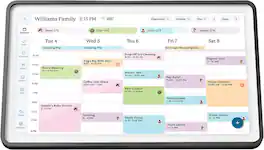
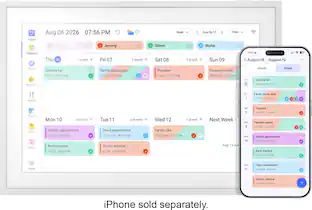
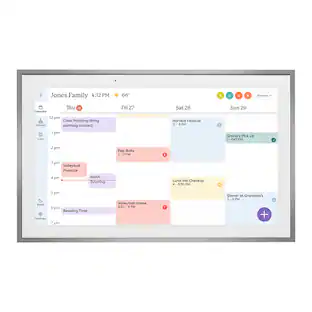
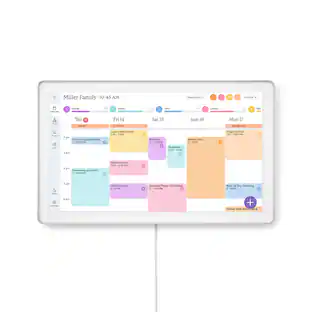
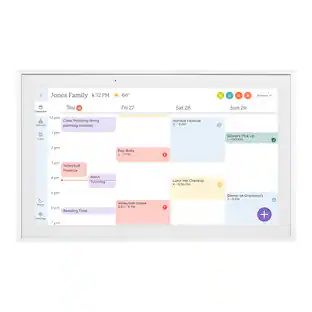
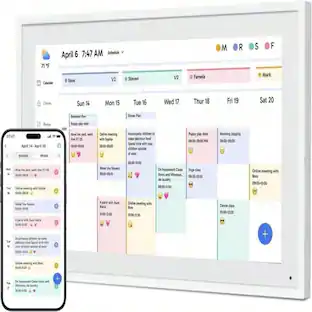
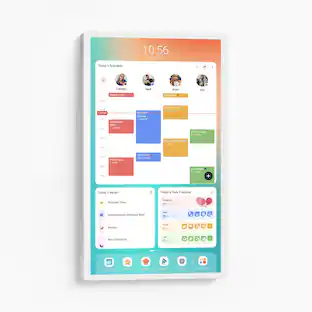
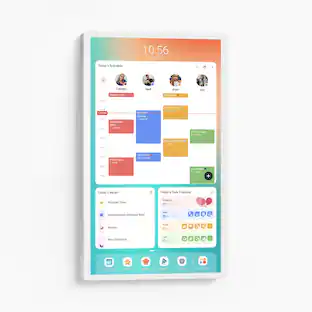
Skylight Calendar 2 - 15" Digital Calendar with removable Shadowbox Frame. Daily Planner and Touchscreen Smart Display for Family Schedules, Work, and Office. Get the whole family organized with chore charts, meal planning, and customizable lists on a WiFi-connected system with a beautiful and intuitive digital display.

  • Skylight All-in-one Smart Home WiFi Touchscreen Digital Calendar: Effortlessly organize the whole family with the touchscreen display for all your calendar events, chores meal plans and tasks.
  • Quick Set-up: Simply plug it in, connect to Wi-Fi, and sync your calendars – all your events will automatically populate and sync. Add events or chores directly on the device or use the free to download mobile app.
  • Stay effortlessly organized with seamless calendar syncing:: Automatically connect with Google Calendar, iCloud Calendar, Outlook, and more. Empower your family’s independence with the interactive Tasks Manager, turning daily routines and chores into fun, healthy habits. Stay organized at a glance with customizable color-coding and flexible day, week, month, or schedule views.
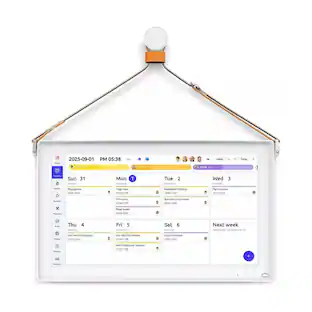
  • Beautiful and Intuitive HD Smart Display:: 15” touchscreen wall mount in portrait or landscape to fit your space, as well as 180° adjustable tabletop stand in landscape.Touch screen display that allows easy schedule creation, viewing and display.
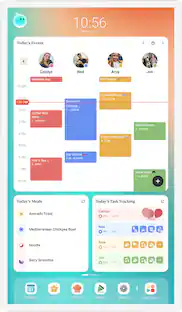
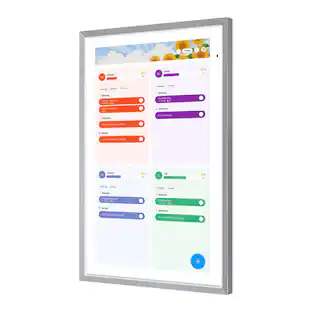
  • Simplify your family’s routine with smart features designed to make life smoother:: Plan meals with ease so you’ll never hear “What’s for dinner?” again. Motivate kids and celebrate progress with the built-in Rewards system that turns good habits into fun achievements. And let Magic Import do the work for you — automatically transforming emails, PDFs, and photos into calendar events. Upgrade to Plus to unlock these powerful tools and bring a little extra magic to every day. Sold separately.
Whats Included
  • Skylight Calendar
  • Detachable Decorative Frame
  • Mounting Brackets & Screws
  • Power Adapter

Q: What is the display resolution of this calendar?

A: The image resolution is 1920 x 1080.

Q: Are meal plans available on this device?

A: Yes, this device helps plan meals with ease.

Q: How much built-in storage does the calendar have?

A: The calendar has 16 gigabytes of built-in storage.

Q: What type of display does this calendar have?

A: This calendar has a beautiful and intuitive HD smart display.

Q: Is there a touchscreen on this digital calendar?

A: Yes, this digital calendar has a touchscreen display.

Q: Does this calendar sync with Google Calendar?

A: Yes, this calendar automatically connects with Google Calendar.

Q: Can I mount this calendar on the wall?

A: Yes, this calendar can be wall mounted in portrait or landscape.

Q: Does this calendar have wireless connectivity?

A: Yes, this calendar has Wi-Fi wireless connectivity.

Sponsored

Compare similar products

Skylight - Calendar 2: 15 Inch Touchscreen Smart Calendar and Chore Chart - Charcoal
4.4(59)

Skylight Calendar 2 - 15" Digital Calendar with removable Shadowbox Frame. Daily Planner and Touchscreen Smart Display for Family Schedules, Work, and Office. Get the whole family organized with chore charts, meal planning, and customizable lists on a WiFi-connected system with a beautiful and intuitive digital display.

Skylight - Calendar Max: 27 inch Touchscreen Smart Calendar and Family Organizer - White

Skylight Calendar Max 27-Inch Digital Calendar & Daily Planner, Touchscreen Smart Display For Work, Office and Family Schedules

Skylight - Calendar 2: 15 Inch Touchscreen Smart Calendar and Chore Chart - White
4.4(59)

Skylight Calendar 2 - 15" Digital Calendar with removable Shadowbox Frame. Daily Planner, Touchscreen Smart Display for Family Schedules, Work, and Office. Get the whole family organized with chore charts, meal planning, and customizable lists on a WiFi-connected system with a beautiful and intuitive digital display.

Aluratek - 15.6" WiFi Smart Calendar and Photo Frame with Touchscreen IPS LCD Display, No Subscription Fee and 32GB - White
3.8(4)

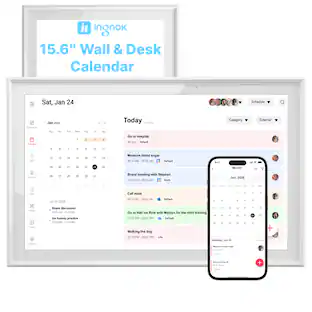
The all-in-one tool that simplifies family scheduling for busy households. Sync your calendars with Google, Apple, Yahoo, Outlook or Cozi. Create task and to-do lists, schedule events, plan meals and more with the eCalendar app for download on iOS / Android devices. Enjoy and feature photos and videos with the digital photo frame feature all controlled through the app. Your photos will be displayed on the IPS LCD screen in 1920 x 1080 resolution. Experience incredible clarity in rich and vibrant colors at an ideal 16:9 aspect ratio. No subscription fees.

Pros for Skylight - Calendar 2: 15 Inch Touchscreen Smart Calendar and Chore Chart - Charcoal
Ease of Use, Display Quality, DesignThere were no pros for this productEase of Use, Interface, Sync CapabilityThere were no pros for this product
Cons for Skylight - Calendar 2: 15 Inch Touchscreen Smart Calendar and Chore Chart - Charcoal
ConnectivityThere were no cons for this productThere were no cons for this productThere were no cons for this product

Specs

Reviews

Customers are saying

Customers value the Calendar 2 for its well-constructed display, ease of use, and elegant design. The process for using the device is smooth and straightforward. However, some customers have expressed a desire for wireless connectivity. Overall, the Calendar 2 appears to be a useful and aesthetically pleasing device for managing schedules and chores.

This summary was generated by AI based on customer reviews.
  • Display Quality (14)
  • Ease of Use (12)
  • Design (4)
  • Connectivity (6)

Customer Images

The vast majority of our reviews come from verified purchases. Reviews from customers may include My Best Buy members, employees, and Tech Insider Network members (as tagged). Select reviewers may receive discounted products, promotional considerations or entries into drawings for honest, helpful reviews.

  • Rated 5 out of 5 stars

    Megan

    This calendar helps keep my life so organized, but also a sentimental touch! From the color coded calendar to the tasking lists, I can stay on top of things while also displaying photos in my house! The only down I’ve found is not being able to hang it on the fridge. The calendar 1 can, but 2 doesn’t have that option, I’d love it to be added!

    Pmcnjv46 Posted

  • Rated 3 out of 5 stars

    A Good Organization Tool with Awful Setup Process

    I’ve been wanting a smart family calendar for a while now, mainly because in our house “I didn’t know we had plans” was becoming way too common. So I finally picked up the Skylight 15" Calendar 2 in Charcoal, hoping it would bring some structure and accountability into our daily routines. Right out of the box, the presentation is solid. You get a clean looking 15-inch 1080p touchscreen display that feels modern and responsive, along with a sturdy stand, a power supply, and even a wall mounting bracket if you want a more permanent setup. Hardware-wise, it definitely feels like a polished product and something you’d actually want sitting on your kitchen counter or mounted on a wall. Now, onto the setup process which, honestly, is where things got frustrating. At first glance, this seems like it should be a plug-and-play device. I downloaded the Skylight app, created my account, and got the activation code to input on the device. Easy enough. But when it came time to connect to Wi-Fi, the device just wouldn’t connect to my Wi-Fi. It sat there spinning endlessly, trying to connect but never actually doing so.I restarted it, same issue. Still spinning. No connection. At that point, I went into troubleshooting mode. I turned on my phone’s hotspot just to test things and it connected immediately. That ruled out a defective unit and pointed directly at my home network as the issue. After searching around online, I found a Reddit post saying that Skylight Calendar only supports the 2.4GHz Wi-Fi band and doesn’t play nicely with modern networks that combine 2.4GHz, 5GHz, and 6GHz into a single SSID. So I went into my Xfinity app and split my network into separate bands, renaming each one accordingly. Important note: doing this will disconnect every device in your house, and you’ll have to reconnect everything manually. Not exactly a small inconvenience, just to get one Smart device on your network. After all that, I thought I was in the clear but nope, still wouldn’t connect. At that point, I reached out to customer support, and they told me I needed to change my 2.4GHz network security to WPA/WPA2. Once I made that adjustment, the Skylight finally connected and completed the setup. So yeah, what should have been a 5 minute Max setup turned into a full on networking project. For the average person who isn't that tech savvy, especially someone using Xfinity or similar providers, this could be a major hurdle. Once everything was finally up and running, though, the experience improved significantly. I invited my significant other to the account, and we both synced our Apple Calendars and Google Calendars without any issues. Unfortunately, I couldn’t sync my Outlook work calendar due to company restrictions requiring IT approval which is understandable, but still worth noting if you rely heavily on a work Outlook account. Functionally, the calendar does exactly what we wanted. It keeps everything centralized and visible, which has already cut down on miscommunication. We also started using the shared grocery list and to-do features, which are surprisingly useful. One of my favorite features is the smart home integration. I paired it with my Alexa, and now we can just say things like, “Alexa, add milk to the Skylight list” or “Alexa, add dinner date Friday at 8 PM on Skylight” And it syncs right to the calendar or list. That kind of hands free functionality actually makes a big difference not having to go to the Skylight calendar or the app to type in the details. You can also assign tasks to specific people, which adds a layer of accountability. For example, I assigned my significant other a reminder to pick up dry cleaning on Thursday. It's a simple, but effective tool. One thing that caught me completely off guard, though, is the built-in subscription model. There’s a Skylight Plus subscription that unlocks additional features like photos, meals, recipes, and rewards. It costs $7.99 per month or $79.99 per year. While not the most expensive subscription service, it's the lack of transparency. There’s no clear indication on the box or purchase page that key features are behind a paywall. The only mention of it is buried in the quick start guide near the back.That’s something I think should be communicated upfront, and honestly, it should include at least a 30-day free trial so users can evaluate whether those features are even worth paying for. Pros Great for keeping the whole family organized in one place Large, clear 15" touchscreen display Useful features like grocery lists, chores, and to-do lists Alexa integration for hands-free adding of events and items Clean design with stand or wall-mount options Cons Only supports 2.4GHz networks, which causes problems in many homes Requires extra steps like changing router settings to work properly Subscription required for some features (~$7.99/monthly $79.99/yearly ) Subscription not clearly advertised upfront Limited support for work calendars like Outlook (depending on company restrictions) Overall, once it’s set up, the Skylight Calendar 2 does what it's supposed to do. It keeps our schedules organized, improves communication, and integrates nicely with smart home features. But the setup process especially with modern Wi-Fi configurations is way more complicated than it should be, and having to potentially reconnect your whole home's internet and repairing every device in the house just for adding one device to the network, that alone could be a dealbreaker for some people. If you’re comfortable troubleshooting network settings, and want a convenient way to organize your family's calendar you’ll likely end up happy with it. But if you expect a seamless out-of-the-box experience, this might test your patience a bit.

    Ian L Posted

  • Rated 4 out of 5 stars

    The Organizer I Didn’t Think I Needed until I Did!

    I’ll be honest: when I first saw the Skylight 15" Calendar 2 in Charcoal, I didn’t think it was going to impress me. At a glance, it looked like a fancy digital frame - something a regular tablet could probably do if you propped it up in the right spot. But once I actually started using it, that skepticism disappeared fast. This thing isn’t just a calendar. It’s a full-on family organization system that quietly takes over the chaos and turns it into something manageable. Within a week, our household felt different. Fewer missed appointments. Fewer “Wait, who’s picking up who?” conversations. Fewer sticky notes on the fridge. It’s wild how quickly it went from “probably unnecessary” to “how did we ever function without this?” Design That Actually Fits Into Your Home The first surprise was how good it looks. The charcoal frame gives it this clean, modern vibe that blends in with pretty much any room. Instead of looking like a piece of tech slapped on the wall, it genuinely passes as décor. It’s subtle, elegant, and doesn’t scream for attention. You can mount it on the wall with the included hardware, or just use the built-in kickstand if you want it on a counter or desk. That flexibility matters more than you’d think - being able to put it exactly where your family naturally gathers makes a huge difference. And the screen? Gorgeous. Bright, crisp, responsive. It feels premium every time you tap it, and even the least tech-savvy person in the house can navigate it without frustration. The Real Power: The Skylight App Calling this thing a “calendar” honestly undersells it. The magic lives in the Skylight app, which ties everything together. The app pulls in calendars from Gmail, Outlook, and pretty much anything else your family uses. Instead of checking three different apps to figure out what’s happening this week, everything shows up in one clean, easy-to-read view. And because it syncs instantly, any change someone makes on their phone shows up on the wall display seconds later. The shopping list feature is another unexpectedly great addition. You can add items on the wall at home, then check them off from your phone at the store. It feels simple, but it’s one of those conveniences that just makes life smoother. A True Shared Family Hub This is where the Skylight Calendar really shines: everyone can contribute. Kids can add their activities. Teens can update practice times. Parents can coordinate work schedules, appointments, and reminders. No more “I didn’t know about that” moments. No more double-booking. No more frantic last-minute texts. It’s not just about organization - it genuinely improves communication. Everyone sees the same information, all the time. And because it’s so easy to use, people actually do update it. It also teaches kids a bit of responsibility. When they add their own events, they start paying more attention to their schedules. It’s a small thing, but it adds up. A Few Minor Drawbacks Nothing’s perfect, and the Skylight Calendar has a couple of quirks worth mentioning. - The power cable is short. If you’re wall-mounting it, you’ll probably need an extension cord. It’s not a dealbreaker, but it’s definitely an oversight. - Some features are behind a subscription. Things like photo displays require a paid upgrade. Given the price of the device, it would’ve been nice to have at least a year of premium included. But the core features - the ones that make this device worth buying - don’t require the subscription. Final Verdict: Absolutely Worth It After using the Skylight 15" Calendar 2 extensively, I can say without hesitation that it’s worth the investment. It’s beautifully designed, incredibly intuitive, and genuinely improves how a family communicates and stays organized. If your household is juggling busy schedules, or if you’re just tired of the constant mental load of keeping track of everything, this device is a game-changer. It’s one of those rare products that actually delivers on what it promises. And yes - it’s worth every penny.

    Goor00inTX Posted

No content
Sponsored

Similar products from outside of Best Buy

sponsored
Ask BlueBETA
Ask a question

Finance Options

My Best Buy® Credit Card
Choose a benefit:Or
Buy Now, Pay Later
4 payments starting at $80.00
Lease to own

Apply today with no credit needed and enjoy flexible payment options.