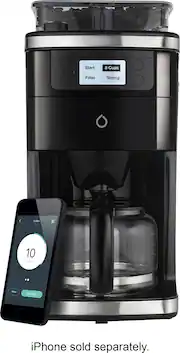
Rating 3.6 out of 5 stars with 43 reviews
3.6- Coffee Quality (8)
- Connectivity (8)
- Ease of Use (7)
- Design (3)
- Grinder (6)
Customer Images
The vast majority of our reviews come from verified purchases. Reviews from customers may include My Best Buy members, employees, and Tech Insider Network members (as tagged). Select reviewers may receive discounted products, promotional considerations or entries into drawings for honest, helpful reviews.
- Rated 5 out of 5 stars
Excellent smarthome addition
I honestly can not understand why anyone would give this smart device anything less than five stars. Aside from the great quality cup of coffee, the ability to customize and automate the brewing experience has helped simplify my life. The app is very reliable and I hope they continue to improve on the already great platform. I have had no issues with connectivity or the grinder. The Alexa integration has also been flawless. If you are a gadget geek like myself, this is a must have!
Posted by Erick
- Rated 3 out of 5 stars
Works but needs improvement
Coffee is good but limited amount of control if you are going to have it grind the beans. I am not sure how people are complaining of weak coffee because mine is way to strong on the weak setting with the grinder set to course (recommended by support) It uses way to many beans and coffee is way to strong for a weak setting. If I switch it to strong it uses the same amount of beans and is the same strength as weak. The other major issue is that the warmer only stays on for 40 min so if you start it when you wake up you better get to it and drink fast or it will be cold. I am giving 3 stars because I do enjoy the Alexa/phone use and the coffee is good (just too strong). I included a picture of how many beans it used for 10 cup not 12 cup pot on the weakest setting.
Posted by Technine
- Rated 4 out of 5 stars
Great coffee maker
After using this coffee maker for the last several months, I am overall satisfied. The coffee taste great and I use either the app or Alexa to start brewing. Pros: This coffee maker looks great! It also has a built in grinder so just put whole beans in the hoper and it feeds into the grinder! You can use the app or Alexa (or the buttons on the display) to calibrate your coffee, adjustments can be made to the strength of flavor, beans or grounds and how many cups desired. Cons: For the price I’d like to see some better commands for Alexa. As it stands, it’s just a smart switch attached to a coffee maker so you ask Alexa to “turn on the coffee” and it starts brewing whatever last setting you had. Also, the water reservoir only holds about 10 cups of coffee (which means you’ll have to refill this daily if you brew 6-8 cups like me). Also, the grounds have to be dumped after every brew, which isn’t so bad until you forgot to do that yesterday and you’re waking up and about to tell Alexa to “turn on the coffee” but you didn’t refill the water and dump the grounds... Final thoughts: The coffee is great and the idea is a novelty. You could probably find a cheaper coffee make with a grinder and just programmed to make coffee in the morning. But the times when I’m thinking about coffee and ask Alexa to get that brewing, it’s pretty cool!
Posted by ChefAdam
- Rated 4 out of 5 stars
Great technology
Great new technology for a smart phone connected coffee maker. Easy internet setup and very user friendly. Trying to tweek the strength of the brewed coffee; almost there.
Posted by LJFDMD
- Rated 5 out of 5 stars
Awesome
I was waiting for this product to hit US for over a year. Grinder is working very well, coffee it's ok too. Main reasons I got it it's to control it with alexa. I already created applets in IFTT app so you are more them welcome to use them. Example: Alexa, trigger 2 cups of coffee. If you use Alexa without IFTT. You can only say Alexa, turn on "your device name" in my case it's coffee and machine will start brewing to last setting you had your machine set it up to. The App. If you set auto brew on your schedule, it also works as alarm clock. The bad thing is that you don't have the option to turn alarm off. So every morning your phone will ring when it starts brewing process. Warning: there's no instructions how to replace front face panels. Both of them top and bottom panels have buttons on left and right side underneath you must press in order to remove them. Main problem is with top panel. The button its located between coffee tray and top panel. You must open coffee tray and have very small finger to reach it in between. Overall Smarter is my new best friend.
Posted by sebagalaxy