Skip to contentGo to Product Search
Main Content

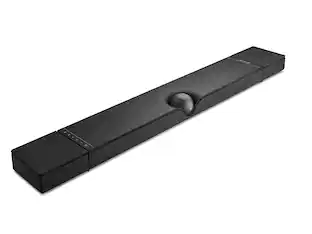
Sonos - Beam Ultra 7.1.2 Channel Wireless Smart Soundbar with Dolby Atmos - White

Model: BMULTUS1
SKU: 6687824
Sold byBest Buy

Customers are saying

Customers enjoy the impressive Dolby Atmos performance, which provides a high-quality 7.1.2 surround sound experience. Users also appreciate the solid and satisfying bass that adds depth to their audio. However, some customers have noted that the device can occasionally experience connection stability issues when relying on Wi-Fi.

Generated by AI based on customer reviews.

Features

  • Surround sound in one soundbar

    7.1.2 Dolby Atmos surround sound with upward-firing drivers. Car chases move across the room. Rain falls from overhead. Whispers land beside you.

  • Every word, perfectly clear

    Dialogue comes through clearly from the moment the TV turns on. When the action gets loud or the room gets noisy, AI-powered Speech Enhancement sharpens every word.

  • Designed for the room you live in

    Slim enough to sit under your TV. Designed to disappear into your space. Place it on furniture or mount it to the wall.

  • More drivers, more detail

    Nine drivers – four more than Beam – reveal more depth in every note and create a wider soundstage. Dialogue cuts through busy scenes. Bass lands with weight. Music fills the room.

  • Made for music too

    Fine-tuned with help from GRAMMY and Oscar-winning creators, Beam Ultra brings the same depth, clarity, and detail to music as it does to TV and movies.

  • Tap, talk, or click for control

    Control Beam Ultra however feels easiest in the moment. Use your TV remote, the Sonos app, Apple AirPlay 2, Bluetooth, or your voice.

  • Tuned to your room

    Trueplay reads your room's acoustics and tunes Beam Ultra accordingly. Whether it’s on furniture or mounted to the wall, you get the best sound for your setup.

  • The start of a system

    Add a sub for deeper bass. Add a pair of surrounds for fuller immersion. Put Sonos in every room to fill your home with music. It all works together.

  • Gets better over time

    The soundbar you set up today is designed to keep improving, with software updates that add new features and refine performance.

Specifications

  • Wireless Connectivity
    Wi-Fi, Bluetooth
    Wireless Subwoofer Connectivity
    Yes
    App Compatible
    Yes
    Indoor or Outdoor Use
    Indoor
    Wall Mountable
    Yes
    Dialogue Enhancement
    Yes
Sponsored

Reviews

Rating 5 out of 5 stars with 17 reviews

5 star rating. 17 reviews
100% would recommend to a friend
Customers are sayingCustomers enjoy the impressive Dolby Atmos performance, which provides a high-quality 7.1.2 surround sound experience. Users also appreciate the solid and satisfying bass that adds depth to their audio. However, some customers have noted that the device can occasionally experience connection stability issues when relying on Wi-Fi.
This summary was generated by AI based on customer reviews.
  • Dolby Atmos Performance (7)
  • Bass Performance (3)
  • Connection Stability (4)

Customer Images

The vast majority of our reviews come from verified purchases. Reviews from customers may include My Best Buy members, employees, and Tech Insider Network members (as tagged). Select reviewers may receive discounted products, promotional considerations or entries into drawings for honest, helpful reviews.

  • Rated 5 out of 5 stars

    Another quality Sonos speaker for the collection

    PROS: * 7.1.2 Surround Sound (while technically true, it won’t truly compare to a speaker setup w/AVR) * Clear, Crisp Audio with excellent dialogue * Dedicated Up-Firing Drivers * Can be used with TV, PC (non-HDMI), Bluetooth, or as a music streaming speaker SO-SO: * The Sonos app and Wi-Fi dependence; it works well most of the time, but be patient when there are issues * Price: $699 (it’s a bit spendy for newcomers, but to me the quality matches the price) CONS: * No remote control (although your phone does the job) We have used the Sonos ecosystem since the mid-2000s, and from their first products to the latest, we have always been very satisfied with their hardware. It is a system you can count on to last, so you never feel the need to upgrade because the hardware is built to last. For instance, the original Sonos 3 speaker, released in 2011, still works for us today. In a technology industry where devices tend to be disposable and last only a few years, Sonos makes an effort to keep its devices going for years upon years. You end up not needing to upgrade because of hardware failure, but because you trust their speakers will sound even better with each improvement. The new Beam Ultra is no ordinary soundbar; it offers much more and delivers excellent sound. With speakers set along the front and top, it delivers 7.1 Dolby Atmos sound that will amaze most people. Although it's designed for films and television, you can also use it with a PC or as your primary speaker for music. When watching films, the voices are particularly clear and easy to pick up. The system will attempt (sometimes very successfully) to create the impression of surround sound on its own, and it performs quite well if you're not used to a full surround sound system. Actions on the left side of the screen play through the left portion of the speaker, and similarly on the right. This makes the movie-watching experience feel much more immersive. If you're starting with your TV sound system and want an unobtrusive setup with a clean look in your entertainment area, the Beam Ultra is the solution. The design is timeless and unobtrusive, with a simple, minimalist form that works well whether it's placed next to a television, on a desk, or even on a windowsill (where mine is currently). I prefer the white color since it matches our walls and doesn't draw attention to itself. The build is premium-standard; the materials and grille feel solid in hand, yet it doesn't feel too heavy. Sonos has a particular ability to create speakers that look both timeless and modern, and this always amazes me. After trying it on our main TV, I decided to use it in the office for now while we wait for a new TV to be mounted in there. I connected it to two Sonos Play Ones, and I am now enjoying playing music in there with a right, left, and the Beam Ultra. There is, in fact, a subwoofer built into the soundbar, even though many companies claim to have one; with this unit, you can actually feel the punch of a small subwoofer without it overpowering the sound. In our family room, we have a large Sonos Sub paired with two Play Ones, and it sounds fantastic. With that said, I am impressed by how much bass the Ultra Beam can produce compared with the main subwoofer. Whether or not you’re in the Sonos ecosystem, you will benefit from the Beam Ultra. It's tough to match this speaker's impressive sound when comparing it to other soundbars out there. You can always add to it, too, since Sonos lets smaller Sonos speakers act as rear speakers for true 5.1 sound (with a sub). And if you’re scared off by past software or app issues, rest assured: Sonos has fixed those issues, and we have been happy with the software for years now. However, with anything Wi-Fi-dependent, issues can still arise, and that can be frustrating.

    Posted by Bryan

  • Rated 5 out of 5 stars

    Big, Generational Improvements in Audio

    TLDR: Big, Room Filling Sound from a Tiny Soundbar. PROS 7.1.2 Surround Sound Dedicated Up Firing Drivers Clear, Crisp Audio Compatible with Other Generations of Sonos Speakers CONS Sonos App Not Remote Control Friendly CEC Needs Improvement CONNECTIONS 1 x Power 1 x HDMI eARC 1 x USB-C SET-UP The Beam Ultra is configured via Sonos' controversial app. I've owned Sonos products for years and I will say that initial configuration and addition of Sonos products is pretty straight forward, but after that, the Sonos app is a difficult mess. The Beam Ultra was immediately recognized on my Android phone and was added and updated in a matter of minutes. It was easy to update, add to a new room, and even to add some existing Sonos products, like my Gen 3 sub, to my Family Room. I like the Sonos set-up process. Actual app use is a whole other story. However, we are here for the Beam, not listen to me whine about an app. SOUND QUALITY As I stated above, the Beam Ultra is being placed in my family room. It is replacing a soundbar/surround combo from a major TV manufacturer. My current soundbar was acceptable, but I was never fully blown away. The more I've used it, the more I see its shortcomings. Even with dedicate surround speakers, I never found the audio convincing and enveloping. Not to mention, while audio was acceptable, it was never particularly clear and/or convincing. Prior to installation, I watched a movie with my existing set-up, streaming it in 4k and Dolby Atmos. Afterward, I pulled out my existing system and installed the Beam Ultra. After updating the Sonos, running the room correction algorithm, and setting it up for my TV controls, I queued the same movie up again. Skipping immediately to the good, action sequences to see if there was any discernible difference between the Beam Ultra and my existing soundbar/surround system. The differences in audio quality were immediately apparent. I was surprised at just how much the audio had improved. Voices were noticeably clearer and more intelligible. The amount of bass was improved as well, even before adding my Sonos Gen 3 sub to the system. Most importantly, the Beam Ultra's surround and Atmos audio was noticeably more present and convincing. The Sonos does a very good job at processing its Atmos audio. Adding those 2 up-firing tweeters to the Beam makes for a much more enveloping soundstage. I have to admit that even without dedicated surrounds, my Beam Ultra outperforms my existing soundbar/surround combo in Atmos-enabled movies. Frankly, I would never have believed at how much better and more realistic the Atmos soundstage is now, if I hadn't witnessed it in person. NEGATIVES First. The Sonos app is still a hot mess. Like I said above, it is easy to add a new product to your system. After that, the app just tries to do too much. It wants to be your one-stop shop for audio, video, etc. I don't like it and don't want it. Just give me an app that controls my devices. It is frustrating. For example, it took me nearly 5 minutes to figure out how to switch back to my HDMI input from Amazon Music. It just isn't logically laid out. Second. The Sonos system isn't universally supported like most other soundbar/surround combos are. Luckily, my TV will control the Sonos volume, but none of my streaming device remotes, nor my TV remote will control the Beam Ultra's power. I've tried 3 different remotes, from 3 different manufacturers. None were successful. At least the volume functions properly via the TV. Third. CEC still needs some attention. My existing soundbar/surround combo was controlled properly via the HDMI-eARC CEC protocol. Volume, power, etc. it was handled properly. Not with this Sonos system. None of my remotes control power. Sonos' troubleshooting section of their website says the system never truly shuts off, only enters a low power state. I'm not sure this is the case with mine or not, as I notice no change in the LED indicators. Sonos needs to provide additional support for CEC protocols and remotes. FINAL THOUGHTS Sonos bills the Beam Ultra suitable for TVs up to 65". I understand why. I have it mounted under my 98" TV and it does look odd. It is a very compact package. Yes, the Sonos looks absolutely tiny under my TV, but as soon as I queue up a good show or movie, I could care less. This Beam Ultra alone handily outperforms the more expensive soundbar/surround combination I had been using. Props to Sonos for including compatibility with older Sonos products. Buyers can start with a Beam Ultra and then add, or even repurpose, most existing products, like I did with my gen 3 Sub. The Sonos app makes it easy to add and configure speakers. Adding a sub and surrounds is easy and straightforward. The room correction algorithm makes it easy and pain-free to tune the entire system regardless of layout and placement. The Beam Ultra is definite improvement to the Beam line of speakers. More drivers, more amps, more realistic and enveloping surround. Audio is crisp and clear. There is punchy bass and the new, up-firing drivers provide a realistic Dolby Atmos surround effect. HIGHLY RECOMMENDED

    Posted by NAMO

  • Rated 5 out of 5 stars

    Beam Ultra brings Big Upgrades

    I have been with Sonos for almost a decade as their products have always felt like a great blend of performance, aesthetics, and smart-integration as one of the first and best players in the Smart home audio market. I have the original Sonos Beam (3.0), Beam Gen2 (5.1.2 with Atmos), and now the Beam Ultra (7.1.2 with Atmos. The biggest change to note between the Beam Gen2 and the Beam Ultra is that the Ultra now has real physical upfiring Atmos speakers instead of the simulated upfiring on the Gen2. You can physically see the grill now on top and if you took apart the Ultra, you would see the two upfiring speakers. The Ultra is also physically larger with about 4" total or 2" additional size on either side. While this makes it less compact, it does allow for more speakers and a wider soundstage while still looking great with smaller TVs around 50". Its also worth mentioning that the wall mount on the Ultra is different and is not a supporting metal plate like the Beam/Gen2 which were identical in size. So, if you want to wall mount the Ultra, you will need to get the new mount which is slightly different in how it mounts. Onto the Ultra itself. There's also now a physical finger slider for volume instead of the capacitive touch buttons on the top of the unit, since that part is now the Grill on the Ultra. I actually like how it is more accessible but I don't actually control by touching the Ultra, I use voice commands, my phone or the TV remote and eARC. In terms of sound quality, I can definitely appreciate the extra speakers for true Atmos sound, however, I also notice the lack of width to really cast a wider sound stage compared to some of my larger competing sound bars from other makers. Still, especially with the AI Speech Enhancement feature (4 diff levels), I really enjoyed the big sound that came from this tiny speaker. Another excellent feature of the Beam Ultra, along with the Arc Ultra, is that Sonos now supports specfiic newer Sonos speakers that can be configured as Surround Satellites. Sonos of course does some magic that they are known for, because they still want you to use these speakers as standalone streaming WiFi speakers in different rooms. So they devised a way to allow these speakers to talk and listen to each other. Yep, that's right, they basically communicate with each other at frequencies the human ear can not distinguish, so that helps each remote speaker determine whether they are in a room that is part of a system, and then how to adjust sound levels to be appropriate. It works incredibly well, just lift up a Sonos Play off its charging base while playing music streamed from your phone. Then put it down in a room with a Sonos Beam Ultra or Sonos Arc Ultra and immediately its light changes color and realizes its now in a room with the Ultra. If you added it to that room's system, it'll start playing the content from the TV. It works incredibly well and now those rear satellites can either always be part of the TV setup until you move it to a different room or outdoors, at which point it becomes a rugged and excellent quality remote speaker. I was also able to do this with the Sonos Ace Ultra headphones, where I could just swap between the speakers and the Ace Ultra to play the content on the TV. I'm really enjoying the Beam Ultra however it is a big step up in price compared to the Beam Gen2. You're also not too far away from the Arc Ultra in pricing, which is probably what Sonos intended. They have a new sound bar that still performs and looks great but is also priced right inbetween the older Gen2 and Arc Ultra. What I am really curious is whether Sonos will keep building out their capabilities to combat Dolby Atmos Flex Connect which is what other companies are pushing. Sonos makes no direct mention that their solution is a Flex Connect alternative or competitor, but Sonos is clearly using their own secret sauce to accomplish the same thing, which is to have a great wireless and component based AV system that can be easily expanded or relocated as needed. I would love to see them allow Sonos users to add a pair of speakers from the Sonos Amp as the primary L/R speakers, then the Beam Ultra can be for upfiring and dialogue. And the Play units in the back as satellites. That would be amazing, hopefully something Sonos looks to add in the future.

    Posted by TechBuyer

  • Rated 5 out of 5 stars

    Flexible Sonos Speaker with Amazing TV Sound

    We have a fairly large Sonos system at home with various Sonos speakers in just about every room. Some are stationary, some are mobile and some I even take with me when traveling. I love the flexibility to play virtually anything I want on any single or group of speakers. A few years ago I bought a Sonos Beam (Gen 1) for the master bedroom TV. Not only did this improve on the audio of the TV’s typically bad built-in speakers, but the Beam joined my Sonos ecosystem and could also just be bedroom music speaker when I wasn’t watching TV. It worked fine but there was no surround sound - just noticeably better stereo audio. I later added a Sub Mini to improve the audio with 2.1 but it was still just good but not great. Enter the Beam Ultra. It’s a bit wider but still compact enough to fit in my bedroom under the TV. While the old Beam Gen 1 had 5 speaker drivers (4 full-range woofers and 1 center tweeter), this new Ultra model has a whopping 9 drivers including 5 toward the front, 2 towards the sides and 2 that fire straight up for Atmos. It still connects to the TV via HDMI ARC (audio return channel) but now also has a USB-C port for connecting to other local sources. The Ultra dropped the old Beam’s Ethernet port, but WiFi works well enough and saves having to run the cord. Setup was even easier than I remembered from the Beam Gen 1. The app immediately found the new Ultra after it was plugged in and joined it to my existing system. As part of the setup, I was able to link the Sub Mini to it as well. Unlike the old Beam which just fired audio out of its front, this Beam Ultra has top-firing speakers for surround sound like Atmos so placement is a bit more of a concern. It’s best to slide it just a tad forward of your TV so the Atmos speakers have an uninterrupted path to the ceiling for optimal sound. Even if this is your first Sonos speaker, the new app makes it super easy to route nearly any source to your Beam Ultra. Turn on the TV and the speaker immediately switches to TV audio. Our Den home theater setup has a receiver and discrete speakers for a true Atmos surround system and this setup sounds almost as good. Seriously! For some extra punch, you can even link up a pair of Sonos Play speakers as surrounds. The Plays have batteries and a wireless charging dock or you can plug them in via USB-C for power. They are also just wireless Sonos speakers in your system and when linked to the Beam Ultra, they form a “Home Theater” group. You can play surround-encoded music to the group for an awesome listening experience or turn on your TV and now you have a full surround setup with the Plays as back-channel speakers. That alone would be good enough for an amazing listening experience, but this is Sonos and you get so much more flexibility. The Play speakers are wirelessly linked to the Beam Ultra but this link is not permanent. In fact, Sonos built in some cool smarts since the Play speakers are themselves wireless battery-powered speakers. Leave them in the room where the linked Beam Ultra is and they form a Home Theater group for music and TV. Pick up either Play speaker and walk it out of the room, and the two surrounds automatically unlink from the Beam Ultra and return to being individual speakers that you can use anywhere in your home singly or grouped with other Sonos speakers. When you’re done listening to them elsewhere, stop what they were playing and put them back in the room with the Beam Ultra and they automatically re-link back to the Home Theater grouping. Way Cool! But that’s not all! I also have the Sonos Ace Ultra headphones which themselves are great headphones. Building on the prior Ace’s cool TV Swap feature where you could transfer the audio from the Beam to the Ace for private listening and back again with a single button press, the Ace Ultra also can do this swap trick with nearly any other Sonos speaker in your home. This feature is still in “early access” and I found a few times that it had difficulty transferring the audio, but most of the time it worked within 2 seconds of the request and was like magic. Sonos speakers have always enabled easy flexibility in choosing what you want to listen to on each speaker, but this new Beam Ultra just takes that to the max with the audio swapping to the Ace Ultra and the ability to use the surrounds as mobile speakers when you’re not watching TV. Plus, the audio is genuinely impressive for music, movies and TV. It’s especially good if you’re listening at night and don’t want to bother others - just transfer the audio to the Ace Ultra or use the “Night Sound” feature to reduce loud sound variations in the Beam Ultra. If you find yourself straining to hear spoken audio in a movie or TV show, the “Speech Enhancement” feature bumps up the vocals in one of 5 levels of enhancement. If you already have a Sonos system at home and need to improve the audio of your TV, this Beam Ultra will do that and so much more. It sounds amazing on its own, but when paired with a Sonos Sub and a pair of Sonos Plays as surrounds, music and movies become an immersive experience. The new Sonos App makes setup, configuration and daily use a breeze to direct just about any source to any speaker or group speakers for multi-room audio. For my iPhone, the Sonos app now takes advantage of Live Activities and the Dynamic Island to keep what’s playing visible and accessible without even having to open the app. Sonos flexibility really is the secret sauce on top of great sound. Want to have a movie playing in the Den and listen to it while cooking in the kitchen? Easy. Not watching movies on the TV connected to the Beam Ultra? Just pick up one of the surrounds and bring it to the back yard for some ambient music. With very few exceptions, everything just “works” and sounds great doing so. This is so much more than just a great way to improve the sound of your TV. It greatly extends and improves a Sonos ecosystem as well.

    Posted by gadgeTT

  • Rated 5 out of 5 stars

    Excellent crisp and clear, room filling audio

    The Sonos Beam Ultra offers an impressive audio experience with premium sound and stylish looks. This Sonos Beam Ultra is a 7.1.2 Dolby Atmos soundbar that has nine drivers, including two upward firing speakers. This 29.5-inch soundbar packs a mighty punch of sound when I listen to music, tv, sports, and movies. The Beam Ultra looks elegant and very modern in style. The soundbar has a redesigned center channel for clear dialogue and the clarity of spoken word while watching entertainment like TV and movies has been impressive. The voices are clear and precise, but the AI speech enhancement makes them even easier to understand without raising the soundbar's volume. The night sound feature is also a great addition, allowing me to still enjoy entertainment and hear voices without explosions and action scenes taking over the room when watching in the late evening hours. As mentioned earlier, this soundbar has nine total drivers: two upward-firing, two side firing, one deep bass channel, and four forward-facing drivers within the centerbody of the soundbar. This ensures that audio bounces all around your room before it reaches your ears and the sound feels like it's coming from every direction during intense action scenes or nature scenes. There is a Sonos Trueplay feature that helps to customize the sound automatically to your room dynamics for optimal sound and performance. Before rurnning the Trueplay it sounded good, but after Trueplay it filled my room much better with a richer audio. The Beam Ultra is excellent at Dolby Atmos content and it really feels like it fills the room from above and around you. The Sonos app is a great tool in getting this all setup, as you'll need the soundbar to pair to your smart device and app. Within the app the controls are easy to use and very intuitive. You can add, and build on your Sonos ecosystem of products with ease. I was able to pair my new Sonos Play speakers into the system easily. The Sonos app recognizes the new products and pairs them to they system, so I was up and ready for a fuller richer sound in my theater experience at home. I also was able to seamless pair up my Sonos Ace Ultra headphones within the app and they sound incredible. Now the beauty of the Sonos app is that I can use the TV audio swap to instantly switch the audio from my Beam Ultra soundbar instantly to my Ace Ultra headphones. The transition is seamless and keeps me right in the action, without having to disturb anyone else in my home when I'm staying up late to finish the game or that movie ending. And it works vice versa that if I'm watching a movie on my TV but listening on my Ace Ultra, I can instantly switch the audio back to my Beam Ultra so everyone in my family to enjoy the movie on TV. The Sonos app makes the layout easy with tabs, sorting out rooms, and easy to control navigation and music controls. The Sonos Beam Ultra is a big performing soundbar with a small footprint and modern style. This soundbar is easy to build onto with additional Sonos speakers if you choose to at a later time. Excellent clear and room-filling audio performance.

    Posted by JKinSYR

Compare similar products

Sonos - Beam Ultra 7.1.2 Channel Wireless Smart Soundbar with Dolby Atmos - White
5.0(17)

A compact soundbar with true 7.1.2 Dolby Atmos. Nine drivers, including dedicated upfiring channels, surround you with immersive sound from every direction. AI Speech Enhancement keeps dialogue clear. A new acoustic architecture delivers deeper bass and greater detail for movies, TV, and music. Control by app, TV remote, AirPlay 2, or voice. Part of the Sonos system. Expand anytime.

Sonos - Beam (Gen 2) 5.0 Channel Smart Soundbar with Dolby Atmos - Black

Effortlessly enrich your entertainment experience with the latest generation of Beam, now with Dolby Atmos. Enjoy panoramic sound for shows, movies and games when the TV is on, and stream music radio and more when it's off.

Sonos - Refurbished Excellent - BEAM1US2SDW-(B) Beam Gen 1 Dolby Digital 5.1 Soundbar - Black
5.0(2)

The Sonos Beam (Gen 1) in Shadow is a compact smart soundbar designed for TV, music, and streaming, delivering rich, room-filling sound with enhanced dialogue clarity. It connects easily via HDMI ARC and can be controlled with your TV remote, the Sonos app, Apple AirPlay 2, or voice assistants like Amazon Alexa and Google Assistant. With built-in WiFi and optional Ethernet connectivity, it integrates seamlessly into your home audio system, offering versatile streaming and simple setup in a sleek, space-saving design.

Sony - HT-A5000 5.1.2ch Dolby Atmos Soundbar, Chromecast built-in, AirPlay2, Bluetooth - Black

Take your entertainment to a new realm of surround sound audio immersion. The HT-A5000 sound bar envelops you in authentic 5.1.2ch surround sound with up-firing speakers, side beam tweeters, a built-in subwoofer and advanced technologies that bring you Dolby Atmos® and DTS:X® audio as well as 8K1 and 4K 1202 video passthrough. Smart features include AirPlay2, Chromecast built-in, Bluetooth audio streaming and works with Alexa and Google Assistant. Adding optional rear speakers adds support for 360 Spatial Sound Mapping12, taking movies, TV and music into a whole new realm.

Pros for Sonos - Beam Ultra 7.1.2 Channel Wireless Smart Soundbar with Dolby Atmos - White
Dolby Atmos Performance, Bass PerformanceSound Quality, Ease of use, Setup, Size, BassThere were no pros for this product—Sound Quality, Setup Ease, Design
Cons for Sonos - Beam Ultra 7.1.2 Channel Wireless Smart Soundbar with Dolby Atmos - White
Connection StabilityConnectivity, Price, Volume, Dolby AtmosThere were no cons for this product—Connectivity, Durability, Size, Equalizer, Volume Control

Specs

Questions & Answers

  • Do you have to have a subwoofer with this new speaker I no it would probably sound better but does sound good without a subwoofer thank you Mike

    From the reviews it would sound okay as a standalone soundbar. But having a sub would have the soundbar focus on the the highs & mids & the sub will take the low frequencies.

    Answered by 808geek
  • I know this is early to ask but does anyone know if the beam ultra would work with the sanus bracket that gets mounted underneath the sanus tv mount?

    Sonos has a brand new mounting bracket for this new beam ultra. Because it's wider than the beam gen 2.

    Answered by 808geek
  • does it work with old play 5’s?

  • I have the landscape series in my backyard. Can this soundbar be connected with the landscape series on the app and be used at the same time?

Ask a question
No content
Sponsored