Rating 4.3 out of 5 stars with 172 reviews
4.3- Sound Quality (102)
- Comfort (33)
- Battery Life (11)
- Weight (7)
- Range (6)
- Volume (8)
- Connection (4)
- HDMI Connectivity (3)
Customer Images
The vast majority of our reviews come from verified purchases. Reviews from customers may include My Best Buy members, employees, and Tech Insider Network members (as tagged). Select reviewers may receive discounted products, promotional considerations or entries into drawings for honest, helpful reviews.
- Rated 4 out of 5 stars
Sony Quality, Virtual 7.1 Sound, Very Comfortable!
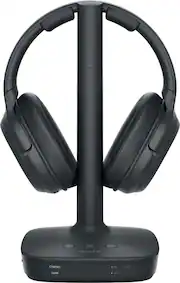
Sony Quality, Virtual 7.1 Sound, Very Comfortable! Sony’s L600 Digital Surround Wireless Headphones are a very nice option for a comfortable, private video listening experience which makes no compromises with the full audio range of your content.. These premium quality headphones incorporate a newly introduced audio signal processor which creates a virtual 7.1 sound system using just the two drivers in the headphones. Here are the key features: • Ergonomic, fully adjustable over-ear, closed dynamic headphone • 40 mm dome driver for maximum bass and wide frequency response • 20 – 20,000 Hz audio frequency range, less than 1% THD distortion • 2.4 GHz RF wireless connection from signal processing/charging station • Maximum reception range from base: 98 feet • Four surround sound field effects (cinema, game, sports, voice) • Three decoding formats supported (Dolby Digital, Dolby Pro Logic IIx, DTS) • Sound compression feature (on/off) • Matrix selection (on/off) • Analog input gain control (on/off) • Three audio inputs (HDMI, optical digital, 3.5 mm analog stereo) • On headset controls for power (on/off), volume, sound field selection • 17 hour maximum battery life, 6 hour charge time from fully discharged state • Dimensions (on charging station): 7.2” wide x 7.4” deep x 11” tall • Weight (headphones only): 11.3 ounces • One year warranty Included in the box are the headphones, signal processing/charging station, power cord/transformer, 5 foot digital optical cable, quick start guide and instructions. Setup is very easy. Just plug in the signal processing tower, attach an input cable (either a digital optical cable, an HDMI cable or a 3.5 mm analog cable) from the TV to the signal processing tower and then charge the headphones. Turn on the power, select the input and put on the headphones. The headphones are very comfortable and fairly lightweight (11.3 ounces). Sony has employed an excellent ergonomic design to maximize comfort and fit. The earphones are angled back at the top (to match the shape of your ears better), swivel at two points (up/down and left/right) and have extension arms on the padded top band to compensate for those of us whose ears are not perfectly symmetric. The ear cushions are very soft and fit nicely over the ear to insure sound isolation. The headphones have three controls on the right earphone (power, volume and sound field selection.) I am not a fan of these controls. The volume rocker button (up/down) doesn’t have enough tactile difference to easily identify and operate it. Also, the power button and the sound field button are both flush with the surface of the earphone so trying to operate them while wearing the headphones is not easy. The sound field button cycles from Cinema to Game to Sports to Voice to None, then back to Cinema. However, there is no indication on the headphone of which sound field is selected. You have to look at the signal processor/charging tower to see the setting. (It is displayed on the tower’s base, along with the input source.) But if you connect the headphones to your TV with an HDMI cable to the ARC port you will be using your TV remote to control volume and you will probably not change the sound field often, so I suppose most will not find these control issues very significant. On the signal processor/charging tower are several controls. At the front of the base are the power, sound field and input selector buttons. At the front of the base on the left side, the current sound field selection and the input source (HDMI, optical or analog) are displayed in lighted type. On the right side the type of signal being processed is displayed (Dolby Digital, Dolby Pro Logic IIx, DTS.) On the left side of the tower base are three on/off switches. The front switch enables the HDMI cable to control power to the earphones. The middle switch activates the “Matrix” function. This is the system’s creation of the virtual 7.1 channel sound effect from a 5.1 channel or stereo input. For most sources you would want to leave the Matrix switch on. The rear switch controls Compression. If it is on, all sounds are adjusted to a more narrow sound range. That is, loud sounds are lowered and soft sounds are increased. Frankly, I think this produces really poor audio quality. I watched a movie with the compression on and with it off and the audio quality was far better when it was off. The only possible use I can imagine for it would be if you were watching a movie with a lot of dialog that had very different sound levels between the speakers. At the rear of the tower are the input and power cable connections. These include a 3.5 mm stereo cable, a digital optical input and HDMI (which is bizarrely labeled “HDMI Out” rather than “HDMI In”). While both digital optical and HDMI will transfer a 5.1 audio signal, using HDMI connected to the HDMI ARC (Audio Return Channel) port on the TV is preferable because in most cases it will automatically turn off the TV’s speakers when the headphones are in use. The analog input is useful if you have no optical output or HDMI ARC output on your TV. The sound input will be analog stereo rather than 5.1 digital stereo but it may be adequate for some. Next to the analog input is a “Gain” switch which provides some amplification to that analog input. Leave it off unless you have a very long connection cable which causes the signal to degrade. On my wish list for this equipment is another HDMI port (an actual HDMI Out) which would allow you to make an HDMI connection to a sound bar in addition to the headphones. If you are going to invest in headphones of this quality you are probably also going to have a sound bar for your TV and you will want to use the HDMI ARC port for that sound bar. OK, enough about the switches and cables! How do these headphones actually sound? Well, in a word, awesome. The Sony WH-L600 drivers have a beautiful, faithful reproduction of mid-ranges, clear highs without being too bright and really thunderous bass. I used the analog input to connect my stereo to the headphones to test their ability to reproduce music. My standards for speaker quality are Cannonball Adderly’s “Country Preacher” and Miles Davis’ “Kind of Blue” albums. I know every note on both of these classics and the slightest deviation is like nails on a blackboard. These headphones passed that tough test with gold stars for quality, sound level and range. I also ran them through several tests for frequency response, sound purity and channel separation and they scored very well. But these are not just stereo headphones – they are designed to give a faithful illusion of a full 7.1 speaker set. Can they do that? I accessed several YouTube videos which allow you to test your audio system setup by sequentially outputting a sound to each of the 7 channels and then to the sub-woofer (the .1 channel) and accompany that with a video which displays the location of the sound. By listening to these YouTube videos with the headphones you could clearly hear the sound in the direction indicated (front, left, right, left center, right center, left rear, right rear.) The sound separation was most pronounced in the “Game” sound field but it was certainly present in each of the other sound field settings. I watched several recent action movies (Marvel blockbusters and recent Star Wars sequels) using these headphones and the audio experience was just outstanding. You will really feel that sounds are occurring to your side and behind you, in addition to those sounds you normally sense from near the screen. No, it is not as good as a full-fledged 7.1 home theater with real, top quality speakers placed carefully around the listener but it is an awfully good (and very economical!) substitute. What other merits do these headphones have? Well, they have a nice range. The 98 foot range is optimistic, but I did obtain flawless reception up to about 50 feet from the base unit. They provide a nice option for your stereo system by just attaching the analog cable to your headphone output on your stereo (assuming it is in the same room as your TV.) Gamers will love the audio effects produced by these headphones! Bottom line - the Sony WH-L600 Digital Surround Wireless Headphones are an excellent choice for serious movie fans who want a very comfortable headset, sophisticated audio reproduction and the ability to blast the soundtrack without disturbing others in the household or their neighbors. You will be glad you chose them!!!
Posted by JimC
- Rated 4 out of 5 stars
Nice Replacement for MDR-RF995RK
-=First Impressions=- I like the look. They have a very minimalistic design. One material for everything which is a matte gray hard plastic. They come well packaged and are extremely well built. However, for the price, I would expect slightly better build quality but they are still nice. These are super easy to setup. I was up and running in less than 5 minutes. Most of the time was spent deciding on where to put the receiver/charging cradle while finding an open plug behind my wall mounted TV. They cover and fit my ears perfectly while being lightweight. I tested these by going on a binge watch of Stranger Things and I didn't remember I had these on. It felt like I was in a small theater with above average sound. Wear fatigue is almost non-existent and they offer great noise isolation with the closed back design. The connection is rock solid and I would get signal two floors up from the basement. Things I like: +Mobility - Not restricted to a cord and can move freely. +Wireless Range - I live in a three story home and had coverage on all three floors. The base was in the basement to test the range. Sony advertised a little over 98ft. I would say their range claim is pretty accurate. +Rechargeable/Battery Life - Sony claims 17hrs but I always charged after each use. I made it to 6hrs of use and have no issues believing the advertised 17hr battery life. I can't watch TV that long so I can't confirm that. +Sound Quality - Sound is reproduced almost exactly like the source's quality. I think Sony is using compression on this but I cannot confirm that. Sony has done a great job with this but I have heard better sounding wireless TV headphones. The frequency range on these are 20 Hz - 20,000 Hz but I own a competitor's mid-tier model and they have a range of 17 Hz - 22,000 Hz and sound fuller. +Input Options - HDMI w/ ARC, Optical, and Stereo MiniPlug are all present on the transmitter. I have yet to find another headphone solution that offers all these. It employs ARC passthrough so you can put it between your surround sound and TV without any issues. These have decent sound from low bass through to crisp highs but have the typical bassy sound profile Sony is known for. +Quality Codecs - It can run Dolby Digital, Dolby Pro Logic IIx, DTS and there is an indicator light that tells you what you are listening to. +Sound Modes - Called "sound fields", these offer different simulated settings you would get from a sound bar. They are decent, but I like my standard output without "effects". The options are: Cinema, Sports, Voice, Game. +Fit - Fit was perfect and balanced. +Setup - Quick and easy. Plug in your source and power them on… everything works! Things I would change: -Lack of controls - I would like to see the ability to adjust Left or Right but that is just being picky. No EQ or amplification options. -Volume - For me these are low but sound good. I like them louder but it doesn't take away from anything. -Cord length - I would like to see a slightly longer cord; maybe a 10ft power cord. -=The Verdict=- If you need wireless sound for digital or audio inputs consider these . There are other options out there, but for the price you pay, I think these are a great value.
Posted by nkpstudios
- Rated 4 out of 5 stars
Great headphones
Excellent sound and signal, able to walk around house without loosing the signal. Great addition to my Bravia TV. It connects automatically when using HDMI connection. The only Reason I didn’t give 5 stars is because headphones get a little warm when wearing them for long periods of time.
Posted by Christmas
- Rated 5 out of 5 stars
Great quality
These replace my old Sony headphones and the new technology is much better with the HDMI connection. The value for quality is well worth it.
Posted by Clintfg
- Rated 4 out of 5 stars
Great for TV, but no true surround feel.
First of all - disclaimer - do NOT expect performance of a fully surround sound system (5.1 or above) out of the hardphones, it's just 2 small speakers and all "surround" effect comes from the digital processing (down-mixing). I'm comparing to my ATMOS home theater system and while headphones do try - everything still sounds like it's in the center of my head, spacial awareness is just not there. That said - headphones do sound really good. Sound is crystal clear with crisp highs and powerfull bass. Headphones are comfortable and I could watch a whole 2 hour movie without any discomfort. Sound does not leak out and won't disturb anyone around you. There are a few digital sound processing modes available - Cinema, Game, Sports, Voice and just a direct signal. My personal preference is to keep all digital processing off and listen to the original sound track. Connections - transmitter base has 3 types - HDMI, Optical input and a regular 3.5mm analog jack. Best case scenario is to use you TV's HDMI input with ARC (Audio Return Channel) capability. That way your TV would automatically switch to headphones as soon as you pick them up from the transmitter base. You will also be able to control headphones volume with your TV remote, or if you adjust volume on the headphones directly - your TV will recognize that and show you the volume control bar. Please make sure that your TV is configured to output a surround signal (there should be something like Digital Audio Output setting in the TV settings, please make sure you have it set as Bitstream or RAW or Unmodified/Compressed). Headphones will detect a surround sound signal and charging base will illuminate a DD or DTS LED. I did verify that it worked with Netflix and while watching a Blu-Ray disk. If HDMI-ARC port is not available or used by other equipment such as a Soundbar or AV Receiver - next option would be to use Optical input (Toslink). Optical input could also be used if you connecting to a computer. 3.5mm input jack will be the least resort if digital sources are not available and will only provide a stereo signal. Wireless range - I was able to move around my house and started experiencing some signal loss about 50 ft away from the transmitter base. Overall - perfect choice if you need a dedicated headphone set for a TV and you can use HDMI-ARC port.
Posted by xKing