Rating 4.1 out of 5 stars with 91 reviews
4.1- Installation (21)
- Water Usage (21)
- Leak Detection (18)
- Accuracy (12)
- App (6)
- WiFi Connectivity (5)
Customer Images
The vast majority of our reviews come from verified purchases. Reviews from customers may include My Best Buy members, employees, and Tech Insider Network members (as tagged). Select reviewers may receive discounted products, promotional considerations or entries into drawings for honest, helpful reviews.
- Rated 5 out of 5 stars
Better than expected
I'm impressed with this device. It is incredibly easy to install and set up. I won't pretend to know how accurate it is, but it recognizes water flow and sends an alert when it senses something is wrong and that is what i wanted. It learns a normal usage pattern and reacts when actual usage deviates unexpectedly. The 'away' mode is great because anything more than a faucet drip is reported. I intend to use this in a rental unit where I can be away for extended periods and something as simple as a leaking toilet could turn into a big problem. Being able to monitor usage remotely will be very helpful.
Posted by AZdave
- Rated 4 out of 5 stars
Serves its purpose with a minor "tolerable" glitch
I have had mine online/inline for almost a year. No major issues to speak of, but a minor issue I would like to point out. After about 6 months the unit started detecting usage every hour of .3 to 1.4 gallons. First thought, A leak! Nope, no leak. No flow through the city's water meter, no drips anywhere. Just an anomoly, I guess. I am thinking maybe RFI? In the photo note the unexplained burst of usage. It happens mulitple times per hour every hour, every day, and NO water flow is present. This a 4 unit apartment building and everybody was gone for the summer when I did my testing and experiments. Main thing is it alerts me to excessive usage and or running toilets and for that I am happy. Last year I had a tenant (student) flush the toilet and unknown to him the chain got stuck under the flapper and he went home for the weekend and the toilet ran for 3 days. Cost me $95.00 in EXTRA water. This product is a sucessful countermeasure to that scenario. Anomoly or not, I like this unit. Setup was easy enough. Has never lost wifi connection during its tenure. Recovers from power failures better than other hardware I have. Deserving of 4.5 Stars all day long.
Posted by Robotech2112
- Rated 4 out of 5 stars
Spot on
I purchased this unit in response to a leak experienced in our lawn sprinkler. After finding a suitable installation location (the 2nd time around) as we have water softener units that I did not originally consider. I find the unit works very well, detecting any water flowing from the tanks into the house. Setup, while sensitive, was easy. I think the unit is a good value when you consider the price you pay for water. If I can get my spouse to appreciate the information available in the easy to understand graphic display then this unit will pay for itself in 6 months to 1 year. My only issue now, is a separate one in that my lawn sprinkler is not attached to the house plumbing (that's an entirely other concern I've been made aware of now).
Posted by Pixelpal
- Rated 4 out of 5 stars
Leak detection warning, accurate, easy install
This is one of those devices that you might think "do I really need that?". Well, if we ever have a leak I think we'll be glad we do; not to mention just for the times we leave the hose running by mistake! Since installing it I'd have to say it's interesting to see our water usage and to view what the usage patterns and amounts are. Before you buy ensure you have access to inlet water supply with a minimum of 6" of clean, straight pipe, power outlet and wifi. Use of the Streamlabs app is required to use this monitor. Installation for us was very smooth. I would recommend taking a picture of the back of the monitor so you have an easily accessible record of the serial number, etc. because once the unit is installed it is not accessible. The steps for installation are basically as simple as the easy to read and illustrated manual outlines. Download their app, connect, sync, attach the monitor to pipe, and adjust and set alerts. We had no installation issues. The Streamlabs monitor has been in use for about a week now and we have gotten alerts based on our chosen app settings. Some have occurred when I had the hose running and some in the middle of the night when our water softener is running its cycle. I've not found the alerts to be overkill or obnoxious. The app will show current water flow (gpm), historical usage for the day, month and year, comparative usage for a day/week/month and recent alerts. Like many wifi connected devices with apps I'm sure Steamlabs will continue to enhance their app over time, but more detail, different format options for data or exclusions for day/time for alerts by users might be helpful. In summary, the Streamlabs SmartHome Water Monitor is a pretty cool device just considering the fact that it can track water flow via ultrasound technology and is an easy to install device that involves no need for tools or plumbers. We dropped one star off the rating due to app limitations, bit pricey and packaging that is just too much of a good thing. The packaging looks nice, but the box is way bigger than necessary for the size of the monitor. Hopefully this product will help us be more mindful of our water use which would be good for the environment, so why add to waste with so much packaging?
Posted by allib
- Rated 5 out of 5 stars
Water Monitoring Made Easy!
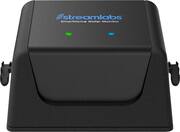
The Streamlabs Wi-Fi Home Water Monitoring and Leak Detection System is a sleek product that runs inline on your main waterline allowing you to monitor water consumption at your house and also detect any potential leaks that might occur. First off, the packaging is some of the best I've seen in the retail industry, I felt like I was opening a product much more expensive than it is (The exterior box might just be a little overkill though, no mater how nice it is. Soft touch oversized boxes looked and felt fantastic. I appreciate this attention to detail being a Graphic Designer. Once past the packaging you are left with a minimalist 'Apple-like' box with simple black and white instructions. You DON'T need any tools, you DON'T need any plumbing skills and you DON'T need to panic when installing the system. It clips onto the outside of your pipes using included zip ties. One word of warning in the instructions and on the label on it's underside, do NOT slide the monitor around on the pipe, you'll damage the sensors. Thankfully Streamlabs includes a spare set of sensor pads for when you do exactly this. I chose to set up my app BEFORE hooking up the monitor to the pipe, in the cool comfort of the house, and not in the heat of the garage. This was a smart move, highly recommended if you live in a hot climate. Once the app is set up, it asks you to calibrate the monitor, which is when I moved to the garage and installed it on the pipe I wanted to monitor in less than 3 minutes, and had a reading from the monitor almost as soon as I connected it to the app and tapped calibrate. The monitor detects the type of pipes you have, and gives you instructions to turn off the water, it will calibrate, and then asks you to go and flush a toilet or turn on a faucet. The monitor has two LED lights on it, one blue one for wifi connection and one green one showing waterflow monitoring. That's it. No other lights or sounds are emitted from the unit. The app has a nice user interface using the Streamlabs corporate palette of black, with white graphics and blue accents. It's a good looking and easy to use app. The home screen lets you know how many gallons of water you've used today, whether there is water running or not and the ability to switch between home and away modes, and also an alert status. IF you click on your daily usage, you then see a live 'gallons per minute' reading, the temperature of the room (which is very useful in a garage, if the temperature gets below 40 degrees, the system will alert you), and then an hourly monitor with little blue dots whenever you've had water running. Below that are comparative graphs for today, yesterday, last week, and last month. You can also connect your Streamlabs monitor to Alexa, to then enable the home and away features of the system.In 'home' mode, the system monitors water usage as you would expect. In away mode, it will alert you if a toilet is flushed for example, when it wouldn't flush ordinarily, if you were away. Those notifications will be incredibly useful, especially if you are away, and you don't expect a toilet to be flushing. I have the slow leak notifications set at 0.5 gpm for longer than 20 minutes and my major leak alerts set to 4.0 gpm for longer than 5 minutes. You can adjust these settings as you so choose. All in all, a great little 'piece of mind' monitor that allows you to track your water usage, so you can compare it to your latest water bill, but more importantly, you can be notified of potential leaks in your water system that could save you thousands of dollars in repair bills, when you are able to catch that leak before it gets too costly. Piece of mind in a small package, does exactly what it says it will.
Posted by Cupra