Rating 4.2 out of 5 stars with 33 reviews
4.2- Video Quality (17)
- Setup Ease (13)
- Motion Detection (8)
- Connectivity (6)
- App Usability (3)
Customer Images
The vast majority of our reviews come from verified purchases. Reviews from customers may include My Best Buy members, employees, and Tech Insider Network members (as tagged). Select reviewers may receive discounted products, promotional considerations or entries into drawings for honest, helpful reviews.
- Rated 4 out of 5 stars
Easy system to set up!
I’m writing this review after having a few days to play with these cameras and app. Setup is super easy, just download the Swann Security app to your mobile device and create a login, tap the “pair device” button in the app and power up the main camera. The app and the camera then walk you through the rest of the setup. I had my wifi router already configured to use both the 2.4 and 5 GHz frequencies, the main camera only connects at 2.4 GHz which it did automatically after I selected my wifi network and entered the wifi password in the app. It did take a minute after setup finished before the live view appeared in the app. You can connect just the main camera at first if you want, then add the other three cameras later on when you have time which is what I did, the app added in the additional cameras seamlessly. Only the main camera has a microphone and speaker, the other three are just cameras so take that into account for your installation. The app has a push-to-talk button when you tap the mic icon in the live view of the main camera and you get live audio on that camera as well. There’s also a siren that you can activate yourself or automatically in the settings to scare off intruders when they get too close. One nice feature is that the notifications that come to my phone indicate either “motion detected” or “person detected” so I have some idea immediately if it’s a small animal or a person in range. The manual said to take your smartphone to the location you’d like to mount the main camera and make sure you have at least two full bars of wifi showing to be sure you’ll have a good connection. That’s a neat thing about these cameras, after you pair it but before you mount the main camera and run any cables, you can just plug the power supply in and hold the camera where you think you want it, check the view you’ll get in the app and check the wifi reception in device settings also so you’ll know if you’re good before you drill any holes. The main camera just needs a 120v outlet to plug in the power supply, then there are 60ft camera extension cables and a 40ft power extension cable to make up the connections. Picture quality- these are 1080p cameras so you’ll get good video of people closer to your house but may not be able to capture something small like vehicle license plate numbers out in the street unless they’re facing the camera nearly head on. Night vision on these is great, the infrared illumination is actually fairly even without hot spots. If you need greater detail farther away, you might need to look into a 4k or better camera system. The app allows you to take photos from the live view or a recorded clip and puts them straight into the camera roll on your mobile device. Super easy. For videos, you can tap the video cam button in the app but my experience with that gave me a grainy, choppy video. What worked for me was to save a recorded clip into my Onedrive folder and transfer it out from there to share. I thought I would have to remove the microSD card from the camera to move video clips to my PC but, happily, that is not the case. The app does it all. Note that you don’t have to sign up for a Secure+ plan, but you do get additional cloud storage if you do. There’s a motion detection mask that you can paint in through the app to help with false alerts. For instance, we have a potted plant on our porch that moves with the wind. I painted a mask over the plant so the moving leaves don’t trigger a motion alert every time the wind blows. Another nice feature about the app is it allows you to configure three modes: home, night, and away. This allows you to set different sensitivities for whether you’re in the house and active, in bed, or out of the house. You can build a schedule and it will switch modes following your schedule.
Posted by Stephen H
- Rated 5 out of 5 stars
Affordable 4 camera security system!
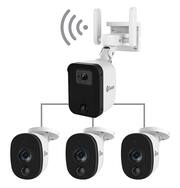
One of the issues that stop many people to install wireless security cameras is the battery, because they are wireless devices, they have batteries that periodically have to be recharged. With this four camera system the battery problem is solved, since it has a main camera from which the remaining cameras get power and also connect wired to send the video signal, then the main camera is the one that sends the signal via wifi. In the box come two boxes one where come the 3 regular cameras, with cables and accessories, in the second box comes the main camera with a cable extension for connection to the power supply and accessories for installation. In the box includes an installation guide that at first seems a little confusing the diagram that comes printed, however once you start connecting the first cables is becoming simpler installation, it takes a little time and patience. Once you have chosen the right place to install the cameras and installed everything correctly you will need to download the Swann Sevurity app to configure the cameras. The configuration is not complicated but I consider that the app needs some improvements because when synchronizing the cameras the app indicates that everything is configured correctly but when reviewing the recordings of the detected events, it was not possible to view them, I had to turn off the cameras, remove and insert again the 64gb micro sd that comes previously installed in the main camera, after turning on the cameras again it began to record the movement or people detected. Regarding the detection I think it has very good sensors even in medium sensitivity as it can be increased if necessary. The app sends notifications almost immediately after having detected movement or a person, what I don't like is that if I click on the notification, it takes me to the live view of the camera in question instead of showing me the recording of what it detected. Despite this, the recordings are saved by date and time, and can be exported if necessary. You can program zones where you do not want the cameras to detect motion. The main camera is the only one that has speaker and microphone which fulfill their function, they are not of great quality but they are of great help. It is possible to connect the cameras via ethernet which makes the connection of the cameras to the home internet network even more stable. The video quality is very good in color and in night mode, however it is not possible to modify anything in terms of video capture in the settins inside the app. In summary it seems to me that it is a very affordable security system considering that there are four wireless cameras, the app fulfills its function satisfactorily keeping you informed of what happens around your home, although it does not record continuously, quickly detects movement or unwanted guests. Honestly for that price I think you get more than you pay for, definitely recommended.
Posted by Serv
- Rated 5 out of 5 stars
Easy to setup and install
This Swann camera set is a pretty good value for what it offers. I’ve had experience with the “older” camera setups that used an NVR and BNC cables, and the newer camera setups that are more wireless and higher tech with apps, and this Swann package offers the best of both worlds. I’ve never been a big fan of wireless devices as they are not nearly as reliable or fast as a hard-wired cables, but when it comes to camera’s the wireless option can be a big relief. To recap this setup, you will still have to run these BNC cables throughout your house, but instead of having to connect to one NVR or central source that sits in a single room, your central source is the primary camera which is less in-wall wiring and running of cables. You only need a single power source to run all these cameras, so if you have a power outlet in your attic your job is already super easy. I personally am running a network cable to the main camera (optional), and the other camera’s feed into the main camera. Do keep in mind that you will need wifi to setup your camera’s even if you do have a hard cable. Setup was straightforward and all done from your phone. The App has a solid rating of 4.7 in the iOS app store which is pretty rock solid, and I believe works with most of Swann’s newer camera systems, so you can mix and add different Swann cameras and manage all from one interface. There is one SD card in the main camera for all the cameras, 64GB which is included but can expand to 256GB to hold additional recordings. I am impressed with the quality of the live view when set to High and night vision works quite well. Each camera (channel) can be defined with its own detection settings which I like, so some area’s can be more motion-sensitive than others. The main camera has additional features that the other cameras don’t, such as triggering an alarm manually or by motion, and a microphone/speaker combo to listen in and/or talk with people. Unfortunately, you do not have these options with the other cameras, but the options you do have with all cameras is to take a snapshot photo and manually record videos. You can also pinch-to-zoom with live view and during playback to get a closer view. One thing to note is that these camera’s only record motion events and do not record 24x7. If you have detection settings set to off, you will have no recordings. I prefer 24x7 recordings personally in case things don’t get picked up, but I understand that most newer camera systems that don’t have a large physical hard drive will not support this. TLDR; Pros - Easy setup overall, with wiring and the initial app setup - Good streaming quality, see daytime and nighttime image attached - I like the alarm, it is reasonably loud but not excessive. - Simple interface to manage the cameras - Memory card included and upgradeable - Ethernet cable optional for better quality or as a backup if wifi fails - Picks up motion well and sends alerts to your phone - Premium subscription option for cloud storage and other perks at a reasonable cost - Nice option esthetically to keep camera’s indoors/outdoors/mixed. The secondary camera’s are smaller and lightweight, less obvious than a bulky camera Not so Pros: - Microphone could be improved, quality is mediocre - Limited options for camera management settings. Would like to see additional settings for recordings - Camera’s 2-4 do not have a microphone or speaker, they are basically 3 extra sets of eyes for the main camera - No option to record motion without notifications enabled (can be annoying during high traffic moments) Overall I think this is a great value. 4 Camera’s with 1080p full HD that is hardwired and never have to worry about battery life and easy management from a phone. I also plug my camera’s and network devices into a battery backup (similar to whats used for computers) to keep the camera’s active even if there is a power outage. While I’m fairly new to the Swann brand and this is my second product, they are starting to become one of my favorites.
Posted by Jp223
- Rated 3 out of 5 stars
Unique 4-camera system for your home
The Swann Fourify camera is not a cloud storage camera and not a traditional DVR / NVR; it is a multi-camera hybrid local storage camera. It has limitations in use, and depending on your situation, this camera would work for you. The first point to note is that this is NOT a continuously recording camera system like DVR/NVR and some cloud cameras. This system is a motion-triggered camera that records on a 64GB microSD. You can replace it with a larger microSD card, but it is not continuously recording. Its placement limits you much more than traditional DVRs; for one, the primary camera (the one with the power, video inputs, and microSD) has to be placed close to a decent wifi signal to allow your system to be able to work remotely for motion alerts (or you can use an ethernet cable after wifi setup is complete to provide internet). Since this camera is the only one with a microphone and a 2-way audio feature, its placement is critical to use it for a 2-way audio feature. This brings me to the next issue with the cabling. The primary camera comes with a power supply that can be plugged up to 40 feet from the camera with the provided extender. Once extended, you use the included 4-way splitter to power your primary camera and the three additional slave cameras. The primary camera has three additional BNC connectors to provide power and video feed links to the slaves. This is messy cabling and no real way to hide it when installed on a wall. Even if you make it look neat, you still have a single point of failure with the power / BNC cables. In a traditional DVR, these are independently replaceable. Setting up the camera via the app is easy, and having used a Swann wifi camera recently, the initial setup is familiar and easy. Once you install the Swann app and sign in, you turn on the primary camera. The voice prompts will guide you through the process. This process should be done before you mount the camera on the wall, as you will need a sufficient wifi signal for the initial setup. Swann requires at least 2 bars of 2.4 GHz (a very subjective way to define wifi internet quality) to be able to operate the camera remotely properly. The app allows you to create hot zones to allow better motion capture of the camera. Picture quality output from the camera is not bad, but as with my previous Swann wifi camera, a lot of edge enhancement to make that 1080P look crisp, which also loses a bit of detail. Night vision is accurate and workable for capturing people as long as they are walking across the motion detector sensor. The cameras are about an 80-85* viewing angle, which is adequate for most situations. You can replace the cameras with standard DVR wide-angle cameras should the provided cameras not satisfy. You will lose the infrared PIR sensor on aftermarket cameras as they generally do not come with that feature. This camera system is very niche in its application and use. Traditional DVR / NVR provides more flexibility and greater recording capacity. Cloud cameras allow more installation flexibility, and many allow continuous recording and motion-triggered event recording. This Swann Fortify, it seems, provides a good hybrid experience but falls short due to its limitation in placement. If you plan to use this camera to monitor inside your house and not outside, this will work fine, but I still think at that point, a cloud-connected camera or one of the Swann CoreCams is a much more flexible solution. On the other hand, if you need a unified DVR recorder with the occasional motion-triggered recording or your placement works for your needs, this would make great for low-traffic security camera needs where you do not need continuous recording and save on cloud storage fees. In the box: 4 cameras, one main camera, three slave cameras, 1080P motion capture recording. A 64GB microSD for storage, one power brick, a 40-foot power extender, a one-to-four power splitter, and three 100-foot standard DVR cables (BNC/Power) for remote slave cameras. Pros: Subscription fee-free motion-triggered capture DVR Remotely connected, with 2-way voice communication on the primary camera Cons: Limited recording ability due to the motion-triggered nature of the camera Installation would depend on your situation; this is a very niche camera, in my opinion, only useful if your situation warrants a camera like this. Messy cabling solution
Posted by TheStigenator
- Rated 5 out of 5 stars
5 stars for quality/ mounting issues
5 Stars because it works as advertised. One star on detailed mounting instructions, LAN functionality/test and size of bundle near first camera. Swann - Fourtify 4 Camera Indoor/Outdoor Wi-Fi Security System Model:SWIFI-FOURTIFY4-US SKU:6518683 HIGH Quality WIFI wired system: Easy setup over WIFI with optional LAN Additional manual located at the Swann site 1 year warranty Comes with most parts needed for mounting 64GB card with optional 256GB Can view all recorded videos with cell phone for free Completely adjustable captures Swann name for quality wired systems Single wire of main wire bundle out the back of the main unit/ Too short! 10.IR function is outstanding Setup: Follow the directions exactly on initial setup as the assembly/setup instructions are mostly clear for setup. But think the wiring process through as there are a lot of wires to deal with. Set up system wires to the main unit before going into the attic and test fire/setup the whole system in the house on a table before mounting on the house. Also, no detailed information on the LAN connection on how it works and how to tell if it is working. It took a lot of work to run this through the attic with no way to check it. Only WIFI is listed in the app. Be advised that the main camera does not have a mounting gasket of any kind with no instructions on how and where to mount the main camera or any camera. Once the main unit was mounted, I hooked up the final main unit connections. I swapped out the 64GB for a 256GB but it is not needed. You can delete all files remotely with your cell phone hence no urgent need for a larger card. Live and recorded views are always available on your phone app with no cloud service. There was a hidden USB C port behind the large cover with no instructions on its purpose. Without a proper covering of the exposed section of the L bracket insects and water will enter the back of the unit if not mounted against the inner top of the soffit against the wall. All the child node cameras had gaskets. No detailed pictures on the preferred way to mount the cameras. In order to get the antennas pointed straight up you will have to mount this on a wall. And that has issues as the protected soffit is the best place to keep it out of the sun and rain and hide all connection cables. In addition, there were no instructions for the LAN sleave. All settings for camera captures are adjustable. Use the factory defaults as a starter. The main unit has a siren and two-way voice (child nodes do not have this feature). Be careful when you activate the siren as I would set it for night when away from the house. Be careful as it will drive the neighbors crazy if you set it wrong (comes in the off position). This is probably off for a reason as it will go off for every delivery you have if not set up properly. LOL Final thoughts: This is a high-quality system that can do just about everything. Swann has a long reputation for making quality products that are designed properly. They are dependable, reliable, user friendly, and at the right price point. This could be an easier way to secure your home without rewiring your whole attic. However, child node cameras require significant cabling. Buy two systems so you can cover the front and back of a large home. I mounted an AX 5300 mesh child node on my laundry room shelf with a UPS. Then ran the power and LAN cables through the wall, then attic, then to the soffit for the main unit. The unit will work without a LAN connection if you cannot run LAN wires to a mesh or switch. Not sure it will work (after WIFI setup) on a LAN connection. Unable to test this LAN functionality and not sure if it shows properly in my LINKSYS menu. Unable to find out if two or more of these can work on the same app! I bought two more child nodes for my AX mesh and mounted one inside the laundry room near the garage attic junction to hook up a LAN. Also added a UPS! I assume this is internally sealed somehow to keep the rain out. Strongly suggest you mount the cameras in a way they are not exposed to the sun or blowing rain. Crawling through an attic and pulling 4 sets of wires to the main unit was a pain. Very large mess of wires near the main camera which have to be hidden. Requires a very large hole!!!!!!!!!!!!!! Soffit mounting may not be possible as all modern soffits are not framed (only metal strips down the edges). Suggestions for Swann: Make the main camera combined all in one cable long enough to get the octopus connections further into the attic. Provide a down-loadable document on proper mounting of units. Update software to allow LAN/com check ! Offer an install kit option to properly mount these. Pictures enclosed! Description The Fourtify Wi-Fi Security Kit is a great way to get more security for less. It’s easy to install and you’ll have multi-camera monitoring in the palm of your hand before you know it. Simply connect the main camera to power and your wi-fi network, then using the cables, connect the three additional cameras to the main camera. Having 4 weatherproof cameras allows you to have full perimeter protection and you’ll know what’s happening at any hour. You’ll have night vision, 2-way audio, True Detect heat and motion detection, and 1080p Full HD resolution. Features Wide viewing angles Wide viewing angles and 1080p Full HD video. Easy installation The entire system powers from one power cable into the main camera, eliminating the need for extra sockets and power cables. Ethernet Ethernet option on main Camera boosts performance in poor Wi-Fi environments. Truly reliable security With True Detect, heat from people and cars triggers push notifications and video recording. Talk to visitors Use the microphone and speaker to talk with people near the camera. Scare off intruders or ask the delivery person to hide the package somewhere safe. Cost effective Low cost of ownership with free alerts and local storage. Want more security Receive peace of mind from having additional cloud video recording, smart alerts, rich notifications, 3 year extended warranty, insurance coverage and exclusive special offers. Key Specs Camera Resolution 1080 Field Of View 90 degrees Night Vision Yes Number Of Cameras Included 3 Camera Power Source Cable with AC Adapter/Plug-in Works With Amazon Alexa, Google Assistant Storage Type Cloud, Memory card Indoor Or Outdoor Use Indoor and outdoor Minimum Operating Temperature -22 degrees fahrenheit Maximum Operating Temperature 122 degrees fahrenheit General Product Name Fourtify 4 Camera Indoor/Outdoor Wi-Fi Security System Brand Swann Model Number SWIFI-FOURTIFY4-US Camera Camera Resolution 1080 Field Of View 90 degrees Night Vision Yes Night Vision Distance 100 feet Number Of Cameras Included 3 Power Camera Power Source Cable with AC Adapter/Plug-in Compatibility App Compatible Yes Camera Compatibility Swann Works With Amazon Alexa, Google Assistant Connectivity Camera Connectivity Wired Storage Storage Type Cloud, Memory card Performance Indoor Or Outdoor Use Indoor and outdoor Minimum Operating Temperature -22 degrees fahrenheit Maximum Operating Temperature 122 degrees fahrenheit Features Mobile Notifications Yes Included Camera(s) Included Yes DVR Included No Cable(s) Included Yes Warranty Manufacturer's Warranty - Parts 1 year Manufacturer's Warranty - Labor 1 year Other UPC 840236134557
Posted by ETP1