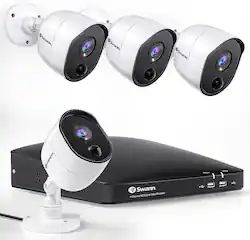
Swann's 1080P business and home security cameras comes with active deterrence is a reliable way to protect what matters most to you. Equipped with powerful infrared night vision that extends up to 100ft in black and white, you can have peace of mind knowing that you have reliable wired security camera system. Stay on top of things with alerts that notify you when activity is detected, and access live streaming and stored footage on your mobile device via multi-camera live streaming that is always available. With the pre-installed hard drive, you can choose between 24/7 continuous recording or Swann True Detect heat and motion-triggered event-only recordings, giving you up to 365 days of stored video. Swann provides Do-it-Yourself CCTV camera security system and we take pride in our role in making all our communities safer. Our product range is designed with the goal of making the latest business and home security system solutions accessible, affordable, and user-friendly. The latest features are Hey Google and Alexa to speak to see. Swann also provides a 1-year limited warranty for protection against factory defects and technical support. Swann loves what we do because we have the vision to be the world leader in smart cameras for home security, taking care of people and making your place safe. As technology and security continue to evolve, our commitment is to always deliver smarter, faster, and the most reliable security solutions.
Q: So there's need hard line to Internet or can you use Wi-Fi signal?
A: Hi Russell. If you wish to view the system via the Swann Security app on your smartphone, then the DVR box will need an internet connection. Most people simply connect a network cable between the DVR and their router, but Swann also sell a Wi-Fi antenna as a separate accessory (model code: SWACC-USBWIFI) if you wish to go wireless instead. If you don't need/want to view the system on your phone remotely then you can also operate it without any internet connection. In this case you would view your system, recordings etc through a monitor you would connect to the DVR box via HDMI cable. -SD, Swann Team.
A: Hi Ame. No, this is a DVR system so the cameras connect to the back of the via DVR analog coax cables. For a PoE (Power Over Ethernet) system you would be looking for an NVR whereby the cameras all connect back to the NVR box using network cables. -SD, Swann team
Q: Can you use this system without internet and how much memory does the system have on the DVR?
A: Hello. Yes, the system can be operated locally without any internet connection you just need a monitor for the initial set up. Once set up is complete, the cameras will record locally to the DVR even if there is no internet connection. You only need an internet connection if you’d like to view the system on a smartphone app or to update its firmware. This system comes with a 64GB MicroSD Card however you can purchase an HDD separately and install it if you wish to have a larger memory on your system. Your DVR supports recording to either a 3.5” SATA or a 2.5” SATA hard drive. The largest hard drive you can connect is 6TB (terabyte). We recommend that you purchase a drive that is surveillance rated, such as the Western Digital Purple™ and Seagate Skyhawk™ range of drives. I hope this helps. LV - Swann Team
Q: Are they hard to install for someone who isn't real tech savy?
A: Hello Sissy. Thank you for reaching out with your question, Swann proudly delivers DIY Home Security with no monthly fees, no contracts, no hidden monthly fees, and no-nonsense. Whilst you don't need to be hugely technical to setup this wired system, there are cables which you will need to run between the back of the DVR and each camera so it will be helpful if you have access to a drill and ladder and are comfortable running cables around your house or roof space. If this sounds too difficult you may wish to consider hiring an expert to install the cables for you. Swann also offer battery powered camera systems which are much simpler to install but will require charging from time to time. If you ever need assistance with your product please know we're here to help. Please visit our support page or contact us over the phone. https://support.swann.com/s/ LV - Swann Team
Q: LG: Can I see and change diferent views of each camera on my iPhone with an app?
A: Hi Tuco. The Swann Security app for your phone will show a live feed from all 4 cameras at the same time. You can then tap on an individual camera to enlarge the size, and then swipe between each camera in the larger view. These particular cameras do not have any motors that allow you to Pan/Tilt them from your phone, they will just face the same direction that you install them at. - SD, Swann Team
A: Hello morecameras. This is a 4-channel DVR, meaning it supports up to 4 cameras, which are already included in this system, so additional cameras cannot be added. Regarding recording, the system records on motion by default since it includes a MicroSD card. However, if you install a separate hard drive (HDD) in the DVR, you can choose between continuous or motion-activated recording. For more details or assistance, please email us at [email protected]. We're here to help. LV - Swann Team.
A: Hi Ssss. There are no compulsory monthly fees to use any Swann product. The cameras in this kit will all record back to the 64GB SD Card which sits in the back of the DVR box. You will then be able to view the clips that are saved on that SD Card from the Swann Security app on your phone, or via a monitor connected to the DVR box. You can also backup the clips to your personal Dropbox cloud account if you wish to. If 64GB is not enough you can easily swap it to a larger card yourself if you want to (up to 512GB is supported), or Swann also sell models with 1TB or 2TB Hard Drives built in. - SD, Swann Team
Q: how much will it cost me for a tech to install my cameras
A: Hello james. Thank you for reaching out with your inquiry. Swann has pioneered the category of DIY installation and does not offer installation or installation services for our products. We recommend doing a Google search for local installers in your area. For further assistance, please visit our support page or contact us over the phone. https://support.swann.com/s/ LV - Swann Team