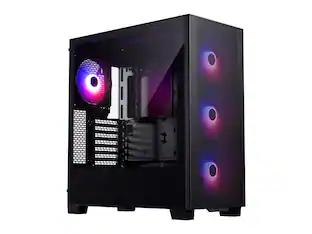
Thermaltake - V100 Perforated Computer Case - Black
Customers are saying
Customers are satisfied with the sturdy build quality and the affordable price point of this product. Users also appreciate the inclusion of multiple front USB ports and the flexible cooling options available. Furthermore, the case provides ample internal space for components and hard drives while maintaining a convenient, full-size design.
Front-panel Ports
Include Front USB, Front Audio In, Front Audio Out for installing peripherals.
Total Drive Bays
Include 6 expansion drive bays
4.72" Fan
Along with a 4.72" fan helps dissipate heat for improved system operation. Supports up to 7 fans for expanded cooling options.
7 Expansion Slots
Lets you install a host of expansion cards
Elegant Look
Black casing color to add a premium look and feel
Construction
Manufactured with spcc material for durability
- Motherboard Form FactorMini-ITX, microATX, ATXMaximum GPU Length400 millimetersProduct Height16 1/10 inchesProduct Width7 1/2 inchesProduct Depth18 1/2 inchesWindow Panel(s)Left side
Reviews
Rating 4.4 out of 5 stars with 66 reviews
- Build Quality (12)
- Price (9)
- USB Ports (6)
- Airflow (5)
- Space (4)
Customer Images
The vast majority of our reviews come from verified purchases. Reviews from customers may include My Best Buy members, employees, and Tech Insider Network members (as tagged). Select reviewers may receive discounted products, promotional considerations or entries into drawings for honest, helpful reviews.
Compare similar products
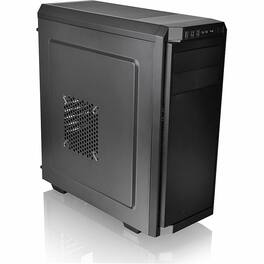
ATX mid-tower chassis with one preinstalled 120mm fan and a perforated side panel Thermaltake V100 Mid-Tower Chassis The V100 mid-tower chassis features one preinstalled 120mm fan, a perforated side panel and supports up to a standard ATX motherboard. The V100 supports the latest PC hardware and all high-end GPU solutions, guarantees on unparalleled expandability for high-end configurations and liquid cooling system to satisfy the market where users have opted for stylish PC chassis with advanced features and aesthetic appeal. Gaming-Oriented Concept Designed for gamers, the heightened foot-stands at the bottom help enhance airflow and the side window panel offers a direct view of interior components of the system. Built-in PSU Cover Equipped with a full-length PSU cover with vent hole design to hide those unsightly cables from view and give your build a sleek and tidy look, and what's more, a better airflow. Outstanding Expandability The V100 supports motherboards up to standard ATX, a tower CPU cooler with maximum height 160mm, and a expansion slot VGA of up to 400mm in length without HDD rack. Most importantly, the hidden drive bay design guarantees expandability for more liquid cooling components. Outstanding Ventilation The V100's unparalleled cooling ability offers various mounting points to support any type of cooling you can dream of including DIY/AIO liquid-cooling systems and air-cooling units. Apart from the built-in 120mm rear fan, users are allowed to install up to 360mm DIY liquid cooling radiator or two 140mm fans at the front to optimize system ventilation.
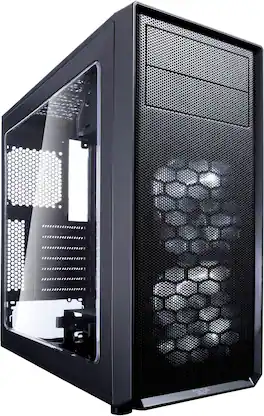
The Focus G is a chassis that showcases the hardware at the heart of your system with elegant accents and sophisticated style. Its flexible ATX layout supports a multitude of hardware combinations including high-profile CPU coolers, up to two dual-fan radiators, full-length graphics cards, multiple HDDs and SSDs, and even support for optical drives. The Fractal Design Focus G hits the mark for the discerning PC enthusiast seeking an aggressively priced chassis that stands out from the competition.

Designed for entry-level PC builders and gamers, Thermaltake Versa H18 Tempered Glass Edition Micro Case features the simplicity appearance with easy cable management design, AIO liquid cooling compatible, and ample ventilation options. Supporting the latest PC hardware and all high-end GPU solutions, the Versa H18 TG is a good choice for those who opt for stylish PC case with manageable frame size and advanced features.The beautiful tempered glass window allows users to display all component of the build, offering a direct view of inner system. The mesh front panel and perforated top panel plus the heighted foot-stands at the bottom provide efficient airflow for the system.
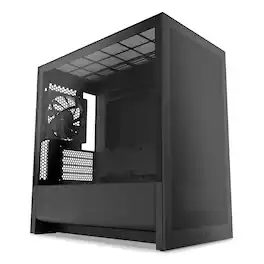
The H3 Flow is a space-efficient micro-ATX PC case delivering exceptional airflow and versatile component compatibility. Designed for optimal cooling, the mesh panels and ventilated PSU shroud keep high-performance components running smoothly.
| Pros for Thermaltake - V100 Perforated Computer Case - Black | |||
|---|---|---|---|
| Build Quality, Airflow, Price, USB Ports, Space | There were no pros for this product— | Build Quality, Cable Management | Airflow, Build Quality, Cable Management, Size, Ease of Access |
| Cons for Thermaltake - V100 Perforated Computer Case - Black | |||
| There were no cons for this product— | There were no cons for this product— | Size, Button Placement | Fan Placement |
Specs
Customers ultimately bought
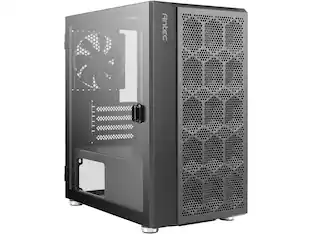 $43.49The price was $53.99
Explore tech essentials Sponsored
 Clearance$79.99The price was $104.99
Discover related products
 $12.99The price was $13.99
 $30.99The price was $32.99
 $24.99The price was $27.99
 $18.51The price was $22.89









Keep exploring
 $309.49The price was $323.99