Rating 3.6 out of 5 stars with 27 reviews
3.6- Speed (12)
- Coverage (3)
- Stability (4)
Customer Images
The vast majority of our reviews come from verified purchases. Reviews from customers may include My Best Buy members, employees, and Tech Insider Network members (as tagged). Select reviewers may receive discounted products, promotional considerations or entries into drawings for honest, helpful reviews.
- Rated 4 out of 5 stars
Fast with decent range
[Employee of bestbuy] Had a Netgear Wi-Fi 6E router that had less antennas and better range. Speeds are about the same on both routers but this one has shorter range. It does have cooler features with a cool display but if you want better range go for a high end nighthawk thats 3,500sq feet.
Posted by ADHDYungBoi
- Rated 5 out of 5 stars
This thing is a BEAST...and amazing!
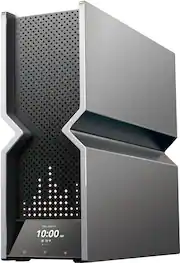
I first went with the Deco BE95 mesh pair, and it was pretty decent, but for some reason, both of the Deco BE95 units ran unusually hot. The mesh setup was fairly decent, and definitely better (by a decent margin) than my previous Netgear RAXE500, which is a pretty high end router. Even so, it's pretty clear that the hardware internals are higher quality in the Archer line. The Archer BE900 is much faster than the Deco BE95. I currently have 5gbps fiber, and it beat the Deco mesh in all wireless band testing, as well as in wired speed tests on my desktop. I am easily getting 2gbps/2gbps on my s23 Ultra phone, and this phone is not even Wi-Fi 7. Also, I have an 8,000 sq property, and even without an extender or mesh, I get coverage everywhere. I have used ASUS and Netgear routers for as long as I can remember, and the user interface from TP-Link has been a pleasant surprise, and very intuitive. I actually prefer it. Not to mention that the touchscreen on the unit is beautiful and easy to use. I am enjoying the Archer BE900 so much that I plan on adding a second BE900 in my home via the EasyMesh setup as soon as they go back in stock. I could write more, but I'm even boring myself at this point. Plainly put, get this router if you have the means to do so. You will not regret it, and it will enhance even your current devices in the meantime until new WiFi 7 devices begin slowly roll out. P.S. This thing is huge, so you need to make sure you have to requisite space house this thing. It looks like a mini-PC, and in the best way possible. For a tech geek like me, this has very a very gratifying experience.
Posted by 5432Juan
- Rated 4 out of 5 stars
Decent wifi-7 Router
Overall, this router is one of the best routers out there. Very strong signal strength and with a wifi 7 adapter, the speeds almost doubled for me. With an old Netgear router which served me almost 6 years, I was getting around 300 / 350 MBPS (Verizon Fios 1GBPS connection). Now, with this router, I am almost getting 600 / 700 MBPS. Streaming Netflix 4K movies look fabulous with the newer speeds.
Posted by Jonathan
- Rated 5 out of 5 stars
BE900
I purchased this router to upgrade from the TPLink Archer AX11000. The AX max out at 40 Ip.s and needed more, so got the BE900. SO far so good, one thing I found out is that TwT does not seem to work properly, unless I am missing something, but changes my internal DNS to 10.10.10.1 to 10.10.10.4 this causing all the WiFI to disconnect. Other then that, extremely fast, well design, great support.
Posted by Forsa
- Rated 1 out of 5 stars
Dont buy, wait for an ASUS, or ANY other company
I will finally be attempting to begin a RMA of this router tomorrow. It has been this bad since i first installed it. A little background. I am a natural tech, in that I am of a natural engineering type. I focused that towards computers around 23+ years ago when I began building my own PC's. Now I am an AI developer with a history in IT. Thats out of the way. Typing this on my phone since, once again, BE900, has rebooted itself. Mine is a V1. I have had nothing but problems during configuation, which was all done manually (reduce processor stress). This was also a nightmare. Not due to difficulty, but hardware issues. Still ANY configuration, or check box related to wifi, will definitly crash the system, at which point I do the full reset procedure and start from scratch again. Also, there is no such thing as backup configuration, as it cannot be restore without losing full accessibility, including direct lan cable. This leads to a, once again, system configuration from scratch. I have tried to set up a daily reboot to hopefully avoid all of the random self-reboots (about 15 minutes offline or longer) unless you go to the router and turn the power off and on to get it back faster, but that has had no effect. It is having symptoms that would best be descibed as complete mainboard failure. I would love the $400 giftcard as the IT time Ive wasted should easily be billed. Sorry about any spelling or grammar mistakes, I only jave internet on my phone. 5G
Posted by BrandonB