Rating 4.6 out of 5 stars with 47 reviews
4.6- Ease of use (12)
- Speed (9)
- Signal Strength (7)
- USB (4)
- Performance (3)
- Size (4)
Customer Images
The vast majority of our reviews come from verified purchases. Reviews from customers may include My Best Buy members, employees, and Tech Insider Network members (as tagged). Select reviewers may receive discounted products, promotional considerations or entries into drawings for honest, helpful reviews.
- Rated 4 out of 5 stars
Excellent product but rather bulky
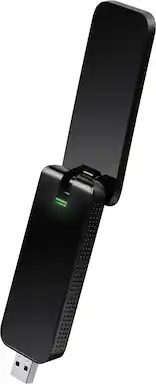
I use this at my job to gain Internet access for a PC that runs a National Instruments PXI system. This adapter has proven an excellent buy. We use it in the USB 3.0 ports on the PC, and it has done wonderfully. We get Internet access with very little lag. My only issue is the size of this thing. Well, considering its capabilities and performance, this is not really something to complain about, but you may have to do peripheral and cable management to work around it. Still, it performs excellently. The setup was easy, although there is a disk involved, which may be an issue for people without a CD drive. You can download the drivers online, however. All in all, I recommend this product.
Posted by cirtemid
- Rated 3 out of 5 stars
It's Okay For The Price
Archer T4U V2 AC1300 Wireless Dual Band USB Adapter *My Test Setup Desktop PC Windows 10 Pro USB 3.0 Port *Wired & Wireless Performance I tested the Archer T4U V2 plugged into a USB 3.0 port on my desktop computer. I ran several speed tests with the adapter plugged in the USB 3.0 port by itself, and while using the included USB 3.0 extension cable. The extension cable had no effect at all on performance. Speed tests were the same with or without. My Internet Plan: Download 75 Mbps / Upload 10 Mbps 2.4 GHz Speed Test: Download 78.51 Mbps / Upload 12.12 Mbps 5 GHz Speed Test: Download 90.37 Mbps / Upload 12.16 Mbps. As you can see, those are great results. However, I have experienced an occasional brief loss of connection while streaming HD content, but for the most part, it has performed decently. Note: When you first plug in the adapter, Windows will install its own generic driver. Before I installed the latest driver from TP-Link’s website, I was getting terrible results on the 5 GHz band. After installing the latest driver from TP-Link, the adapter performs much better. So for the absolute best performance, you MUST install the latest driver from TP-Link’s website. *My Thoughts The adapter offers decent performance, especially after the driver update. I do have concerns about it’s build quality, though. It’s made of plastic and doesn't feel very durable in hand. As long as you aren't frequently plugging it in and unplugging it, it should be fine. It would have been nice if TP-Link would have made it out of metal, or at least a harder plastic. I have USB thumb drives that feel better made than this. Also, it's too bulky to use in a USB port by itself when neighboring USB port(s) are occupied. Thankfully TP-Link includes an extension cable to remedy this. And some may find the bright, flashing green LED to be a distraction, especially in a dark room. Other than those few concerns, it’s inexpensive and performs decently.
Posted by TechOnDeck
- Rated 5 out of 5 stars
10-Fold Speed
I currently have Xfinity Internet Services and I was originally only receiving 10mbps worth of speeds. With this adapter though, I am getting 100mbps+ speeds. It has a really easy setup, which is plug-in, install driver, and go.
Posted by Kale
- Rated 5 out of 5 stars
Works very well!
What i like is that its picks up my wifi signal way better then the other usb wifi adapter I had before and its very easy to set up, plug in, install i drivers from disc and change your wifi user thing to the adapter and boom you can use it. But the only bad thing about it is that its wide so it takes up a usb socket but for me its worth the sacrifice. Woulf recomand this if you dont want to spend that much for a usb wifi adapter.
Posted by Hayden
- Rated 5 out of 5 stars
Super easy set up and works great!
Easy installation with very little time needed. My Mac is located one floor above where the router is located (opposite ends of the house) but I see full bars on Wifi status. I see no difference in browsing speed between my mac using this device and other wirelessly connected devices (tablet, laptops, and phones). It is a bit bigger than what I expected especially when the antenna portion is in open position (L-shape), but no more than normal USB flash drive of about 2 inches long. I recommend this unit.
Posted by Kevin