Rating 4.5 out of 5 stars with 1223 reviews
4.5- Ease of use (554)
- Compatibility (118)
- Price (43)
- Size (26)
- Performance (25)
- Connectivity (47)
- Setup (31)
- App (3)
Customer Images
The vast majority of our reviews come from verified purchases. Reviews from customers may include My Best Buy members, employees, and Tech Insider Network members (as tagged). Select reviewers may receive discounted products, promotional considerations or entries into drawings for honest, helpful reviews.
- Rated 5 out of 5 stars
Effective little Smart Plug!
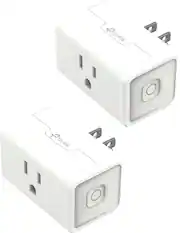
I needed a smart plug for my inside Christmas lights. This is the perfect addition for anyone's smart home! It has a little light on the side so you know when it is ON/OFF, and the smart compatibility is great. It works with everything. It is also small and compact, so it can fit into almost any space
This review is from TP-Link - Kasa Smart Wi-Fi Plug Mini with Homekit - White
Posted by DanM
- Rated 5 out of 5 stars
We love these plugs
These plugs are outstanding! We use them for our aquarium tank lights, tv in kids' room, and lights for terrarium. Easy to use, makes standard plug items able to be turned on or off remotely and on a schedule time. Outstanding and life changing product!
Posted by DJDonutOne
- Rated 5 out of 5 stars
Kasa Smart Plug works great in Mi Casa
I've had three of these in use with some shop lights in my garage sine January of 2023 and they've worked extremely well. They work with my google nest, too, so all I have to do is tell it turn the shop lights on and they've worked every time. No connectivity issues all the way out in the garage and they reconnect automatically after power outages.
Posted by MichaelS
- Rated 4 out of 5 stars
Excellent with one catch
Works extremely well. Setting them up with HomeKit is a little more challenging. Unfortunately they put the QR code on the bottom of the device and it makes it a bit difficult to scan while plugged in. Thankfully you can unplug it, scan quickly, and plug it back in. If you do that and are patient it works fine!
This review is from TP-Link - Kasa Smart Wi-Fi Plug Mini with Homekit - White
Posted by DrLilRich
- Rated 5 out of 5 stars
Hassle free plug with Energy Monitoring
These are straight forward to operate and monitor the energy usage. Earlier i was owing a wemo plug, which will work if you have luck. This one are comparatively easy to set up and use.
This review is from TP-Link - Kasa Smart Wi-Fi Plug Mini with Homekit - White
Posted by Sanjtech