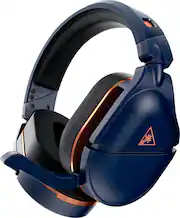
Rating 4.1 out of 5 stars with 2174 reviews
4.1- Sound Quality (1065)
- Comfort (385)
- Battery Life (260)
- Compatibility (51)
- Fit (40)
- Connectivity (136)
- Volume (60)
- Weight (27)
- Range (22)
Customer Images
The vast majority of our reviews come from verified purchases. Reviews from customers may include My Best Buy members, employees, and Tech Insider Network members (as tagged). Select reviewers may receive discounted products, promotional considerations or entries into drawings for honest, helpful reviews.
- Rated 4 out of 5 stars
Overall,GOOD: TB-Stealth 700 Gen2 MAX Wireless
I became a fan of Turtle Beach headsets with my last pair. If you buy cheap, then they don’t last. My last pair of wireless TB headphones lasted 11 years. So far I’ve had these headphones about 4-5 months. I’ve only tried them on the ps4, not the xbox, laptop or phone yet. - I’m so happy they finally released a new headset that can be used on Xbox and ps4 (multi platform)! I like to invest in quality headsets, but I’m not going to, or able to, pay that money for multiple headphones. - they’re well made, have great sound, I can hear chat well and my voice comes through clear for my party. - I like not having any wires… not even a talkback cable. Wonderful! - The foam ear cushions are comfy and they block a lot of noise. Also the ability to make adjustments to the ear cushions to increase comfort for eyeglass wearers is nice. Although, trying to pull the ear cushions off to make adjustments took quite a tug. - if you don’t have a pc to update the firmware/software they still work. But, if you can borrow a pc, then get them updated. - initially the headphones were a little too tight on my head. After month 3 of wearing them, they’ve finally loosened just a bit and they feel great now! They never did feel too heavy… not from the band on top of the head or the weight on the ears. Nor did they feel too warm, especially in the hot summertime. - if you set the headphones to accept phone calls… while you are gaming, it will automatically answer the call. You don’t get a chance to let your party know and you won’t be able to speak with them until the call is finished. Not my thing, so I keep that feature off personally. But if I use them to listen to music, then it’s a nice feature. - they’re kind of like the ps4 controller in that you can’t travel too far, and over time that distance shortens a bit. - if I’m too far away for too long, then they have to be paired again. - rarely there is a static sound and rarely does it drop the sound. Overall I believe they are worth the money. A solid headset with minimal issues.
This review is from Turtle Beach - Stealth 700 Gen 2 MAX Wireless Gaming Headset for Xbox Series X|S, Xbox One, PS5, PS4, & PC - Black
Posted by Kitty
- Rated 4 out of 5 stars
Good for turtle beach
[Employee of bestbuy] These headphones are above average for someone that likes the turtle beach headphone format. There are better headsets imo for the same price point for sound for sure. If you do buy them get a protection plan unless you hang them up every time. I'm pretty careless as far as giving them a light toss onto the night stand fairly regularly. Had a couple break before one i think was from a short fall to the floor and the other I believe was from having a bigger head than most and it stretched eventually and cracked by the earmuff. If you liked the 600 gen 1s these are a good upgrade. I like them because I can hear myself talk the sound is decent and the charge lasts for quite a while. The quality for turtle beach has been on a downhill slide since the xbox 360 and xbox 1 days but these are a major improvement over the cheaper turtle beach headsets. If I had to put a price tag on them it'd be close to 130 to 150 dollars
This review is from Turtle Beach - Stealth 700 Gen 2 MAX Wireless Gaming Headset for Xbox Series X|S, Xbox One, PS5, PS4, & PC - Black
Posted by RobertB
- Rated 5 out of 5 stars
Solid headphones for the price
Really good sound in-game using the “super human hearing mode” included with this headset. Sound is directionally accurate. I can literally hear things my teammates cannot. Ear pads fit snug and comfortable and they don’t slip around your head at all. My glasses fit without trouble. They’re not very breathable though so it can get a bit warm. The structure of the headset seems stronger and more durable than the previous iterations of the Turtle Beach Stealth Gen series. This is a big upgrade because I’ve been through four Turtle Beach Headsets that just structurally failed. The battery lasts a really long time. I only charge it after every couple days of heavy gaming. When you turn the headset on, it gives you an audio report on the charge level of the battery. The headset looks great. It looks even better in person than in the pictures for real. The only real drawback was that the packaging was kind of cheap. For the money, I would have hoped to receive a headset specific carrying case along with it, like the elite gaming controllers of similar price. It would have been nice but, it wasn’t a deal a breaker.
Posted by Chuck
- Rated 3 out of 5 stars
Initial launch has a few issues, but can be great!
I'll try to keep this brief. I bought these at launch and am on the very first firmware iteration. I love the look, I love the ear cushions, I love the app where you can control everything independently, and I absolutely love the sound... When it works properly. I find I have to turn it on at least twice in order to get it to connect to the dongle in Xbox mode. When it connects, the volume can be extremely inconsistent. Usually it's far too quiet, but a quick run through the app and moving a slider in the Custom EQ section brings the volume back to life. It's a minor inconvenience, but it has to be done every time I turn them on. I want to love these and give them 5 stars, the sound and customization with the EQ is amazing, but the volume issues, the connectivity issues, and the preset EQ's all being very low volume and hard to differentiate in comparison to the original 700 Gen 2 units have me unable to get past 3 stars. I'm sure these issues will be ironed out in a firmware update, I've been going back and forth with Turtle Beach support to help give as much information as I can, but until the inconveniences are ironed out I've found myself using a different wired set of headphones just because I don't feel like dealing with it. If I can edit this after they're updated, I'll happily do so.
Posted by TimT
- Rated 5 out of 5 stars
A different experience
I recently purchased the Turtle Beach Stealth 700 Gen 2 MAX Wireless Multiplatform Gaming Headset, and I am extremely impressed with its performance. The headset is compatible with Xbox, PS5, PS4, Nintendo Switch, and PC, making it a versatile choice for gamers. The sound quality is excellent, with crystal-clear audio that allows me to hear even the faintest sounds in the game. The noise-cancelling feature works exceptionally well, blocking out any background noise and ensuring that I remain fully immersed in the game. The headset is also incredibly comfortable to wear, with soft, plush ear cushions that fit snugly around my ears without causing any discomfort or irritation. The headband is adjustable, which means that the headset can be adjusted to fit any head size. Another impressive feature of this headset is its battery life, which lasts for over 40 hours on a single charge. This means that I can play for hours on end without having to worry about the battery running out.
This review is from Turtle Beach - Stealth 700 Gen 2 MAX Wireless Gaming Headset for Xbox Series X|S, Xbox One, PS5, PS4, & PC - Black
Posted by Hamzah